4
BEFORE USING THE SLATE
iskn’s technology works with magnets measuring the position and orientation of The Ring
in real time.
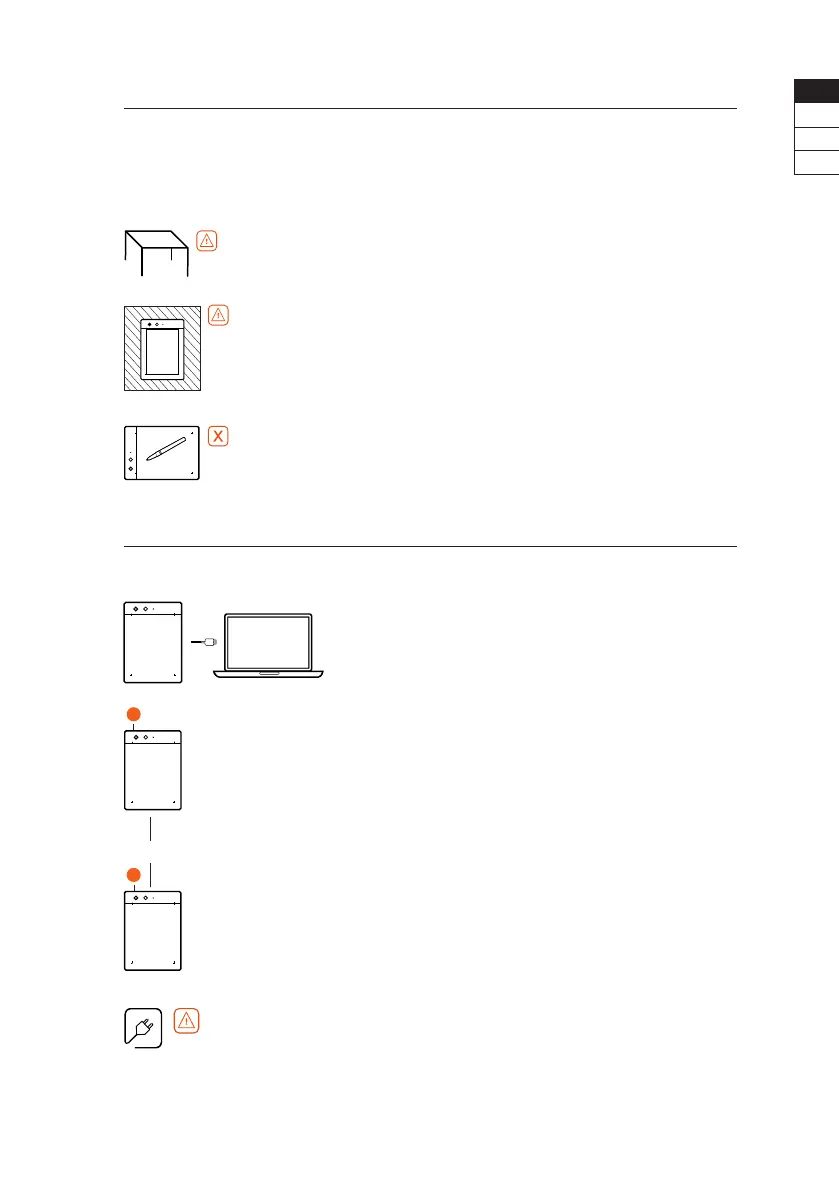
Follow these few basic rules for optimal use:
•
Avoid placing The Slate on a metal table or one made
with metal parts.
•
Be sure to use only one writing tool at a time.
For best use, keep all other metal objects more than
20cm (7,9“) away from The Slate (smartphones/tablets,
speakers, magnets, computers, etc.).
•
Be careful not to leave other iskn drawing tools near
The Slate.
YOU’RE ALMOST THERE
First charge The Slate using your computer (PC or Mac).
CONNECT THE SLATE
to your computer using the micro USB cable.
START OF CHARGING
The side LED is orange pulsing.
DEVICE IS CHARGED
The side LED is orange xed.
Only charge The Slate using the micro USB cable provided
via your PC or Mac.
Do not charge The Slate by plugging it directly into an AC
outlet using an adapter.
You can start using The Slate while charging.
3 hours maximum
EN
FR
DE
ES


 To Next Page