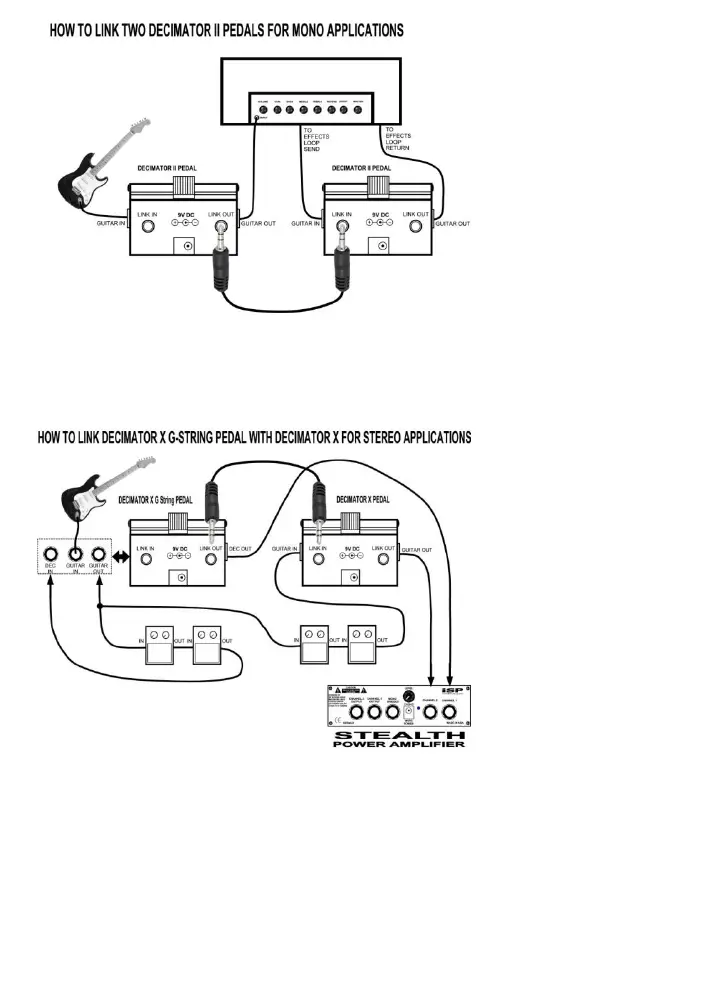
The guitar is connected to the input of the first pedal and Guitar Out feeds the input of a guitar head or
input of a pedal chain. The second Decimator X is connected in the effects loop of the Head with Send
connected to Guitar IN and Return connected to Guitar OUT. Adjust the Threshold by setting the
Threshold of the first pedal to remove the noise of the Guitar first and then adjust the second pedal
Threshold to remove the HEAD gain noise.
The first Decimator pedal in the chain is a Decimator X G String and the G String is required to provide a
separate Guitar IN and Guitar OUT to feed the front end of a Stereo system. The Guitar is connected
directly to the Guitar IN of the Decimator X G String. The Guitar OUT requires a Y Cable to feed the input
of both channels in Stereo. In this example the Guitar OUT is connected to a Stereo Pair of pedals. The
outputs of the stereo pedal chains are connected to the Decimator IN on both the G-String and standard
Decimator X pedals. The Decimator OUT of both the X G String and Decimator X pedals are connected
to the Stereo Input of an ISP Technologies STEALTH power amplifier. Connect an RTS 1/8 inch cable
from the LINK OUT of the first Decimator X G-String pedal to the LINK IN of the second Decimator X
pedal. Adjust the threshold control of both pedals for the proper noise reduction and no further adjustment
should be required.
The diagram on the left shows
how to LINK two Decimator X
pedals allowing the second
pedal to track the direct
instrument input. This will
allow the second pedals’
internal level detector to track
the guitar directly, providing
tracking performance similar to
the professional rack mount
Decimator ProRack G.
Connect an RTS 1/8 inch cable
from the LINK OUT of the first
pedal to the LINK IN of the
second pedal.
This diagram shows just one
example of how to connect a
Decimator X G String pedal with
a standard Decimator X pedal
for true Stereo applications. A
true stereo Decimator system
can be realized by linking a
Decimator X G String and a
standard Decimator X. The
Diagram shows how to connect
two pedal chains in Stereo.
There are countless True
Stereo Applications: this
Diagram simply shows an
illustration of how to connect the
two Decimator X pedals for true
stereo use.


 To Previous Page
 Loading...