Form No. IS211 (Rev. A 02.23.15)
ISSPRO, INC.
•
2515 N.E. Riverside Way
•
Post Office Box 11177
•
Portland, Oregon 97211-1899
503-528-3400
•
800-888-8065
•
Fax: 503-528-3495
www.isspro.com © 2010 ISSPRO, Inc. All Rights Reserved.
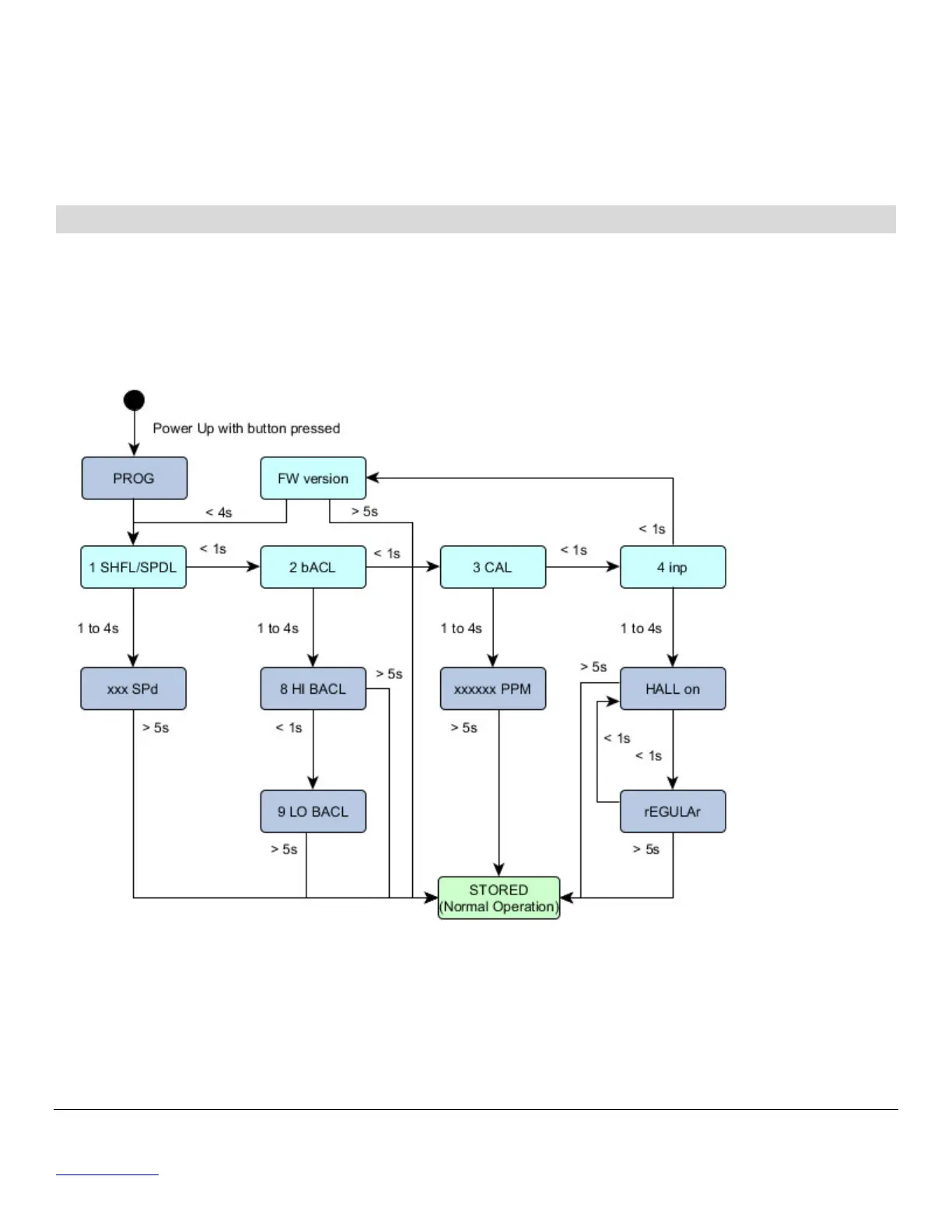
• Turn on power to the speedometer while pressing the front button. Release the button after
the pointer moves to zero.
• Press and release the button four times quickly.
• The display indicates the current firmware version.
• Press the button for less than 1 second to wrap back to the first programming option.
Press and hold the button for more than 5 seconds to exit programming.
TO RECALL THE TRIP METERS
In normal operation, momentarily press the button to cycle between
• Odometer display (miles)
• Trip A (miles)
• Trip B (miles)
While in Trip A or B display mode, pressing the button for more than 1 second will reset the displayed
trip meter distance.
Figure 1 Programming Overview


 To Previous Page
 Loading...