5-30
COMFORT AND CONVENIENCE
The AM/FM radio can be used when the starter switch is in the "ACC" or "ON" position.
AM/FM Radio
V
Control Panel
Turning the Power On
Press "SW" to turn the radio on. Press it
again to turn it off.
!
"
No. Name
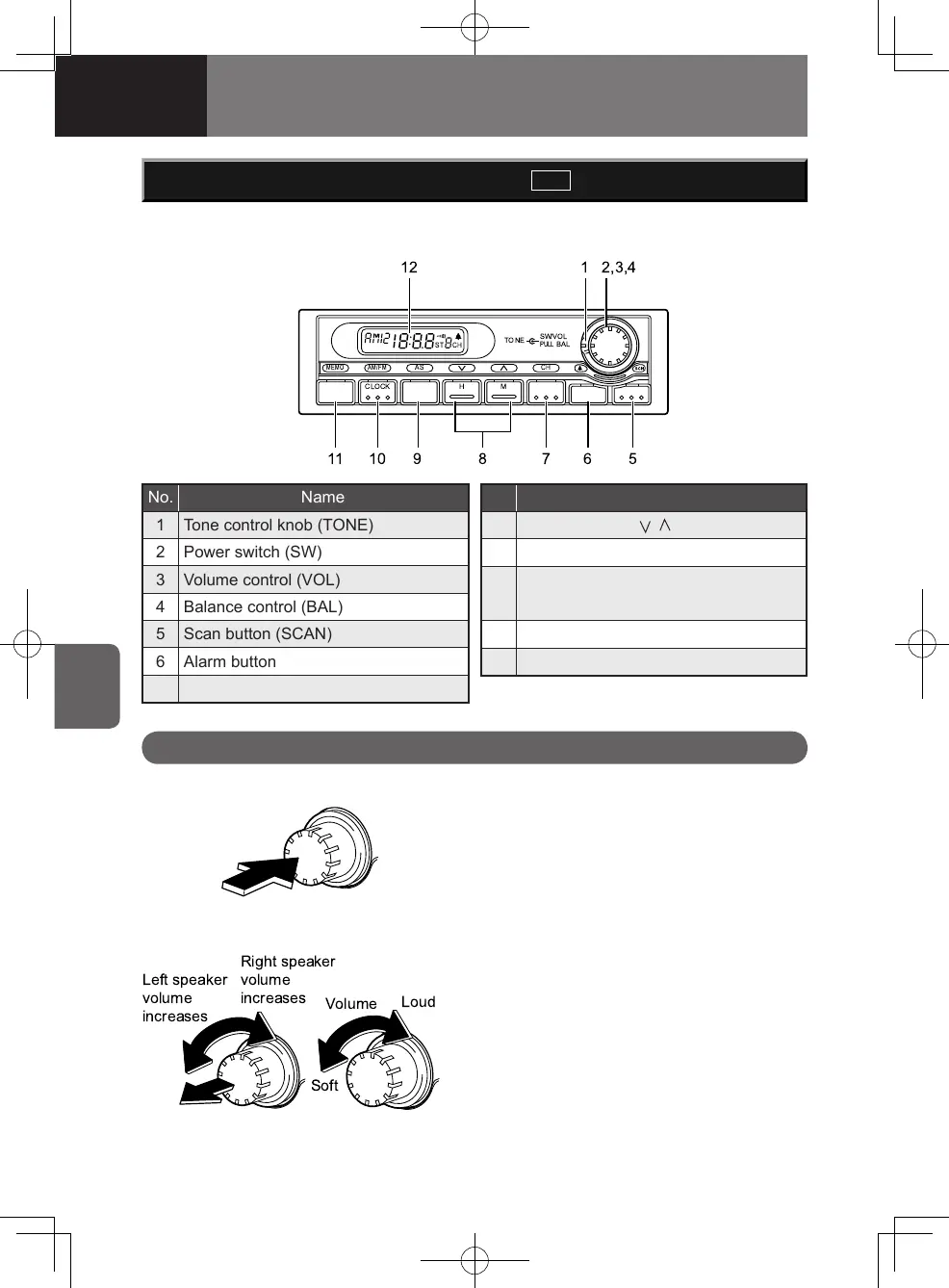
1 Tone control knob (TONE)
2 Power switch (SW)
3 Volume control (VOL)
4 Balance control (BAL)
5 Scan button (SCAN)
6 Alarm button
7 Channel button (CH)
No. Name
8
Tuning buttons ( , )
9 Automatic storing button (AS)
10
Band selector button (AM/FM)
Time adjusting button (CLOCK)
11 Memory button (MEMO)
12 Display
Volume and Left-right Balance
Adjustment
Turn the "VOL" control to adjust the
volume.
Pull the "BAL" control out and turn it to
adjust the left-right balance.
4608498sec05COMFORTANDCONVEN5-305-304608498sec05COMFORTANDCONVEN5-305-30 2015/11/0214:11:232015/11/0214:11:23



 To Next Page