TO USE BACKLIGHT
Press the top of the weather station once, the LCD display illuminates for approximately 5 seconds
and then turns off.
Remark: When the backlight is illuminated the function buttons will not operate.
TO DISPLAY TEMPERATURE IN DEGREE °C OR °F
Simply press WAVE / – (°C/°F) to display temperature in degrees °C or degrees °F.
WEATHER FORECASTER ICON AND PRESSURE TREND INDICATOR
Your weather station has a built-in barometric sensor which measures the change of the air pressure
over time. Your weather station takes around 24 hours to gather average air- pressure readings to
provide a weather forecast for next 12-24 hours.
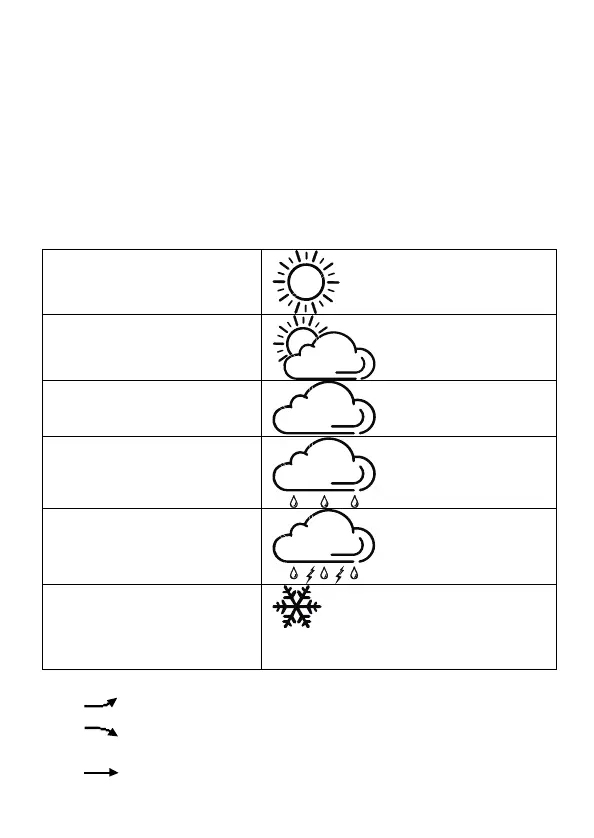
WEATHER ICONS
There are five possible types of weather icons that will be displayed:
SUNNY
SUNNY AND CLOUDY
(PARTLY SUNNY)
CLOUDY
RAINY
STORMY
FROST ALERT
Frost Alert Icon appears when outdoor temperature
is below +3°C
AIR PRESSURE TENDENCY INDICATORS
When the
arrow appears, the air pressure is increasing; the weather is expected to improve.
When the arrow appears, the air pressure is decreasing; the weather is expected to become
worse.
When the
arrow appears, the air pressure change is stable.
EN.7
Downloaded from www.vandenborre.be


 To Next Page