Need help?
Do you have a question about the Italsea 7CH4Q107 and is the answer not in the manual?
Overview of the controller's key technical specifications and capabilities.
Pins for potentiometer voltage supply and speed reference input.
Inputs for maximum speed potentiometer and backward safety contact.
Pins for disabling operation and the electrobrake coil negative connection.
Common positive supply for electrobrake/horn and horn negative output.
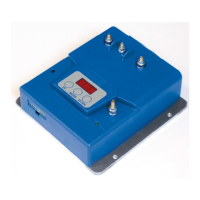
Overview of the programmer's LCD display, buttons (UP, MODE, DOWN), and basic navigation.
Explanation of the initial 'Tester Mode' display showing motor current, voltage, and other parameters.
Steps to enter the programming mode, select, change, and confirm parameters.
Troubleshooting for forward/backward switch status at power-on.
Troubleshooting for potentiometer faults or incorrect neutral position.
Addressing thermal protection and power stage damage issues.
Procedure for handling overcurrent and short circuit alarms.
Handling second overcurrent or short circuit alarms.
Troubleshooting undervoltage and overvoltage conditions.
Procedure for overload protection activation and resolution.
Addressing disable switch, key-off sequence, and EEPROM failure alarms.
Option to load factory default parameter values.
Adjusts acceleration and deceleration ramp times for smooth operation.
Configures forward and backward maximum speed limits.
Sets rated current and overload time for motor protection.
Procedure to restore all controller parameters to factory defaults.
Sets the time for acceleration from stop to maximum speed.
Sets the deceleration time for reversing direction.
Sets the deceleration time to stop from maximum speed.
Sets maximum speed percentages for forward and backward operation.
Defines the minimum speed as a percentage of battery voltage.
Configures the controller for 24V or 36V battery supply.
Parameter for RxI compensation to improve performance.
Steps to calibrate a single-ended potentiometer for speed reference.
Steps to calibrate a Wigwag1 potentiometer with enable switches.
Steps to calibrate a Wigwag2 potentiometer without enable switches.
Configure the potentiometer course range selection.
Confirm the potentiometer course setting.
Set and confirm the zero (neutral) voltage point for the potentiometer.
Set and confirm the maximum voltage point for the potentiometer.
Select and confirm the speed reference type (single-ended or wigwag).
Configure and confirm the potentiometer course setting.
Calibrate the zero, negative maximum, and positive maximum voltage points.
Configures the deadband for the speed reference input signal.
Details on the electrobrake coil operation and timing.
Sets a reduced speed based on the multimode input.
Sets a reduced current based on the multimode input.
Sets the duration for the backward safety function.
Sets the speed limit for the backward safety function.
Configures the motor's rated current and overload time parameters.
Formulas and examples for calculating overload protection parameters.
Settings for IGSL and PGSL, likely related to speed or current limits.
Settings for IGCL and PGCL, possibly for current or gain control.
Settings for LPOT and CPOT, potentially related to potentiometer inputs.
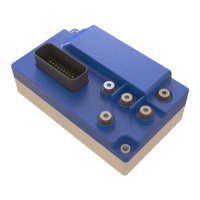
The Italsea 7CH4Q107 is a sophisticated four-quadrant chopper designed for controlling PMDC motors, particularly in traction applications powered by 24V or 36V batteries. At its core, the device utilizes a powerful microprocessor to provide digital control over motor speed and current regulation. This intelligent control system is further enhanced by an efficient diagnostic capability that identifies failures and incorrect wiring connections, ensuring reliable operation and simplifying troubleshooting. The programmability of its main parameters allows for flexible adaptation to various application requirements.
The power stage of the 7CH4Q107 is configured as an "H bridge" and operates using Pulse Width Modulation (PWM). This design choice results in a very low current ripple, which significantly contributes to the high efficiency of the system. The chopper is engineered to comply with major EC standards, underscoring its quality and safety.
The primary function of the 7CH4Q107 is to precisely control the speed and current of PMDC motors. It achieves this through a four-quadrant operation, meaning it can provide power in both forward and reverse directions, as well as regenerative braking. This capability is crucial for applications requiring dynamic control, such as electric vehicles or material handling equipment.
The device integrates a comprehensive set of safety features to protect both the controller and the motor. These include output short circuit protection, MOSFET short circuit protection, and thermal protection to prevent overheating. It also incorporates low voltage and overvoltage protection to safeguard against battery irregularities, as well as reverse battery protection. An overcurrent protection function, which is temperature-dependent, further enhances the device's resilience. Additionally, it can detect faults in the potentiometer and associated wiring, ensuring accurate speed reference input.
Speed reference can be provided either through a voltage signal (0.5-4.5Vdc) or a 1-10 kΩ potentiometer, offering versatility in control input. An on-board main contactor, rated for 24V-80A continuous operation, manages the main power supply to the motor. Regenerative braking is a key feature, allowing energy to be recovered during deceleration, which can improve overall system efficiency and extend battery life.
The 7CH4Q107 is designed for ease of use and configuration, primarily through an external handheld programmer, the 7PROGLCD. This programmer serves as the main interface for displaying parameters, alarms, and measurements, as well as for configuring the controller's settings.
Upon power-on, the handheld programmer defaults to a "Tester Mode" page. In this mode, users can monitor critical operational data such as motor current and voltage, speed reference input, internal aluminum heatsink temperature, battery voltage, hour-meter readings, and the software release version. This real-time diagnostic information is invaluable for monitoring system health and performance.
To access the programming functions, the user presses the "MODE" button on the handheld programmer. This action brings up the first parameter. The "UP" and "DOWN" buttons are then used to navigate through the list of parameters. Once a desired parameter is selected, pressing "MODE" again enters the change menu, allowing the user to adjust its value using the "UP" and "DOWN" buttons. Confirming the new value is done by pressing "MODE" once more. To exit the programming menu and return to the "Tester Mode," both "MODE" and "UP" buttons can be pressed simultaneously, or the system will revert automatically after a few seconds of inactivity.
Key programmable parameters include:
The 7CH4Q107 incorporates several features that aid in maintenance and diagnostics:
twrk = K / (Iwrk² - In²) enables precise calculation of the safe operating time under various load conditions.The combination of robust safety features, comprehensive programmability, and detailed diagnostic capabilities makes the Italsea 7CH4Q107 a reliable and user-friendly controller for PMDC motor applications.
 General
| Model | 7CH4Q107 |
|---|---|
| Input Voltage | 24V DC |
| Number of Channels | 7 |
| Protection | Overload, Short Circuit |
| Operating Temperature | -10°C to +50°C |

 To Next Page