If the buon is held down for 10 seconds or longer,
the iTaste MVP will shut itself off unl the buon is
released and pressed again.
The iTaste MVP uses a built in Micro USB Port. You can
recharge it with a Micro USB cable. It can also work as
a pass-through for use while charging.
Remembers last set voltage or waage when the
baery is turned off and then back on.
Digital display shows Ohms meter, Voltage / Waage
seng, number of puffs taken since last me the
baery was turned off.
Turn ON the small pin switch in boom of iTaste MVP,
connect cable into USB OUTPUT port (DC 5V , maximum
output current 0.5A, the 3 most popular power
connectors for iPhone / iPods, MiniUSB (Motorola /
Blackberry), a Micro USB (Motorola / Nokia / LG /
Samsung). Turn OFF the small pin switch when finish
charged your electronics .
buon will acvate the baery.
Press the “U” buon for 3 seconds to enter variable
voltage mode. The screen will show you the Puff
counter first followed by the last adjustment (The last
adjustment may be a voltage or waage seng), aer
showing the last adjustment, the iTaste MVP will enter
variable voltage mode. Voltage can be adjusted from
3.3 to 5.0 volts in .1 volt increments by pressing the
“U” buon.
Press the “P” buon for 3 seconds to enter variable
waage mode. The screen will show you the Puff
counter first followed by the last adjustment (The
last adjustment may be a voltage or waage seng),
aer showing the last adjustment, the iTaste MVP
will enter variable waage mode. Waage can be
adjusted from 6.0 to 11 was in. 5 wa increments
by pressing the “P” buon.
Hold both the “P” and “U” buons simultaneously for
2 seconds. The screen will show a series of readings,
the first being the resistance of the aached load (Rx.x,
for example R2.2), the second being the baery
voltage, the third being the number of puffs since the
device was last turned off and the fourth being the last
set voltage or waage. If no load is aached the
display with show “NON”.
If you wish to check the number of puffs taken since
the iTaste MVP was last turned off, you can also hold
either the “P” or the “U” buon to display the Puff
Counter which will be followed by the display of
current mode (VV mode or VW mode). In this state,
you can also adjust the voltage or waage by pressing
the “P” or “U” buon.
ON/OFF baery switch:
Quickly clicking “ ” three mes will enable or disable
the baery. Once enabled, holding down the buon
will acvate the baery.
This safety feature prevents the atomizer from
turning on while it's in your pocket or bag and it
prevents any sengs from geng changed without
you knowing.
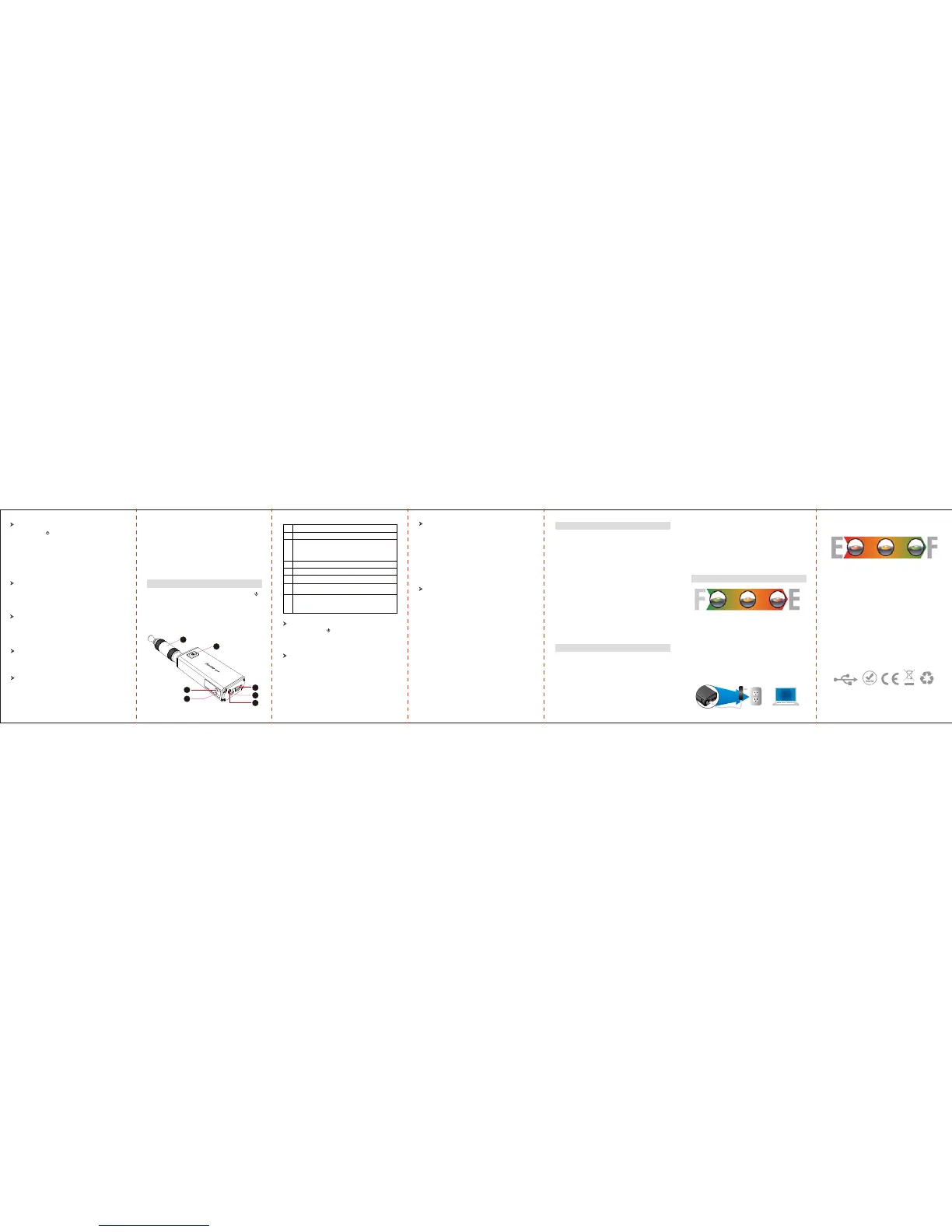
There are three main buons on the iTaste MVP: “ ”
buon, “P” buon and “U” buon; all the funcons can
be acvated by using those three buons to change
sengs in a single step, without the use of a menu
system. Your chosen mode will be displayed on the
digital screen.
Quickly clicking the “ ” buon three mes will enable
or disable the baery. Once enabled, holding down the
10 seconds cutoff:
Passthrough:
Remembers last set voltage or waage :
Built-in 3 digit display :
Portable power source for electronic products
OPERATION GUIDE
ON/Off:
Variable Voltage Mode :
Variable Waage Mode :
Ohms Meter & Baery Level Indicator & Puff Counter:
7
6
5
4
3
2
1
1
2
5
6
7
3
4
NO. Funcon descripon
iClear dual coil clearomizer
ON/OFF Power buon:
The iTaste MVP baery capacity is displayed via green,
yellow and red LED lights. Green = Fully Charged
Yellow = Half Discharged Red = In need of charging
“P” buon: VW
“U” buon: VV
Portable power source for electronic products
Turn ON this small pin switch when use as power source
for electronic products .
Recharge iTaste MVP with a standard USB Micro cable
plug, it can also work as a passthrough for use while
charging.
cartomizer or clearomizer. Connecng to a volt meter
without the load required for high voltages can
damage the device.
Don’t abuse your iTaste MVP although it’s made of
metal; You can damage it by dropping it.
Set lower voltages /waage for lower Ohms, higher
voltage/waage for higher Ohms.
When plug in, the LED light will blink from red to
yellow to green, then stay on current baery capacity
level, for example, if your baery current capacity
yellow, then LED light will stay on Yellow, then change
to Green. Aer the iTaste MVP is fully recharged, the
LED lights will turn off.
Recharge iTaste MVP with a standard USB Micro cable
plug, it can also work as a passthrough for use while
charging.
Plug the USB cable into iTaste MVP’s input and plug
the other end into a power source.
The color of the LED light indicates the remaining
baery life. Aer the iTaste MVP is fully recharged,
the LED lights will turn off.
1. Red LED light = baery voltage is lower than 3.61V
2. Yellow LED light = baery voltage between 3.61V
and 3.75V
3. Green LED light = baery voltage is more than 3.75V
4. Red LED will keep blinking for 8 seconds when
baery capacity is lower than 3.3V and the device
will turn off automacally.
5. Red LED light will stay on for 5 seconds when a load
short circuit is detected or the current of the coil is
more than 3.5A, then no vapor will be produced.
6. If you take a drag for longer 10 seconds, the baery
will stop it’s output, the RED light will blink 10 mes,
and the iTaste MVP won’t connue to work unl
you press the power buon again.
The LED light will blink in different colors to indicate
the current baery voltage.
LED Light Blinking Mode:
Replace or refill the cartridge if vapor volume decreaes.
The manufacturer is not responsible for a damaged
atomizer, cartomizer or clearomizer.
Driving them with too much power for too long or
running them dry can burn them out.
We recommend you start with a low voltage seng
and work your way up unl when you find the right
seng for your atomizers, cartomizers or clearomiers.
Never use your iTaste MVP without an atomizer,
Notes:
CHARGING ITASTE MVP
OR


 To Previous Page
 Loading...