-2-
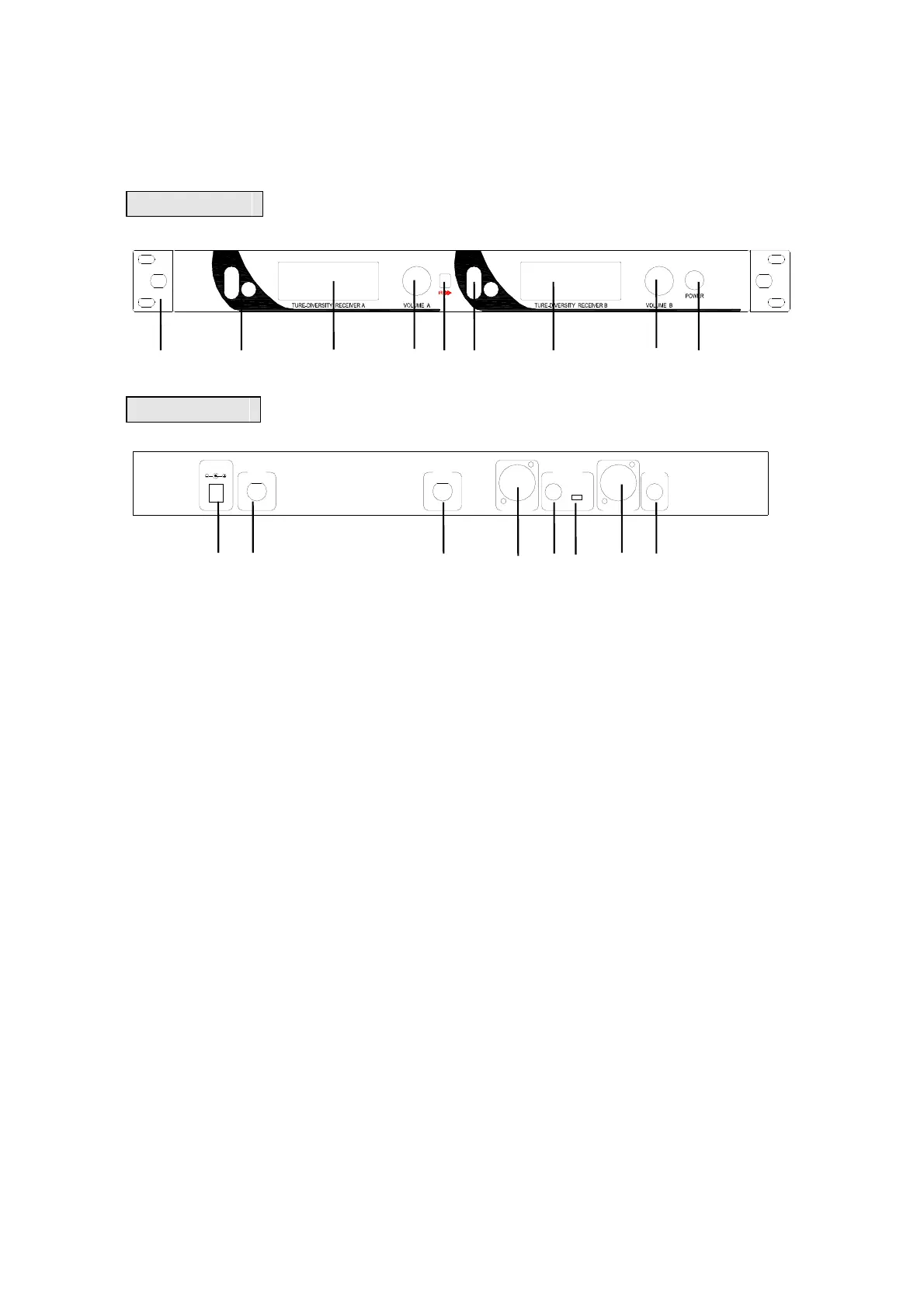
1. Transmitter Framework and Function
Front Panel
TELETRON
R
①② ③④⑤②③ ④⑥
Back Panel
DC INPUT
ANT B
BAL A OUT
UNBAL OUT
BAL B OUT
12-15V 800mA
UNBAL A
BA+B
ANT A
OUT
⑦⑧ ⑧ ⑨⑩⑾ ⑨⑿
1) Mounting Ear. If to put in 19 inch rack, please screw off the two
nails on the sides of the device, then fix the ear on nail hole sites.
Nylon can separate the noise interference from the amplifier and
other devices.
2) Function Key. Press “SET” key to cycle pick the main menu,
stop 2~3 seconds to choose one menu and current set state will
be showed on the screen. Press “▲▼” key to change or reset the
menu, then press “SET” key to take effect.
3) LCD screen. Display the operation mode, frequency/channel,
audio output intensity. LCD screen will be on when power is switch
is on.
4) Volume adjusting knob. To adjust the output volume of
transmitter.
5) Frequency pairing window.
6) Power switch. When the switch is on, the LCD screen is on.
Long press the switch to turn off the power.
7) Power socket. 12V DC/1A power input socket, positive inside


 To Next Page
 Loading...