How to
Use the
Activated
Carbon
Filter
The Touchless Trash Can is equipped with a Deodorizer Compartment that houses the
odor-neutralizing Activated Carbon Filter. One (1) replaceable Activated Carbon Filter is
pre-installed inside the Deodorizer Compartment. Please follow these instructions to
maximize the lter power.
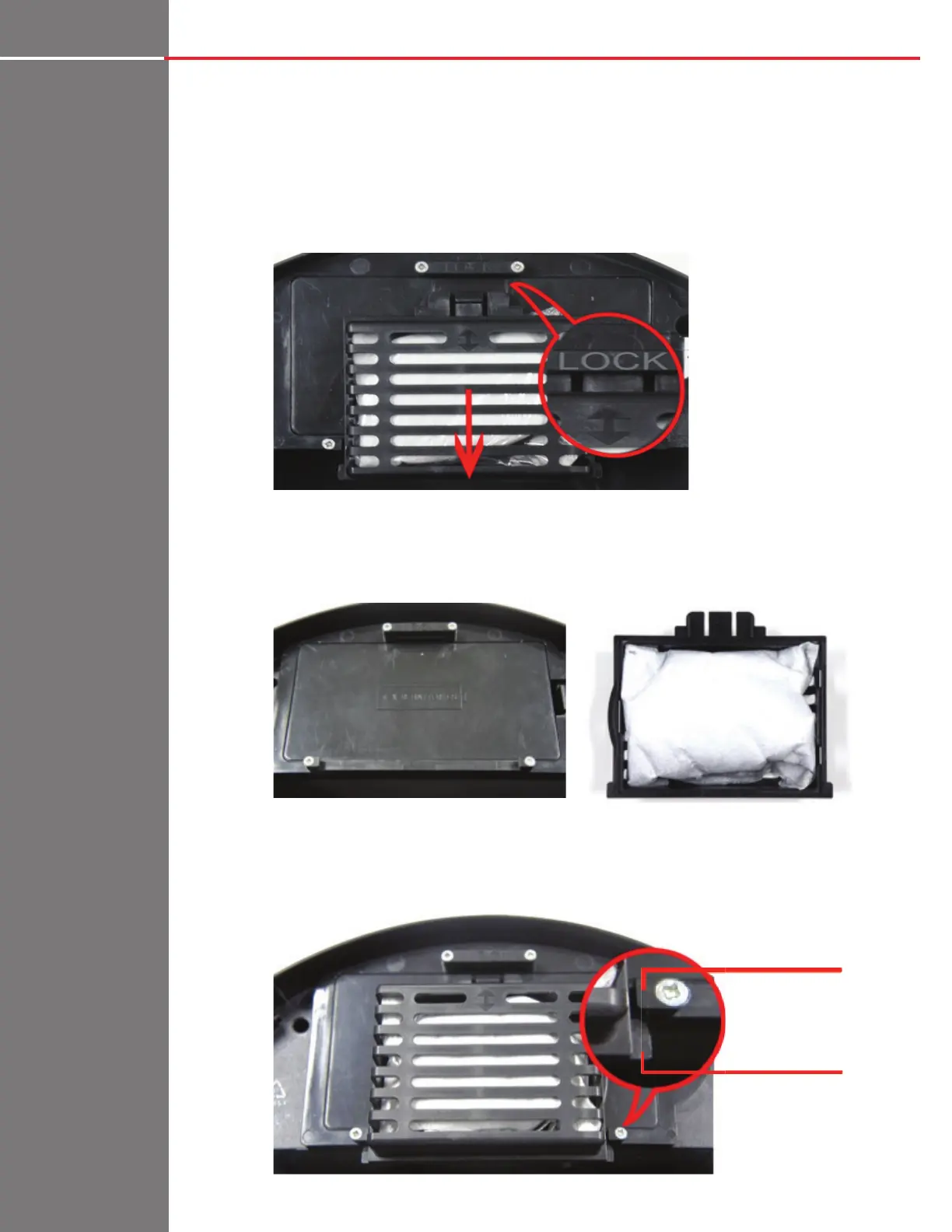
1: Locate the Deodorizer Compartment on the underside of the Lid Unit. Pull it away from
the ‘LOCK’ symbol to unlock it.
2: Find the Activated Carbon lter inside the Deodorizer Compartment. Tear open and
throw away the bag covering the Activated Carbon Filter pouch (Do NOT cut open the
lter pouch).
3: Align the two-way arrow on the Deodorizer Compartment to the ‘LOCK’ symbol while the
two end tabs are in front of the latches. Press lightly on the Deodorizer Compartment
and push toward ‘LOCK’ to lock it.
Latch
Tab


 To Next Page