13
No Internet Connection
• Unplug the modem and router for 2 minutes.
Then reconnect them and wait until the Internet
comes back up. From the iTV Viet box, go to
Home > Help > and Reboot the box. The Internet
should be connected to the box now.
• If there is still no Internet connection, check
the date and time in the top right corner. If it is
incorrect then x it by, returning HOME >
Settings > Date & Time > Automatic date & time >
Always ON.
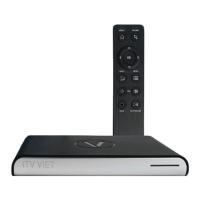
AIR MOUSE REMOTE
Please read the manual before using. The USB chip
must be in the iTV Viet box at all times. Each USB chip
belongs to it’s own remote. You can not use the USB
for another remote.
Basic Functions and Usage
• Choose the program then click OK to watch. To
stop the program, click BACK.
• The MOUSE function can be used in YouTube,
Google and any apps that require the mouse.
• Use the arrow buttons UP, DOWN, LEFT, RIGHT, OK
and BACK to navigate.
• Use the MENU button on the iTV Viet remote to
edit app settings.
Troubleshooting: Unresponsive remote control
A. Remove the USB from the back of the iTV Viet box
and unplug the power of the box. Wait 1 mintue
and replug the box. Wait until the picture appears
on the TV, then insert the USB back inside the box.
B. Change the USB port in the back to another port.
C. Check the batteries. You will need to change
them if the light is completely red or alternates
between red and blue.
D. Reset the remote control as per instruction.
Pairing: If the remote does not respond, try replacing
the batteries; otherwise follow these pairing
instructions:
1. Take out the USB at the back of the iTV Viet box.
2. Place the remote on a at surface to continue.
3. Press and hold the HOME
and VOLUME
DOWN
buttons at the same time.
4. Release the buttons when the blue light turns on.
5. Plug the USB into your TV box.
6. When the blue light quickly blinks and stops,
pairing is complete.
Mouse Reset: If your mouse is not working properly,
follow these instructions to reset it:
1. Place the remote on a at surface to continue.
2. Press and hold the LEFT and RIGHT
< OK >
directional arrows on the remote.
3. When the blue light turns on, release the remote
control.
4. The blue light will turn o when the mouse has
been recalibrated.


 To Next Page