HOW TO USE
CAUTIONS FOR OPERATION
Make sure the purifier is connected to the adapter (DC 12V) and plugged to an adequate socket.
Make sure the plug is tightly connetect to the socket.
Do not use the product in case of a damaged plug, a damaged socket, damaged body part or malfunctioning
product.
Do not touch the cord with wet hands.
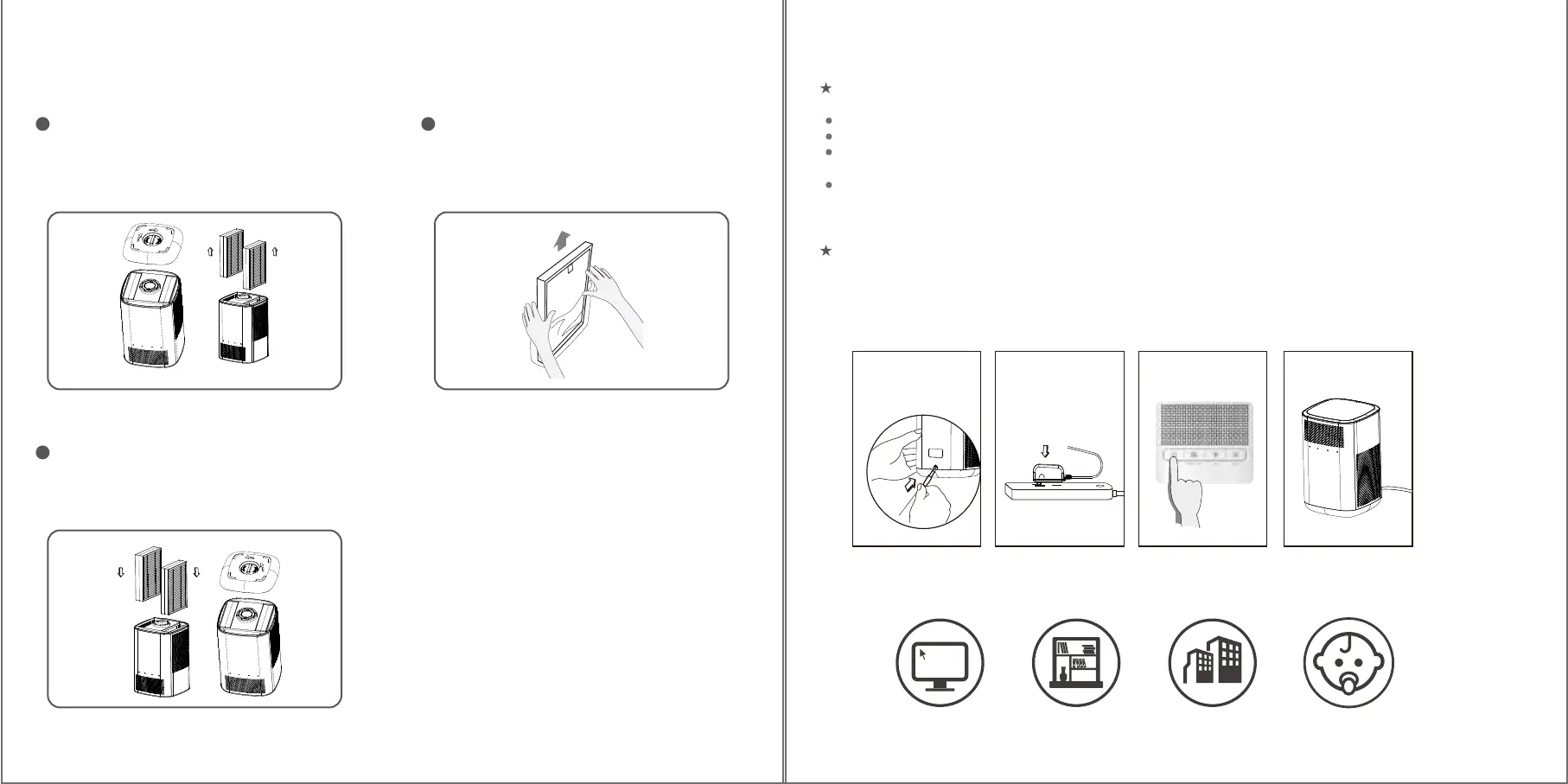
2. Connect to power supply
I. Remove the packaging film of filters
Spin the turn-knob to take off the bottom
cover and pull out two filters.
05 06
1
Remove the packaging film of new filters.
2
Replace the old ones and remount the
bottom cover.
3
CAUTIONS FOR CLEANING
1. First, plug the output end of the adapter to the port on the back of the product.
2. Plug the other side to an adequate socket. The purifier should enter under stand-by mode.
3. Gently press the ON/OFF button toturn on the purifier.
4. The purifier should work properly.
Desk Study Hotel Baby’s room
USAGE SCENARIO
1 2 3 4


 To Next Page