EasyManua.ls Logo

IULOCK IU-30 - User Manual

Default Icon
2 pages
Print Icon
To Next Page IconTo Next Page
Loading...
60mm or 70mm
24mm
54mm
60mm/2-3/8"
Lock Components
1. Prepare the door and check dimensions
Required tools not included
Ruler
Philips head screwdriver
Hammer
Chisel
Use template to mark holesDrill two holesCheck dimenslons
4.Install the batteries and perform
the door handing process
5.Install the interior cover
feed power cable through hole in knob and guide spindle into handle.
Align the exterior keypad with the bore hole. Feed the power cable through latch.
The spindle on the exterior keypad should be aligned with the hole in the center
of the latch. Insert the spindle through this hole as you press the exterior keypad
against the door.
Adjust the latch to the distance you are going to install, 60 or 70mm
(Backset 2-3/8” or 2-3/4)
Bore 1'' diameter
hole for latch
Bore 2-1/8''
diameter hole
Template
Backset
must match lock (2-3/8'' or 2-3/4'')
2.Install the latch and strike
Install latch
Install strike plate
3.Install the exterior keypad and the interior assembly
Setting latch2-3/8" or 2-3/4"
Install the exterior keypad
Install the interior assembly
Push out the power cable with a screwdriver
70mm/2-3/4"
+
-
+
-
+
-
+
-
2-1/8''
IULOCK
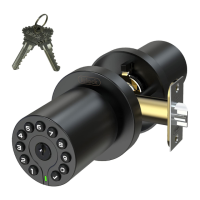
IU-30 SMART DOOR KNOB
Installation and User Guide
Features
. two ways to access: code and key
.
-30 to 80 °C temperature range
. Low power consumption, 4 AAA for 1.5 Years Battery Life or 15,000 times unlock
. Backlit keypad for use in low light environments
. 1 master code and 50 user codes
. Passage mode for hassle-free entry
. Color LED indicator lights up to show when codes and commands have been successfully entered
. Built-in disguise feature to protect your codes from prying eyes
. Low battery warning indication
Programming guide
Indicator light signals and beep
This function is an added security feature which is aimed at preventing passcode theft. With Passcode Disguise, you may enter 40 digits into the keypad.
As long as the correct passcode sequence is entered, regardless of how many digits were entered before or afterwards, the lock will unlock.
For example, if your user passcode is “112256, you can successfully unlock the lock by entering “xx...xx112256xx...x(limit 40 digit).
Passcode and Passcode Disguise
.The master code MUST EXIST and can be modified, but cannot be deleted.
. The lock comes preset with default master passcode 123456
. Used to put the lock in programming mode.
. Can unlock the lock
. Must be different from all of the User Codes currently in the lock.
If you forget the master passcode, you can reset the lock to factory
settings,which restores the default master passcode. See Restore Factory
Settings
.User codes can be added, modified, deleted.
. The lock comes not preset any User Code
. Used to unlock the lock
. Must be different from the master passcode and other user passcodes
. Up to 50 possible User Codes can be stored in the lock at one time.
Master passcodeUser passcode
To delete all user codes, including the master code, follow the instructions
below:
1. Use a screwdriver to remove the screws from the interior cover.
2. Remove the cover and find the reset button located on the battery pack.
3. Press and hold the reset button for 7 seconds until long beep are heard. The
master passcode will return to the manufacturer default code '123456'.
Restore Factory Settings
Change the master passcode as soon as
possible! because of the master passcode can unlock the door.
After restore factory ,
Keypad
Check botton
LED indicator
The color of the light indicates & beep ,the status of the lock.
. a correct master passcode or user passcode was entered ,one long beep
. the programming process is complete ,one long beep
. an incorrect master passcode or user passcode was entered,three short beep
. there was an error in programming, three short beep
. red blinking and beep after keypad backlit off indicates critically low battery
Green
Red
Control of the lock is simply 4-16 digit master passcode or 4-16 digit User passcode.
Passcode Disguise
Key
Pay attention toon the spindle "THIS SIDE UP
Do not pull the power cable too hard
Key
Keypad
LED indicator
Emergency Power Jack
Exterior Assembly
Plastic box
Strike plate
Screw
Latch
Interior Assembly
Mounting Screws (M4*40mm)
Interior Cover
THIS S I
DE UP
T
HIS SIDE UP
THIS S
I
DE UP
AAA
AAA
AAA
AAA
Rubber grip
M4*10mm
Rubber grip
Rosette rubber
Rosette rubber

Question and Answer IconNeed help?

Do you have a question about the IULOCK IU-30 and is the answer not in the manual?

Overview

The device described in the manual is the IULOCK IU-30 SMART DOOR KNOB. It is a smart door knob designed for residential use, offering keyless entry and advanced security features.

Function Description

The IU-30 Smart Door Knob provides secure access control through multiple methods, primarily focusing on passcode entry. It eliminates the need for traditional keys, offering convenience and enhanced security. The device is designed to be user-friendly, with a clear programming interface for managing passcodes and settings. It also includes an auto-lock timer for added security and a beeper for audible feedback.

Important Technical Specifications

  • Access Methods: Two ways to access: code and key.
  • Operating Temperature: -20 to 85 °C.
  • Battery Life: Up to 1.5 years with 4 AA alkaline batteries. Low battery warning is indicated by a red LED and beeping.
  • Passcode Capacity:
    • 1 master code.
    • 50 user codes.
    • 10 one-time user codes.
  • Passcode Length: 4-16 digits for master and user passcodes.
  • Auto-Lock Timer: Adjustable from 2 to 99 seconds. Default is 5 seconds.
  • Warranty:
    • Lifetime Limited Mechanical and Finish Warranty: Covers defects in material and workmanship of the lockset's mechanical components and finish for as long as the original user occupies the residential premises.
    • 1-Year Limited Electronics Warranty: Covers defects in material and workmanship of the electronic components for one year from the date of purchase.

Usage Features

1. Programming and Passcode Management:

  • Master Passcode: Essential for all programming functions. The master passcode MUST EXIST and cannot be deleted. It can be changed.
  • Adding User Passcodes: Up to 50 user passcodes can be added, each 4-16 digits long.
  • Changing User Passcodes: Existing user passcodes can be modified.
  • Deleting User Passcodes: Individual user passcodes can be deleted.
  • One-Time User Passcodes: Up to 10 one-time passcodes can be created, which are valid for a single use only.
  • Passcode Entry: To unlock, enter a valid passcode followed by the "Enter" button.
  • Programming Mode: Accessed by pressing "Press" then "Enter" and then the master passcode.
  • Easy Passcode Mode: Allows adding and deleting user passcodes without needing the master passcode for each operation, simplifying management.
  • Advanced Passcode Mode: Requires the master passcode for each user passcode operation, offering higher security.
  • Auto-Lock Timer: The door automatically locks after a set time (2-99 seconds) after being unlocked. This feature can be enabled or disabled.
  • Beeper: Provides audible feedback for button presses and programming. It can be turned on or off.

2. Indicator Lights and Beeps:

  • Green Light: Indicates a correct passcode, successful programming, or the lock is unlocked.
  • Red Light: Indicates an incorrect passcode, low battery, or an error during programming.
  • Beeping: Accompanies button presses, indicates successful or failed operations, and warns of low battery.

3. Security Features:

  • Passcode Disclosure Prevention: The device is designed to prevent unauthorized disclosure of passcodes.
    • Programming Guidance: The manual advises against entering passcodes in front of others.
    • Passcode Disclosure: A simple 4-16 digit master passcode or 4-16 digit user passcode.
    • Passcode Disguise: Allows users to enter random digits before or after their actual passcode (up to 45 digits total) to prevent others from guessing the passcode by observing finger movements.
  • Automatic Locking: The auto-lock timer ensures the door is always secured after a set period.
  • Tamper Resistance: The device is designed to resist tampering, with warnings against unauthorized modifications.

4. Installation:

  • Required Tools: Phillips head screwdriver, ruler, chisel.
  • Steps:
    1. Prepare the door and check dimensions.
    2. Use template to mark holes.
    3. Drill two holes.
    4. Install the latch and strike.
    5. Install latch.
    6. Install strike plate.
    7. Adjust the exterior and interior assembly and install the interior assembly.
    8. Push out the power cable with a screwdriver.
    9. Install the exterior keypad.
    10. Install the interior cover.
    11. Install the batteries and perform the door handling process.

Maintenance Features

  • Battery Replacement: When the red LED flashes and the beeper sounds 10 times after entering a code, it indicates low battery. Replace with 4 new AA alkaline batteries. The lock will still function for approximately 50 more times after the low battery warning.
  • Restoring Factory Settings: This process deletes all user codes, the master code, and all other settings. It requires removing the screws from the interior pack, disconnecting the battery pack, pressing and holding the "Reset" button, and then reconnecting the battery pack. The master passcode will revert to the default: 123456.
  • Troubleshooting Guide: The manual provides solutions for common issues such as:
    • Lock not working after keypad light off.
    • Lock not opening.
    • Keypad not responding.
    • LED indicator light off.
    • Lock not locking automatically.
    • Forgetting all codes.
  • Cleaning: The exterior of the device can be cleaned with a soft, damp cloth. Avoid abrasive cleaners or solvents.

Important Safeguards:

  • Read all instructions before installation and use.
  • Familiarize yourself with all warning and caution statements.
  • Remind all family members of safety precautions.
  • Protect user codes and master codes.
  • Dispose of used batteries according to local laws and regulations.

IULOCK IU-30 Specifications

General IconGeneral
BrandIULOCK
ModelIU-30
CategoryDoor locks
LanguageEnglish

Related product manuals