ROLLER
Press arrow keys to select
On
Off
Off
HEAT
ROLLER
Press arrow keys to select Press arrow keys to select
ROLLER
ROLLER
SETTINGS
HEAT
NAME AND FUNCTION OF EACH COMPONENTS PRELIMINARY CHECKS
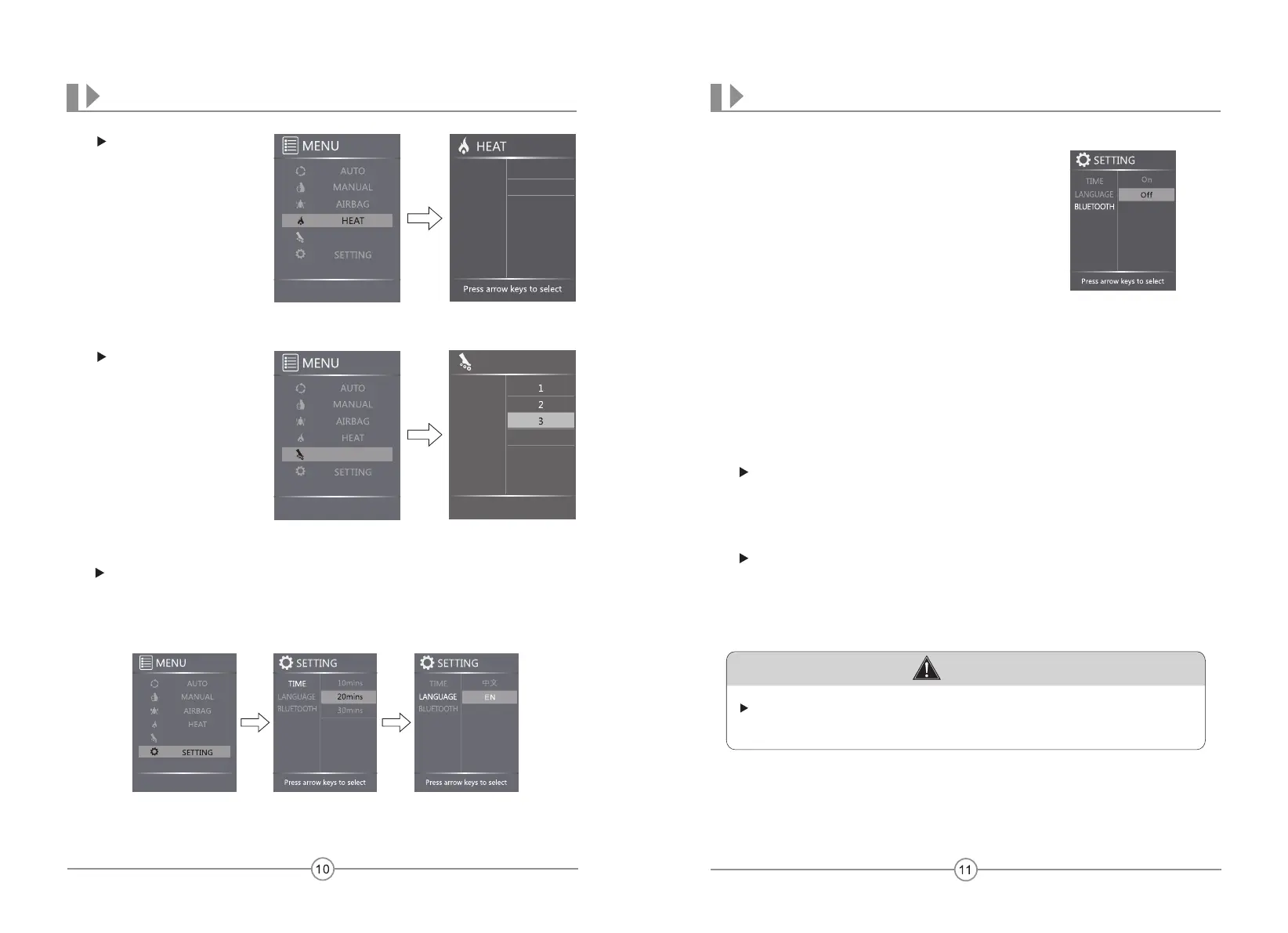
Press HEAT from MENU
display,then press Up or
Down button to turn on
or off back heat function.
ROLLER
Press ROLLER from Menu
Display,then press Up or
Down button to toggle
among speed level 1,2,3
and off.
Time:
Press TIME from SETTING to show available timer:
10min,20min,30min.press Right button then press
Up or Down button to navigate,press OK button to
enter the timer you desire.
Language:
Press LANGUAGE from SETTING to show available
language:中文,EN.press Right button then press Up or
Down button to navigate,press OK button to enter the
1anguage you desire.
Bluetooth:
From BLUETOOTH.press Right button then press Up or Down button to activate
or deactivate Bluetooth function. press OK button to enter the setting you desire.
Notes:All Settings listed above will be memorized and no need to set again with
power failure.
Press SETTING from MANUAL display,press OK button to enter SETTING
display,Then press Up or Down button to navigate among:TIME,LANGUAGE,
BLUETOOTH.Press OK button to enter the setting you desire.
CAUTION
While pairing your mobile device with the massage chair,please verify that the
massage chair and the blue tooth is set to “ON”.
Download app and control the chair from an Android or iOS device,below is the
instructions:
For an iOS device:
Open the App Store on your iOS device (iPhone, iPad, or iPod touch),use keyword
“RT6602”to search,download it to your device and have it set up.while setup
completed,open it and switch the Blue Tooth to “ON”,pair it with the massage chair.
(Note:Version of iOS device need to be above 4.0)
For an Android device:
Supplier will email the app to customer,download it to your device and have it set
up.while setup completed,open it and switch the Blue Tooth to “ON”,pair it with the
massage chair.
(Note:Version of Android device need to be above 5.0 and with Blue Tooth function)
APP DOWNLOAD AND INSTALLATION
Press arrow keys to select
ROLLER


 To Previous Page
 Loading...