HYst is an item, where you can program the range
of the switching thresholds around the requested
temperature (hysteresis). The range can be set with
a 0.1°C step from 0.1°C to 1°C. (Default setting
±0.2°C)
With a set accuracy of ±0.5˚C a temperature of 24°C will be kept this
way, at 23.5°C it starts heating and at 24.5°C it stops heating. In real conditions
regulation could have a much bigger temperature scatter because of the thermal
inertia in the heated premises.
Warning: An over-narrow pre-programmed hysteresis
perform on/off switching of the heating very often.
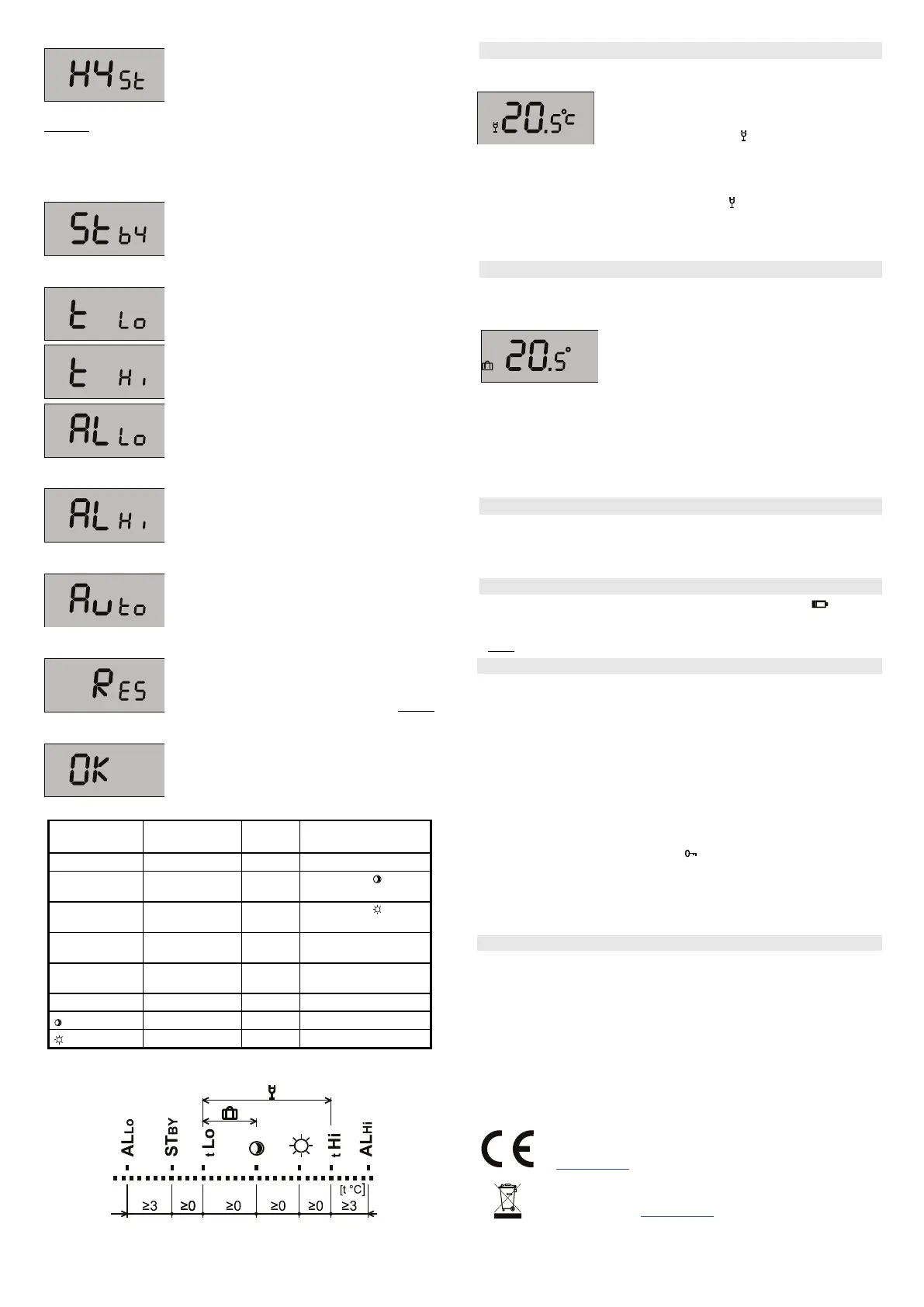
The item Stby sets the temperature which will be
kept in the case of switching off the thermostat
(item OFF). The Stby temperature is always at least
3°C higher than ALLo. The value of the Stby
temperature does not have to be set higher than the
temperature.
The t Lo item is the lower limit to which the
economical temperate can be set.
The t Hi item is the upper limit to which the comfort
temperature can be set.
AL Lo is the lower critical temperature. When the
temperature drops under the pre-
thermostat sends an alarm report to the receiver and
this state is indicated by a permanently lit (!) symbol.
The ALLo temperature is always at least 3°C lower
than tLo.
is the upper critical temperature. When the
temperature increases above the pre-set value, the
thermostat sends an alarm report to the receiver and
this state is indicated by a permanently lit (!) symbol.
The ALHi temperature is always at least 3°C higher
By this item you can turn the adaptive pre-heating
On or Off according to the heating system inertia.
When enabled, the thermostat starts measuring the
time after which it has reached the requested
comfort temperature and according to this time it
starts future pre-heating.
For a reset to factory default settings the RES item is
used. After you enter the menu and press the knob
on the RES item ON/OFF appears. By scrolling the
knob select ON, and press the knob. Then a RESET
will be done. When the reset is finished, a 20°C
temperature is pre-set.
By pressing the knob when the thermostat shows
you OK you leave the service menu and return to the
basic thermostat menu.
Range of temperatures settings.
Lower limit of
temperature
Upper limit of
temperature
Low temperature alarm
report
High temperature alarm
report
* The ranges of t Lo and t Hi can´t overlap each other.
Party mode
The thermostat can allow a special Party mode. In this mode the thermostat
keeps the temperature for a pre-defined time. You can only enter the party mode
from the weekly program (not from the manual mode).
When that defined time expires the thermostat goes
back to the weekly program.
By turning the knob the (
) symbol appears. Then by
pressing the knob enter the Party mode settings. The
first value is time (hrs) after which the thermostat returns to the weekly program.
Choose this value by turning the knob and by pressing to confirm it. Then select
the temperature which the thermostat will keep by turning the knob, confirm by
pressing. The Party mode is indicated by the (
) symbol of a glass on the
thermostat LCD display. The temperature can be pre-set in the tLo – tHi range.
If you want to leave the party mode earlier than the pre-defined time, by turning
the knob select the weekly program and confirm by pressing.
Holiday mode
Because of saving costs when nobody is in the building, it is not necessary to
keep the pre-defined temperature in the service menu (a holiday typically) the
thermostat can be switched to the Holiday mode. The thermostat keeps the
temperature pre-set in the Set1 menu. You can enter
the holiday mode only from the weekly program (not
from the manual mode).
You can enter the Holiday mode only from the
weekly program (not from the manual mode) by turning
the knob until the suit case symbol appears. By pressing enter the settings. The
LCD display shows a flashing value of days for which the economical temperature
has to be kept. By turning the knob, pre-set the number of requested days and
then press the knob to confirm it. The time countdown starts from the moment of
setting. Subtraction is done every day at midnight. When Holiday mode expires
the thermostat returns to the weekly program. Note: The day when the settings
were done is also subtracted.
Showing the pre-set temperature
The thermostat always shows the current room temperature in the normal
mode. Briefly pressing the knob will show the temperature which has been
set for this time. The pre-set temperature flashes 3s then it shows the current
temperature again.
Replacing the batteries
When the thermostat starts to indicate the Low Batt symbol ( ) or stops
working completely, replace the batteries for new ones. A Low battery report is
sent to the receiver.
Note: We strongly recommend only using alkaline batteries, type AA 1.5V.
Use with the AC-116 receiver
When the thermostat has been enrolled to a 2-way receiver (AC-116) it can
indicate by a blinking exclamation symbol (!) on the LCD of the thermostat that
communication has been lost.
You can block the channel to which the thermostat is enrolled with a different
device (magnetic contacts in windows for instance). Blinking of the (▲) symbol on the
thermostat LCD indicates that the thermostat is blocked.
Using the AC-116 receiver you can block the control of the thermostats at 3 levels.
1 – temperature adjustment (when the LOc menu is entered it can be unlocked)
2 – entering the menu (the temperature can be changed but access to the menu is
blocked)
3 – Locked completely (control from the thermostat is completely blocked)
When control is blocked from the AC-116 receiving unit, it is indicated on the
thermostat LCD display by the key symbol (
).
The weekly schedule is saved wirelessly to the receiver. Even on the AC-116
receiving unit equipped with an AC-100LCD touch screen module it is possible to set
the weekly schedule for every single channel and save it wirelessly to the thermostat.
So from one place things can be managed and programmed, for more than one
thermostat.
Technical specifications
Power: 2x AA 1.5 V alkaline batteries
Lifetime of batteries: typically 1 year
Regulation range: +6°C to +40 ˚C
Temperature regulation sensitivity: adjustable: ± 0.1- 1 ˚C
Alarm when temperature drops below ALLo: -9 to +20°C
Alarm when temperature exceeds ALHi: +30°C to +70°C
Communication band: 868.1 MHz, JA-100 protocol
RF range: up to 100 m (open area)
Operational temperature: -10°C to + 70°C (no condensation)
Dimensions: 66 x 90 x 22 mm
Complies with ETSI EN 300220, EN50130-4,
EN55022, and EN 60950-1
Can be operated according to ERC REC 70-03
JABLOTRON ALARMS a.s. hereby declares that the TP-155 module
compliance with the essential requirements and other relevant provisions of Directive
1999/5/EC and 2011/65/EU. The original of the conformity assessment can be found
at www.jablotron.com - Technical Support section
Note: Although this product does not contain any harmful materials we suggest you
return the product to the dealer or directly to the producer after use. For more
detailed information visit www.jablotron.com.
TP-155 Wireless programmable indoor thermostat 2 / 2 MMC51701


 To Previous Page
 Loading...