EasyManua.ls Logo

Jabra BT 125 - User Manual

Jabra BT 125
14 pages
Print Icon
To Next Page IconTo Next Page
Loading...
Bluetooth headset
User manual
All manuals and user guides at all-guides.com
all-guides.com
Question and Answer IconNeed help?

Do you have a question about the Jabra BT 125 and is the answer not in the manual?

Summary

About Jabra BT125

New Headset Features

Product Specifications

Details on talk time, standby time, weight, operating range, and Bluetooth profiles.

Getting Started

Powering the Headset On and Off

Pairing with Your Phone

Entering Pairing Mode

Steps to put the headset into pairing mode by pressing the answer/end button.

Searching for Jabra BT125 on Phone

Instructions for searching for the headset from your mobile phone's Bluetooth menu.

Confirming Pairing

Steps to confirm pairing on the phone, including entering the passkey (0000).

Wearing and Using the Headset

Wearing the Headset

Instructions on how to wear the headset on the right or left ear and adjust the ear hook.

Optimal Placement

Tips for optimal performance by keeping the headset and phone on the same side of the body.

How to Use the Headset

Ending a Call

Procedure to end an active call by pressing the answer/end button.

Making Calls

How calls made from the phone are transferred to the headset.

Rejecting Incoming Calls

How to reject an incoming call by pressing and holding the answer/end button.

Voice Dialing

How to activate voice dialing by pressing the answer/end button.

Redialing Last Number

How to redial the last number by pressing the answer/end button.

Adjusting Volume and Sound Quality

How to adjust volume using the volume up/down buttons.

Call Waiting and Hold

How to put a call on hold and answer an incoming call.

Indicator Light Meanings

Blue Light Blinking

Indicates active call (1 sec blink) or standby mode (3 sec blink).

Blue Light Solid

Indicates low battery level or charging in progress.

Blue Light Flashing (Pairing Mode)

Indicates the headset is in pairing mode, refer to Section 7.

Troubleshooting and Q&A

Audio Quality Tips

Tips for optimal sound quality, such as headset and phone placement.

No Sound from Headset

Steps to troubleshoot no audio, including checking volume and pairing.

Connection Issues

Troubleshooting tips for when the phone does not show the headset or connection fails.

Feature Compatibility

Information on which features are supported by the phone and headset.

Unsupported Features

Explanation that feature availability depends on phone support.

Further Assistance

Online Resources

Information on where to find the latest support and online user manuals.

Contact Information

Storage Guidelines

Warranty Information

Warranty Period

Product is warranted for one year against material and manufacturing defects.

Warranty Exclusions

Conditions that void the warranty, such as unauthorized repair or damage.

Limitations of Liability

Company's responsibility limited to repair or replacement of the product.

Consumable Parts

Consumable parts like earpads and battery are not covered by warranty.

Certifications and Safety Approvals

Bluetooth Compliance

Bluetooth word mark and logos owned by Bluetooth SIG, Inc.

FCC Compliance

Product complies with FCC Part 15 rules, subject to specific operating conditions.

CE Marking

Product meets R&TTE Directive (99/5/EC) requirements for CE mark.

Japanese Approval

Product is certified under TELEC (based on Japanese Radio Law).

Glossary

Bluetooth Definition

Wireless technology for short-range device connection without wires or cords.

Bluetooth Profiles

Protocols enabling Bluetooth devices to communicate with each other.

Pairing Explained

Establishing a secure link between two Bluetooth devices for communication.

Passkey;PIN

Secret code entered to pair a phone with the Jabra BT125.

Standby Mode

The headset is in standby mode, waiting for incoming calls.

Summary

About Jabra BT125

New Headset Features

Product Specifications

Details on talk time, standby time, weight, operating range, and Bluetooth profiles.

Getting Started

Powering the Headset On and Off

Pairing with Your Phone

Entering Pairing Mode

Steps to put the headset into pairing mode by pressing the answer/end button.

Searching for Jabra BT125 on Phone

Instructions for searching for the headset from your mobile phone's Bluetooth menu.

Confirming Pairing

Steps to confirm pairing on the phone, including entering the passkey (0000).

Wearing and Using the Headset

Wearing the Headset

Instructions on how to wear the headset on the right or left ear and adjust the ear hook.

Optimal Placement

Tips for optimal performance by keeping the headset and phone on the same side of the body.

How to Use the Headset

Ending a Call

Procedure to end an active call by pressing the answer/end button.

Making Calls

How calls made from the phone are transferred to the headset.

Rejecting Incoming Calls

How to reject an incoming call by pressing and holding the answer/end button.

Voice Dialing

How to activate voice dialing by pressing the answer/end button.

Redialing Last Number

How to redial the last number by pressing the answer/end button.

Adjusting Volume and Sound Quality

How to adjust volume using the volume up/down buttons.

Call Waiting and Hold

How to put a call on hold and answer an incoming call.

Indicator Light Meanings

Blue Light Blinking

Indicates active call (1 sec blink) or standby mode (3 sec blink).

Blue Light Solid

Indicates low battery level or charging in progress.

Blue Light Flashing (Pairing Mode)

Indicates the headset is in pairing mode, refer to Section 7.

Troubleshooting and Q&A

Audio Quality Tips

Tips for optimal sound quality, such as headset and phone placement.

No Sound from Headset

Steps to troubleshoot no audio, including checking volume and pairing.

Connection Issues

Troubleshooting tips for when the phone does not show the headset or connection fails.

Feature Compatibility

Information on which features are supported by the phone and headset.

Unsupported Features

Explanation that feature availability depends on phone support.

Further Assistance

Online Resources

Information on where to find the latest support and online user manuals.

Contact Information

Storage Guidelines

Warranty Information

Warranty Period

Product is warranted for one year against material and manufacturing defects.

Warranty Exclusions

Conditions that void the warranty, such as unauthorized repair or damage.

Limitations of Liability

Company's responsibility limited to repair or replacement of the product.

Consumable Parts

Consumable parts like earpads and battery are not covered by warranty.

Certifications and Safety Approvals

Bluetooth Compliance

Bluetooth word mark and logos owned by Bluetooth SIG, Inc.

FCC Compliance

Product complies with FCC Part 15 rules, subject to specific operating conditions.

CE Marking

Product meets R&TTE Directive (99/5/EC) requirements for CE mark.

Japanese Approval

Product is certified under TELEC (based on Japanese Radio Law).

Glossary

Bluetooth Definition

Wireless technology for short-range device connection without wires or cords.

Bluetooth Profiles

Protocols enabling Bluetooth devices to communicate with each other.

Pairing Explained

Establishing a secure link between two Bluetooth devices for communication.

Passkey;PIN

Secret code entered to pair a phone with the Jabra BT125.

Standby Mode

The headset is in standby mode, waiting for incoming calls.

Overview

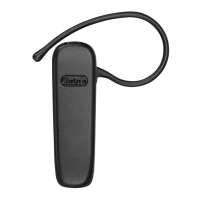
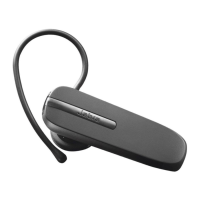
The Jabra BT125 is a Bluetooth headset designed for wireless communication, offering a hands-free experience for users. Its primary function is to allow users to make and receive calls without needing to hold their mobile phone, enhancing convenience and safety, particularly in situations like driving.

Function Description

The Jabra BT125 operates as a Bluetooth-enabled audio device that pairs with a mobile phone. Once paired, it allows for seamless interaction with call functions directly from the headset. Key functionalities include:

  • Answering Calls: Users can answer incoming calls with a simple press of the answer/end button on the headset.
  • Ending Calls: Active calls can be terminated by pressing the answer/end button.
  • Rejecting Calls: If a user wishes not to answer an incoming call, they can reject it by pressing and holding the answer/end button when the phone rings. This feature may redirect the caller to voicemail or provide a busy signal, depending on the phone's settings.
  • Voice Dialing: For compatible phones, the headset supports voice dialing. A quick press of the answer/end button activates the phone's voice dialing feature, allowing users to initiate calls by speaking a name or command. For optimal performance, it is recommended to record voice tags through the headset if possible.
  • Redialing Last Number: The headset can redial the last number called, a convenient feature for quickly reconnecting.
  • Volume Adjustment: Dedicated volume up (+) and volume down (-) buttons allow users to adjust the audio level during calls, ensuring clear communication.
  • Call Waiting and Call Hold: This advanced feature enables users to manage multiple calls. If an incoming call arrives while another call is active, the user can put the current call on hold and answer the new one. Switching between held and active calls is also possible, as is ending the current active call.

The headset is designed to provide clear audio for both the user and the person on the other end of the call. Its wireless nature allows for freedom of movement within a certain range from the paired phone.

Usage Features

The Jabra BT125 is designed for straightforward use, with an emphasis on intuitive controls and comfortable wear.

  • Powering On/Off: To turn the headset on, the user presses the answer/end button. To turn it off, the answer/end button is pressed and held for a longer duration.
  • Pairing with a Phone: Before initial use, the headset must be paired with a mobile phone. This involves putting the headset into pairing mode (typically by pressing and holding the answer/end button until a specific light indicator appears, usually a solid blue light). The phone then needs to be set to search for Bluetooth devices. Once the Jabra BT125 is discovered, the user selects it and enters a passkey (commonly "0000") to establish the connection. A confirmation message on the phone indicates successful pairing. If pairing fails, the process can be repeated.
  • Wearing the Headset: The Jabra BT125 is designed to be worn on either the right or left ear. It features an adjustable ear hook that can be rotated 180 degrees to fit the desired ear. The ear hook can be tightened at its rear end for a more secure fit. For optimal performance, it is recommended to wear the headset and the mobile phone on the same side of the body or within line of sight to minimize interference.
  • Call Handling: When a call is initiated from the mobile phone, the audio is automatically transferred to the headset (depending on phone settings). If the phone does not support automatic transfer, the user can manually transfer the call to the headset by pressing the answer/end button.
  • Light Indicators (LED): The headset features an LED indicator that provides visual feedback on its status:
    • Flashing blue light (once per second): Indicates an active call.
    • Flashing blue light (once every three seconds): Indicates standby mode.
    • Flashing blue light (low battery): Signals that the battery level is low.
    • Solid blue light: Indicates that the headset is charging or in pairing mode.

Maintenance Features

Proper care and storage are essential to ensure the longevity and optimal performance of the Jabra BT125.

  • Charging: The headset is powered by a rechargeable battery. It should be fully charged for approximately two hours before initial use. Charging can be done via an AC adapter connected to a power socket or through a USB cable connected to a PC (USB cable and car charger are sold separately). A solid blue LED indicates that the headset is charging, and the light turning off signifies that charging is complete.
  • Storage: When not in use, the Jabra BT125 should be stored safely with the power turned off. It is crucial to avoid storing the headset in extreme temperatures, whether high (above 45°C/113°F) or low (below -10°C/14°F), as this can shorten battery life and negatively impact product performance. High temperatures can also directly damage the product.
  • Moisture Protection: If the device gets wet from water or other liquids, it should be wiped dry immediately to prevent damage.

The Jabra BT125 is designed to be a reliable and user-friendly Bluetooth headset, compatible with Bluetooth-enabled mobile phones that support the Headset and/or Hands-Free profiles. Its design focuses on ease of use, comfort, and essential call management features for a convenient wireless communication experience.

Jabra BT 125 Specifications

General IconGeneral
Talk TimeUp to 8 hours
Standby TimeUp to 170 hours
Bluetooth ComplianceBluetooth 2.0
Operating Range10 meters (33 feet)
Noise CancellationNo
Supported Bluetooth ProfilesHeadset Profile (HSP), Hands-Free Profile (HFP)
CompatibilityBluetooth-enabled devices

Related product manuals