03
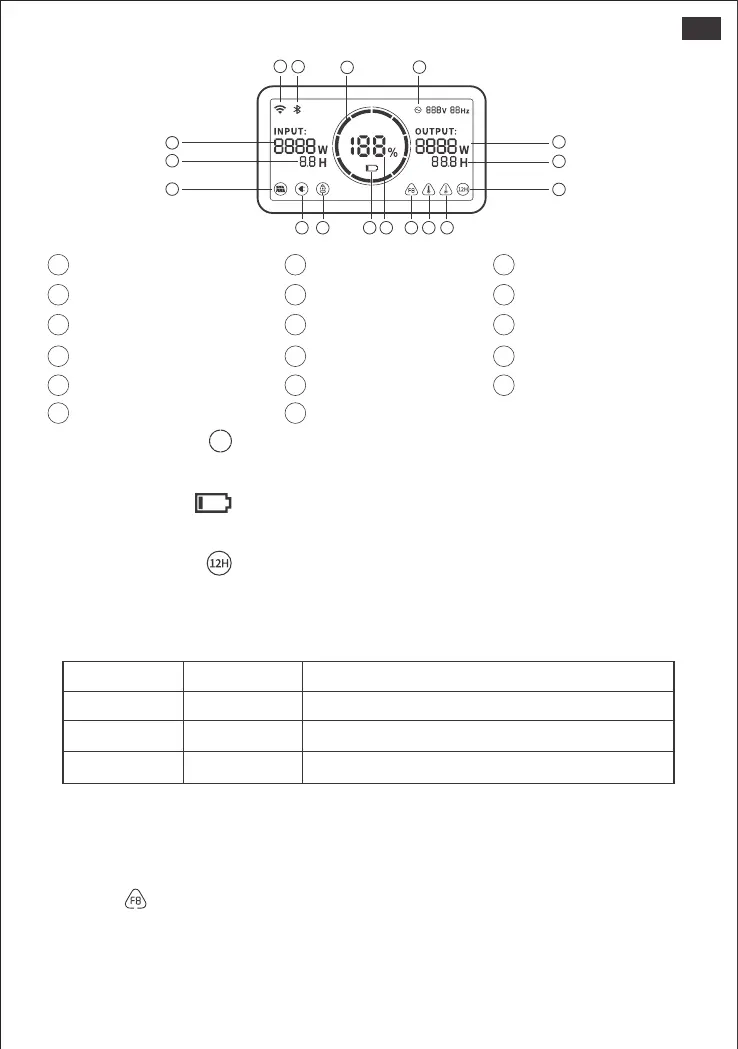
LCD Display
Battery Power Indicator ( ) :
When the product is being charged, the orange circle around the battery percentage will light up in
sequence. When charging other devices, the indicator will show the battery level.
Low Battery Indicator ( ) :
When the battery is less than 20%, the Low Battery Indicator will stay on. When less than 5%, the Low
Battery Indicator will flash. When it is being charged, the Indicator will be o.
Energy Saving Mode ( ) :
To avoid forgetting to turn o the output which results in battery consumption, the product turns the
Energy Saving Mode on by default. This occurs when no device is connected or the connected device
is less than or equal to a certain value. (Refer to the table below for more details), the device will
automatically turn o all outputs after 12 hours.
Output Output Power Defaults
AC Output The device will automatically shut down after 12 hours
The device will automatically shut down after 12 hours
The device will automatically shut down after 12 hours
≤25W
≤2W
≤2W
USB Output
Car Output
To turn o the Energy Saving Mode: Long press the AC Button and Main Power Button until the
Energy Saving Mode icon disappears. In Non-Energy Saving Mode, please remember to turn o the
products to avoid battery consumption.
To turn on the Energy Saving Mode:Long press the AC Button and Main Power Button until the Low
Power Mode icon lights up on the screen.
Fault code ( ) :In order to quickly solve the user’s feedback, we set up common fault codes F0-F9
in the system: if you find any fault code of F0、F1、F2、F3、F4、F5、F6、F7 on the display screen,
please contact us for after-sales treatment; If F6 code appears, please remove the load or unplug
the charging plug, the product can restore by itself, if not, please contact after-sales treatment; If F9
fault code appears, please remove the load and the product can recover by itself, if not, please
contact after-sales service.
8 Output Power
7
Remaining Battery Percentage
1 Input Power Remaining Charge Time
2
4 AC Wall Charging Indicator 5 Car Charging Indicator
10
Error Code
11
High Temperature Warning
13
Low Power Mode
14
AC Power Indicator
16
Bluetooth
17
WiFi
Solar Charging Indicator
3
6
Low Battery Indicator
9
Remaining Discharge Time
12
Low Temperature Warning
15
Battery Power Indicator
8
14
9
13
1211107654
15
16
17
1
2
3
US


 To Next Page