
 Need help?
Do you have a question about the Jam Ultra HX-EP900 and is the answer not in the manual?
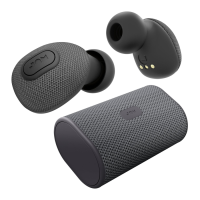
Details the multi-function button, status light, and charging contacts on the earbuds.
Identifies the micro USB and USB ports on the charging case for charging and device connection.
Instructions for charging the earbuds by placing them into the portable case.
How to power on both earbuds, automatically upon removal or manually.
Steps to automatically or manually sync the two earbuds to work as a pair.
Guide to connect the synced earbuds to a Bluetooth-enabled device for audio playback.
Instructions for powering on a single earbud for mono audio use.
Steps to put a single earbud into pairing mode with a device.
How to connect a single earbud to a Bluetooth device for mono audio.
Instructions on how to turn off the earbuds by placing them in the case or holding the button.
Guide on using the portable charging case to recharge earbuds or smart devices.
Explains LED indicators for earbuds while inside the charging case.
Details LED status lights for the portable charging case itself.
Describes LED status lights for earbuds when used together in stereo mode.
Explains LED status lights for earbuds when used individually in mono mode.
Details basic music playback controls like play, pause, next, and previous.
Explains how to handle phone calls (answer, reject, end) using the multi-function button.
Instructions on how to manage a second incoming call while on an active call.
How to activate voice assistants like Siri or Google Assistant.
Method to check the remaining battery level of the earbuds.
Steps to manually turn off a single earbud.
Steps to resolve Bluetooth pairing and connection problems.
Troubleshooting steps if earbuds do not automatically sync or pair.
Provides contact information for warranty service and support in USA and Canada.
Details FCC compliance regulations and technical specifications for the device.
States compliance with Industry Canada's radio standards for device operation.
Provides essential safety precautions to follow when using the product.
Warning regarding chemicals in the product known to cause cancer or birth defects in California.
Information on proper disposal of the internal lithium battery and handling small parts.
States that all servicing must be performed by authorized personnel.
Provides website links and contact methods for obtaining warranty service and information.
 General
| Type | In-Ear |
|---|---|
| Connectivity | Wireless |
| Waterproof | IPX4 |
| Driver Size | 6 mm |
| Frequency Response | 20 Hz - 20 kHz |
| Impedance | 16Ω |

 To Next Page