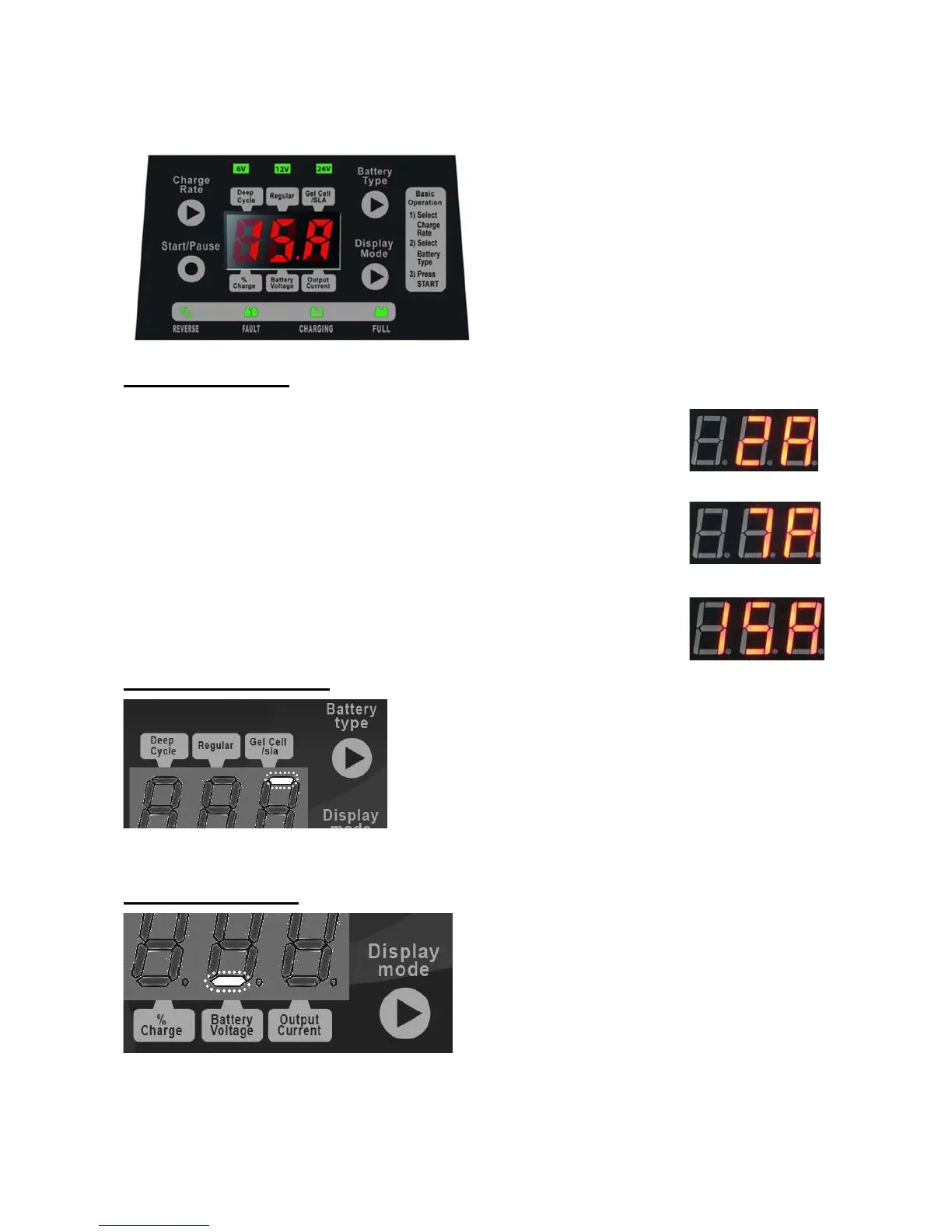
4. Control Panel
The Control Panel has several buttons and indicators.
Charge Rate Button sets the charge rate to one of the following:
2A DC Slow – Applicable on 6V/12V/24V battery, at a 2Amp DC Slow Rate Charging. The 2A
rate is not intended to be used as a trickle charger for larger batteries.
7A DC Normal – Applicable on 12V/24V Battery, at a 7Amp DC normal rate.
15A DC Fast – Applicable on 12V Battery only, at 15Amp DC fast rate.
Battery Selection Button sets the type of battery to be charged to one of the following:
Gel Cell / SLA – Select for charging all type of “Gel
Cell” & “SLA” batteries.
Regular – Select for charging all types of “lead acid”
batteries (SEALED/MF or WET/ FLOODED TYPE).
Deep – Select for charging Deep cycle type batteries.
Batteries should be marked with their type. If charging a
battery that is not marked, check the manual of the item that uses the battery. If the battery
type is unknown, use the “Gel Cell / SLA” setting.
Display mode button sets and shows one of the following readings:
Output current – This shows the selected/
programmed charging current.
Battery voltage –This shows the voltage of the
battery in DC, or Charging Voltage.
Charging % –This shows an estimate percent
of charge.


 To Next Page