ENGLISH OPERATION MANUAL
JB SYSTEMS
®
3/25 PPA-121
FUNCTIONS
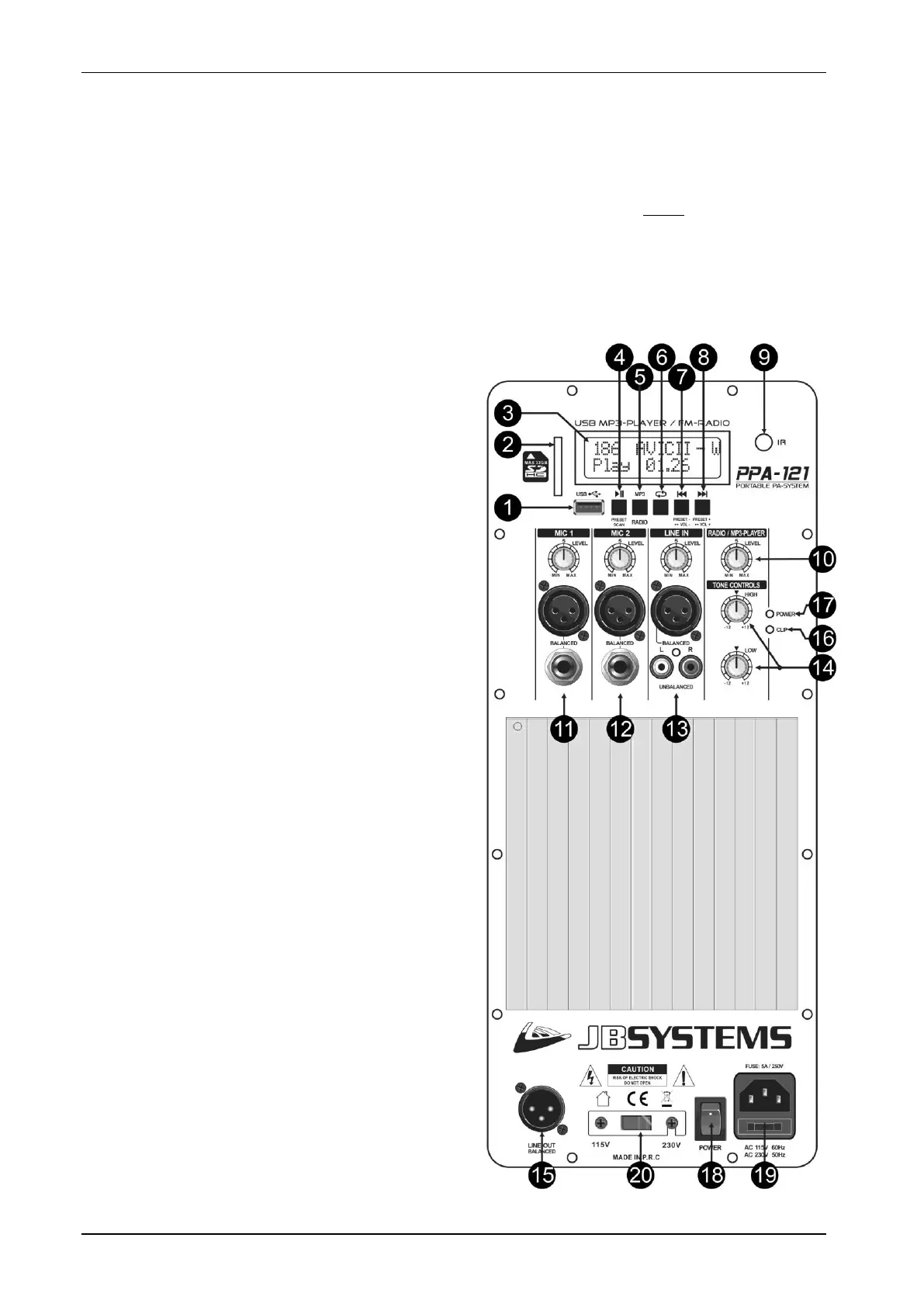
1. USB-input: here you can connect a USB-stick. As soon as the memory device is inserted, the display
shows “-- USB --”, followed by the total number of songs detected.
Important note: the USB-memory should be formatted in FAT16 or FAT32. If a new USB-stick is not
detected, please format it first using a Windows PC.
2. SD-CARD input: here you can insert an SD or SDHC-card. Insert the card gently with the upper side
(printed side) facing to the left. As soon as the memory device is inserted, the display shows “-- SD --”,
followed by the total number of songs detected.
Important note: the SD-card should be formatted in FAT16 or FAT32. If a new SD-card is not detected,
please format it first using a Windows PC.
3. LCD DISPLAY: shows valuable information about the played music or radio stations.
4. PLAY/PAUSE button:
Player operation:
Press shortly: to start/pause the current
audio track.
Press longer: to enter folder select, use
buttons (7) and (8) to browse the folders.
Radio mode:
Press shortly: tuner scans the FM-band and
programs the FM-preset stations
automatically.
5. SOURCE button: press this button to toggle
between MP3-player and FM-tuner (radio).
6. RANDOM button: press this button to choose one
of the different random modes:
REPEAT ONE: repeat the current track.
REPEAT FOLDER: repeat current folder.
REPEAT ALL: repeat all tracks on the USB-
memory. This is the “standard” playback mode.
REPEAT RANDOM: play all tracks in random
order.
7. PREVIOUS TRACK button:
Player operation:
Press shortly:
Normal playback: select previous track.
Folder select: (see: 4): select previous
folder.
Press longer: reduce the volume of player.
Standard the volume is set to maximum: we
advice to keep it at maximum and use the
rotary knob (10) to change the volume.
Radio mode:
Press shortly: select the previous preset.
Press longer: reduce the volume of player.
Standard the volume is set to maximum: we
advice to keep it at maximum and use the
rotary knob (10) to change the volume.
8. NEXT TRACK button:
Player operation:
Press shortly:
Normal playback: select next track.
Folder select: (see: 4): select next folder.
Press longer: increase the volume of player.
Standard the volume is set to maximum: we
advice to keep it at maximum and use the
rotary knob (10) to change the volume.
Radio mode:
Press shortly: select the next preset.
Press longer: increase the volume of player.
Standard the volume is set to maximum: we



 To Next Page