
 Need help?
Do you have a question about the JBL 4312BMkII and is the answer not in the manual?
Set speaker distance and angle (40-60 degrees) for a precise center image. Align HF units at ear-level.
Use sturdy bases (5-20 cm) to avoid floor surface interference and position speakers at ear-level.
Connect with amplifier power OFF. Observe terminal polarity (red/black). Use Y terminals or banana plugs.
Use dry cloth for cabinets, soft brush for speaker units. Avoid liquids, direct sunlight, and high temperatures.
Woofer stress is normal. Lifespan affected by temp, humidity, UV. Avoid strong light and heat sources.
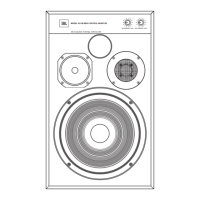
The JBL 4312BMKII and 4312MkIIWX are 12-inch, 3-way studio monitors, representing new additions to the classic 4312 family of bookshelf studio monitors, a lineage that traces its origins back to the 1968 introduction of the original 4310. These models are designed to provide accurate stereo sound reproduction, making them suitable for various audio applications where precise sound imaging and detailed frequency response are crucial. The primary distinction between the B and WX models lies in their finish: the WX features a traditional oiled walnut finish, while the B is presented in a black tolex vinyl.
Upon receiving your JBL 3-Way Studio Monitor 4312, it is important to ensure that the product is complete in both appearance and functionality. Should you discover any scratches or defects, it is recommended to contact the store of purchase directly. For future convenience and protection, it is advisable to retain the original box and all packing materials. This is particularly important because, in the event that the product requires shipping for repair services, JBL Incorporated will not assume responsibility for any damage that may occur during transit due to inadequate packing.
Proper installation is key to optimizing the performance and longevity of your monitors. It is crucial to avoid placing the monitors in close proximity to power amplifiers or radiators, as these devices generate significant amounts of heat. Similarly, steer clear of excessively humid or dusty environments, and any locations that are exposed to direct sunlight. For optimal stability and sound quality, the monitors should always be placed on a firm, solid floor.
Setting up the monitors correctly is essential for achieving the most accurate stereo soundstage. Begin the setup process using a recorded sound source that features a distinct virtual center image. The initial step involves establishing the center point between the speakers by ensuring equal distances from both the left and right speakers. Once this is achieved, adjust the distance between the listening position and the speakers, as well as the distance between the right and left speakers, until a precise center image is obtained. These monitors are engineered to deliver the most accurate stereo soundstage when the interior angle formed by the lines connecting from each speaker to the listener falls within a range of 40 to 60 degrees. Additionally, for optimal acoustic performance, it is recommended to maintain a distance of approximately 50 cm or more from both the left and right walls. The perceived center of the speaker's sound image is typically located in the vicinity of the HF (high-frequency) unit. Therefore, it is advisable to position the speakers so that the HF unit is aligned with ear-level. To further enhance sound quality and prevent acoustical interference from the floor surface, it is recommended to place a sturdy, cube- or block-shaped base with a thickness of 5 to 20 cm underneath the speakers.
When connecting the speakers to your amplifier, always ensure that the power is turned off. Connecting the speakers while the power is on can potentially damage both the amplifier and the speakers. The positive terminals of the speaker are marked with a red ring, while the negative terminals have a black ring. It is imperative to connect the cables without mistaking the polarity. The speakers are designed to operate in positive phase, meaning that when a positive signal is applied to the positive terminal, the woofer will move in the forward direction. For a safe and secure connection to the terminals, it is recommended to use Y terminals or banana plugs on the cable ends.
The monitors feature independent, continuous variable attenuators for each unit, allowing you to adjust the MF (mid-frequencies) and HF (high-frequencies) levels relative to the speaker's woofer level. These adjustments should be made to suit the specific reverberation characteristics of your listening room and your personal preferences. It is worth noting that, in general, most speakers require approximately 1 to 2 months of initial use for their vibration system to achieve optimum performance. As the level balance may change during this initial break-in period, it is recommended to periodically readjust the level accordingly to maintain optimal sound.
The speakers are shipped with the grill installed, which serves to protect the internal units. The grill can be removed and re-attached as needed for maintenance or aesthetic preferences.
Regular maintenance will help preserve the appearance and performance of your JBL studio monitors. When performing any maintenance, gently wipe the surface of the cabinet with a dry cloth to remove dust. Avoid using damp cloths or cleaning papers, as these can dull the finish on the cabinet surface. It is crucial not to use volatile liquids such as benzene, paint thinner, or alcohol, and never spray insecticide near the cabinet. If dust accumulates in the grill netting, use a vacuum cleaner to remove it, but adjust the suction power to a gentle setting to avoid damaging the grill. Do not wash the grill in water, as this can cause it to sag or its color to become uneven. If the surface of the speaker unit itself becomes dusty, use a soft, dry calligraphy brush or a paint brush to carefully sweep the dust away; never use a damp cloth on the speaker units.
The speaker system is a durable consumer good, but certain components, particularly the edges of the woofer that support the rapid movement of the paper cone, are subject to significant stress and have a finite lifespan. The overall lifespan of the speakers can also be affected by environmental factors such as temperature, humidity, and ultra-violet radiation. To maximize the longevity of your speakers, avoid exposing them to strong lighting from equipment or direct sunlight. Additionally, refrain from placing the speakers in high-temperature environments, such as near air conditioner exhaust pipes or heat radiators. By following these guidelines, you can ensure that your JBL studio monitors continue to deliver exceptional audio performance for many years.
 General
| Sensitivity | 93dB (2.83V/1m) |
|---|---|
| Woofer | 12-inch (300 mm) |
| Midrange | 5-inch (125mm) polymer-coated pulp cone midrange (105H-1) |
| Tweeter | 1-inch (25mm) magnesium/aluminum alloy dome tweeter (054ALMg-1) |
| Nominal Impedance | 8 ohms |

 To Next Page