EVOi.net
20
APPLICATIONS
EVOi.net IN RECTANGULAR ROOMS (continued)
Longer / Wider Rectangular Room:
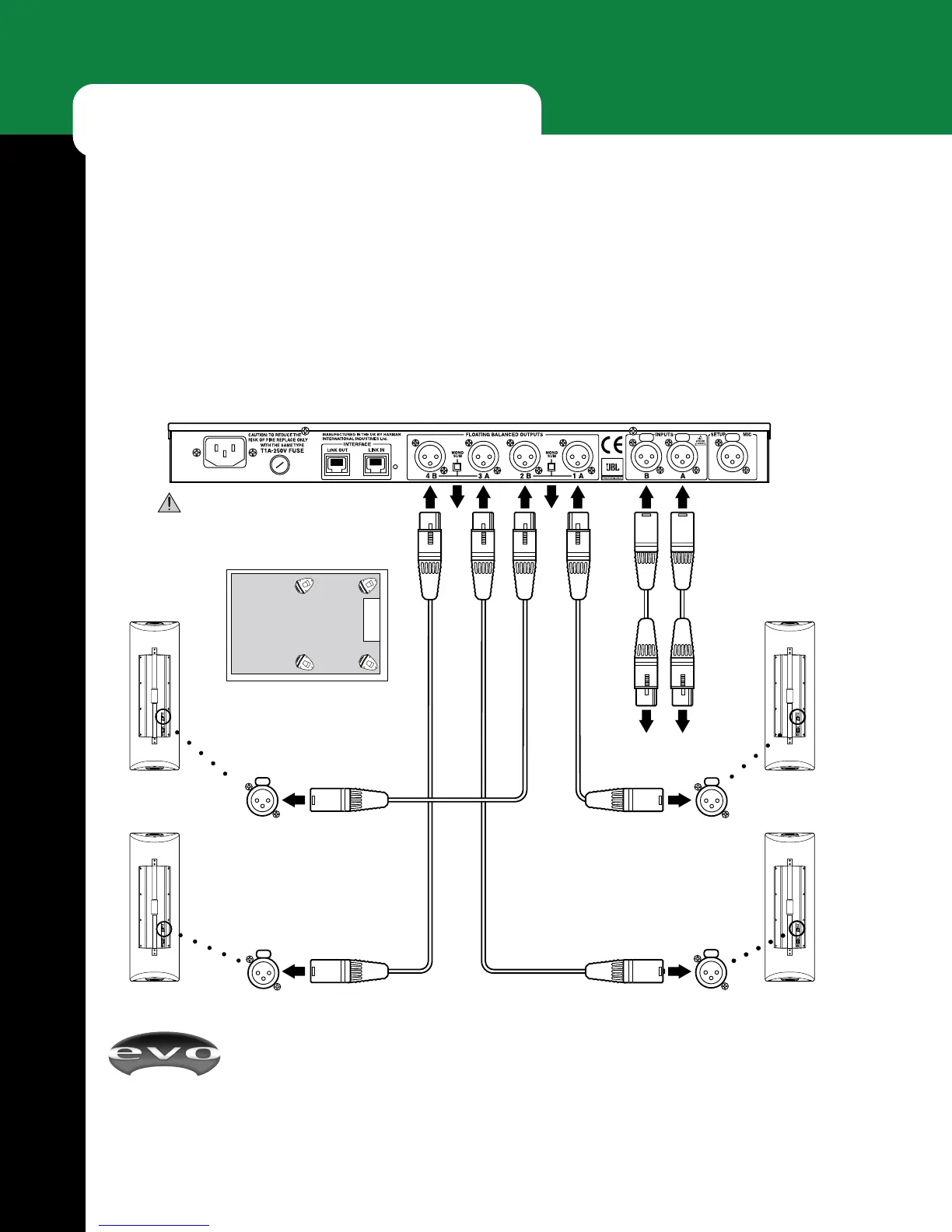
EVOi.net + 2 Main (Stereo) EVOi.324s + 2 Delay (Stereo) EVOi.324s
In large rooms, an EVO system as illustrated in the inset diagram may be required. EVOi.324s are hooked up to MAIN
OUT 1&2 and the Delays, AUX OUT 3&4. Stereo is required, so EVOi.324s are positioned as shown (refer to EVOi.324
Users Guide page 13) and the Measurement Microphone placement and order of positioning is shown.
EVOi.net Rear
(NOTE: For clarity, power connections are not shown.)
Speaker Placement In Room
EVOi.324
Input
EVOi.324
Input
EVOi.324
Delay R
EVOi.324
Delay L
XLR Signal Cables
XLR Signal Cables
EVOi.324
Input
EVOi.324
Input
EVOi.324
Main R
EVOi.324
Main L
Audio Outputs
(from Mixer)
IMPORTANT: Make sure POWER is off
before making connections.
Out
RRL
LR L
RL
Out
Main LMain R
Delay LDelay R
Approximate measurement microphone placement.
1 = Auto EQ. Main Out Setup 1&2
2 = Auto EQ. Aux Out Setup 3&4
3 = Delay Setup
123


 To Next Page