EasyManua.ls Logo

JBL FLIP4 - Page 6

JBL FLIP4
32 pages
Print Icon
To Next Page IconTo Next Page
To Previous Page IconTo Previous Page
Loading...
FLIP4
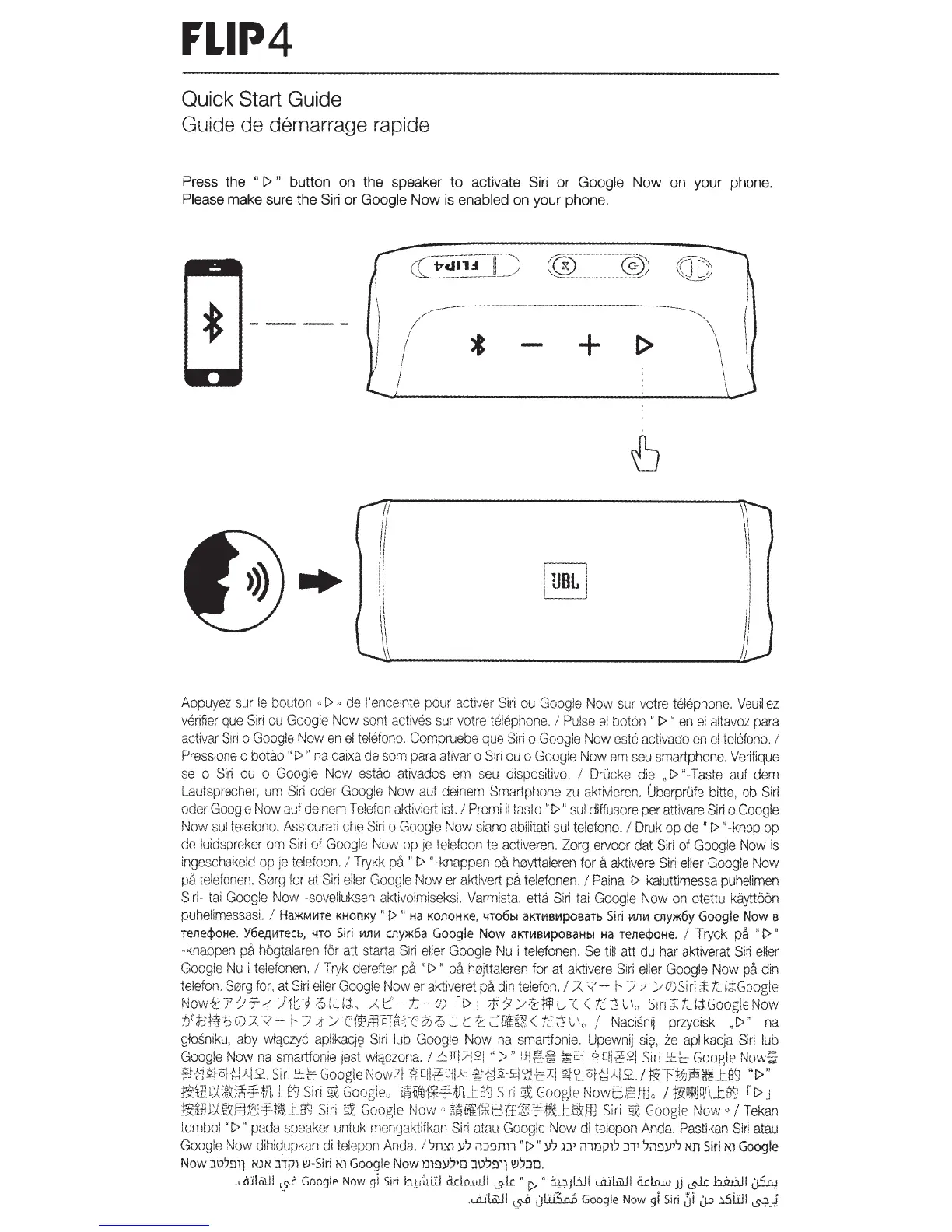
Quick
Start
Guide
Guide de demarrage rapide
Press the
"
[>
"
button
on
the speaker to activate
Siri
or
Google Now
on
your phone.
Please make sure the
Siri
or
Google
Now
is
enabled
on your phone.
!'?:---
-
--
-
---
-
-
-
~
{~
@
~-
-
-
-
-
--
----
/---------
---------------
--
--
-------
---
---
--
-
~\
I * +
~
\
I
\_
I
I
Appuyez
sur
le
bouton
"[>,
de
!'enceinte
pour
activer
Siri
ou
Google
Now
sur
votre
telephone.
Veuillez
verifier
que
Siri
ou
Google
Now
sont
actrves
sur
votre
telephone_
!
Pulse
el
bot6n
"
[>
"
en
el
altavoz
para
activar
Siri
o
Google
Now
en
el
telefono.
Compruebe
que
Siri
o
Google
Now
este
activado
en
e!
telefono.
I
Pressione
o
botao
"[>"
na
caixa
de
som
para
ativar
o
Siri
ou
o
Google
Now
em
seu
srnartphone.
Verifique
se
o
Siri
ou
o
Google
Now
estao
ativados
em
seu
dispositive.
/
Drlicke
die
"[>"-Taste
auf
dem
Lautsprecher,
um
Si
ri
oder
Google
Now
auf
deinern
Smartphone
zu
aktivieren
.
Uberprufe
bitte,
ob
Siri
oder
Google
Now
auf
de
i
nem
T
elefon
aktiv
i
ert
ist.
!
Premi
il
tasto
"[>
"
sui
diffusore
per
attivare
Siri
o
Google
Now
su
i
telefono
.
Assicurati
c
he
Siri
o
Googie
Now
siano
abiiitati
sui
telefono.
I
Druk
op
de"[>
"-knop
op
de
!uidspreker
orn
Sir
i
of
Googie
Now
op
je
telefoon
te
activeren.
Zorg
ervoor
dat
Siri
ot
Google
Now
is
ingeschakeld
op
je
telefoon.
I
Trykk
pa
"[>
''
-
knappen
pa
hoytta!eren
for
a
aktivere
Siri
eller
Googie
Now
pa
telefonen.
Sorg
tor
at
Siri
el!er
Google
Now
er
aktivert
pa
telefonen.
I
Paina
[>
kaiuttimessa
puhelimen
Siri-
tai
Google
Now
-sovelluksen
aktivoimiseksi
.
Varmista,
etta
Siri
tai
Google
Now
on
otettu
kaytt66n
puhelimessasi.
/
Ha*MI-ITe
KHOnKy
"
[>
"
Ha
KOJlOHKe,
4T06bl
aKn1Bt.1poearb
Siri
11Jll.1
C!lY*6Y
Google
Now
e
rene<jloHe.
Y6eA!-1Tecb,
'-lTO
Siri
1<1J1VI
cny*6a
Google
Now
aKTt.1Bt.1poeaHbl
Ha
rene<jloHe.
I
Tryck
pa
"[>"
-knappen
pa
hbgtalaren
for
att
starta
Siri
eller
Google
Nu
i
telefonen.
Se
till
att
du
har
aktiverat
Siri
eller
Googie
Nu
i
telefonen.
!
T
ryk
derefter
pa
"
[>
"
pa
hoj
ttaleren
for
at
aktivere
Siri
eller
Google
Now
pa
din
teiefon.
Sorg
fo
r.
at
Siri
eiler
Googie
Now
er
aktiveret
pa
din
telefon.
/ 7.
?-
r--
7
;t
> 0
Siri
::t:t.:::i;:i:Googl
e
Now{£
7-
7
-T-1
-
::J'
1
t:
-r
~
L
:::r;r
,
:;;z
t '
-1J-
O)
i
t>
J
*.Y
/-?::Ffl
L..
-c
<
tc
'C':
l '.,
Siri
if:td;:i:Goog!e
Now
tJ't;HF.S
O
)
:::Z?
-
t-
7:t/T1~ffiPJ~
~
cil;{);::.
t
~;:::
·
fj\fg;;(t.::';:!l
1
,
,
I
Nacisnij
przycisk
,[>"
na
glosniku,
aby
wlqczyc
aplikacjfi!
Siri
lub
Google
Now
na
smartfonie.
Upewnij
si~.
ze
aplikacja
Siri
lub
Google
Now
na
smartfonie
jest
wlqczona.
/
!:11!1-jQI
"[>"
t:Jif!~
~!ci
?,T!j-~!'~1
Siri
~EE:-
Google
Now~
;f{-~;sfor{~AI2
..
Siri
_s~t~
Google
~,Jow7f
:fr:CH
-
~Ojl)d
:~{)2f£i:d2J:[
l?~~:lof·~AI2
..
/t~Tf7Jps~_tS~
"[>"
~ltJL:.(;%:
)
~
'
HJ1
_
l8~
Siri
9!
Googie,.
i~W!J1
;
*f-~J1JJ~
Siri
:sx
Google
Now818fflo
I
frtn*~OJ\JJJ\J
r-[>
J
t!WlJJ.gY,fflf&
:
:f
:
ijfJ~rfj
Siri
sx
Google
Now
c
§~t~1iK81:Ef&Ff-~J~mm
Siri
~
Google
Now
o
I
Tekan
tombol
"[>"
pada
speaker
untuk
mengaktitkan
Siri
at
au
Google
Now
di
telepon
Anda.
Pastikan
Siri
atau
Goog!e
No
w
dih
i
dupkan
di
telepon
Anda
. I
'.m:x1
y')
ilJ~nn
"[>"
y')
n'
illlJj)lJ
J'T'
Jil~Y'J
Nn
Siri
Nl
Google
Now
J\JJ!lll
N)N J1jJ1
1!1-Siri
Nl
Google
Now
lJ1!l)JJ'D J\JJ!11) I!IJJD
.
.
J.lii..Ol.ll
~
Google
Now
gl
Siri
~
ddruuJI
~
"[>
<4;ljlill
JUl&ll
dd.o.JJ.J
Jj
~
h2..UJI
LJ.5-o.J
--
.
...ru·I..Ol.ll
~
Jl.i:.i5.o..D
Google
Now
gl
Siri
ZJi
LJ.o
~WI
~JJ

Other manuals for JBL FLIP4

Related product manuals