EasyManua.ls Logo

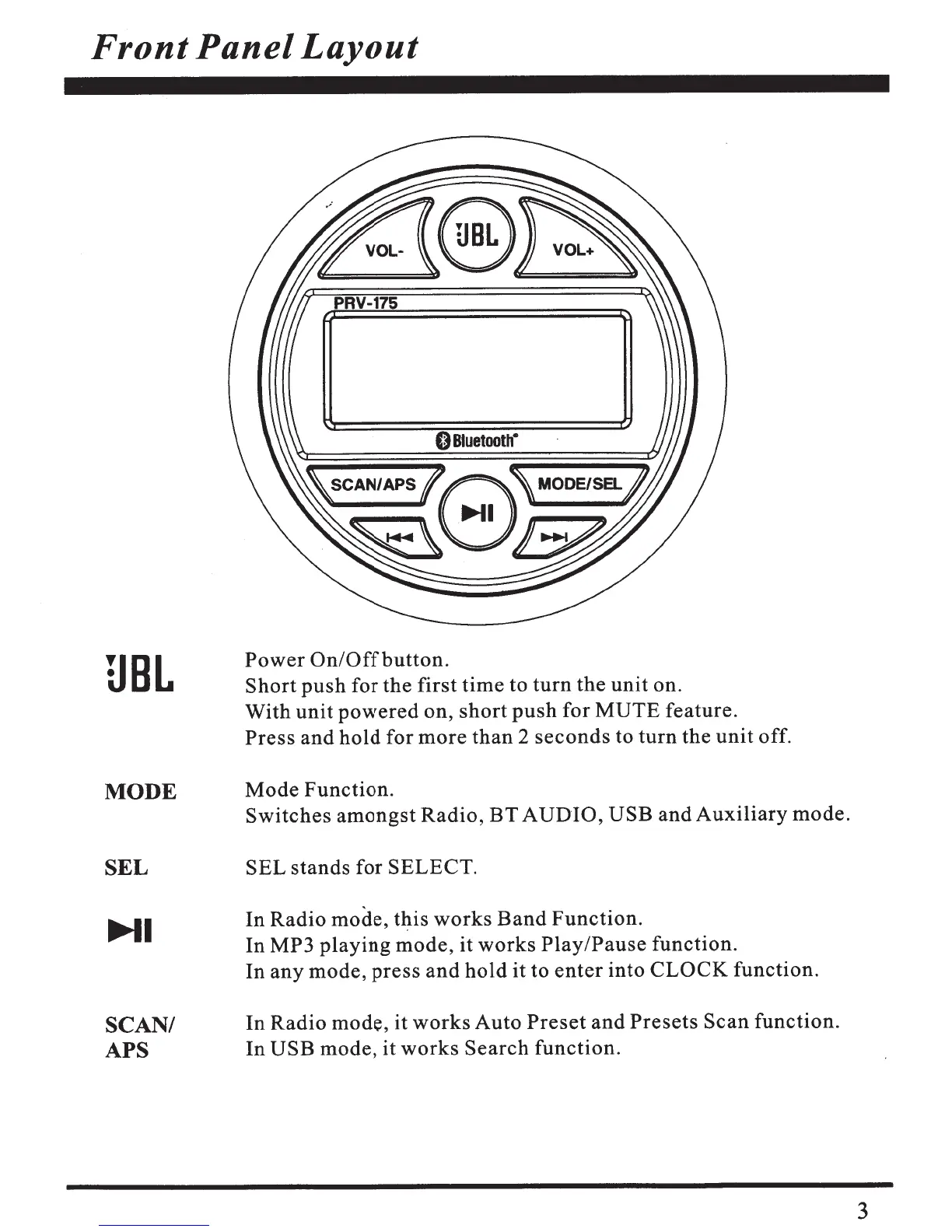
JBL JBL-PRV175 - Front Panel Layout; Power and Mute Controls; Mode and Selection Buttons; Playback and Clock Adjustment

JBL JBL-PRV175
10 pages
Print Icon
To Next Page IconTo Next Page
To Previous Page IconTo Previous Page
Loading...
Front
Panel
Layout
UBL
MODE
SEL
~I
SCAN/
APS
PRV-175
0
Bluetooth•
Power
On/Offbutton.
Short
push
for
the
first
time
to
turn
the
unit
on.
With
unit
powered
on,
short
push
for
MUTE
feature.
Press
and
hold
for
more
than
2
seconds
to
turn
the
unit
off.
Mode
Function.
Switches
amongst
Radio,
BT
AUDIO,
USB
and
Auxiliary
mode.
SEL
stands
for
SELECT.
In
Radio
mode,
t~is
works
Band
Function.
In
MP3
playing
mode,
it
works
Play/Pause
function.
In
any
mode,
press
and
hold
it to
enter
into
CLOCK
function.
In
Radio
mode, it
works
Auto
Preset
and
Presets
Scan
function.
In
USB
mode,
it
works
Search
function.
3

Related product manuals