FR
Connexion Bluetooth
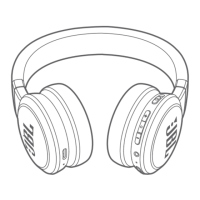
1. Allumage du casque
ON (bouton coulissant)
Note : un intervalle de 3 secondes est nécessaire entre l’allumage du casque et son
extinction afin d’éviter les actions involontaires.
2. À la première connexion, le casque passe automatiquement en mode de jumelage
après son allumage.
3. Connexion à un appareil Bluetooth
Choisissez « JBL LIVE650BTNC» pour connecter.
ES
Conexión Bluetooth
1. Enciende los auriculares
ON (Botón deslizante)
Nota: Es necesario un intervalo de 3 segundos entre encender y apagar los
auriculares de nuevo para evitar activaciones en falso.
2. Si es la primera conexión, el auricular se pondrá en modo de emparejamiento
automáticamente después de encenderlo
3. Conéctalos a un dispositivo Bluetooth
Selecciona “JBL LIVE650BTNC” para conectar
DE
Bluetooth-Verbindung
1. Einschalten des Kopfhörers
AN (Schiebeschalter)
Hinweis: Zwischen dem Ein- und erneuten Ausschalten des Kopfhörers müssen
mindestens 3 Sekunden liegen, um eine Fehlbedienung zu verhindern.
2. Wenn du den Kopfhörer zum ersten Mal verbindest, wechselt er nach dem
Einschalten automatisch in den Kopplungsmodus.
3. Mit Bluetooth-Gerät verbinden
Wähle „JBL LIVE650BTNC“ zum Verbinden
IT
Connessione Bluetooth
1. Accenderelacuffia
ON (pulsante a slitta)
Nota: È necessario un intervallo di 3 secondi tra l'accensione e lo spegnimento delle
cuffie per evitare un falso comando.
2. Se alla prima connessione, la cuffia entrerà in modalità abbinamento
automaticamente dopo l'accensione.
3. Collegamento ad un dispositivo bluetooth
Scegliere"JBL LIVE650BTNC" per collegarsi
NL
Bluetooth aansluiting
1. Zet de hoofdtelefoon aan
AAN (schuifknop)
Opmerking: Een interval van 3 seconden tussen het aan- en uitzetten van de
hoofdtelefoon is nodig om een vals alarm te vermijden.
2. Als de hoofdtelefoon de eerste keer wordt aangesloten, wordt de koppelingsmodus
bij het inschakelen automatisch geactiveerd.
3. Koppelen met een Bluetooth-apparaat
Selecteer “JBL LIVE650BTNC” om aan te sluiten.
HU
Bluetooth csatlakozás
1. Kapcsolja be a fejhallgatót
BE (csúszka gomb)
Megjegyzés: A hibás indítás elkerüléséhez 3 másodperces időintervallumra van
szükség a fejhallgató be-, és kikapcsolásához.
2. Az első alkalommal történő bekapcsoláskor a fejhallgató automaitkusan párosító
módba kapcsol a bekapcsolás után.
3. Csatlakoztassa a bluetooth készüléket
Válassza a “JBL LIVE650BTNC”-t a csatlakoztatáshoz
RU
Соединение через Bluetooth
1. Включите наушники
ON (ползунок)
Примечание. Между включением и выключением наушников должно пройти 3
секунды, это делается для предотвращения ложного включения.
2. При первом подключении наушники после включения автоматически перейдут
в режим сопряжения
3. Подключитесь к Bluetooth-устройству
Выберите "JBL LIVE650BTNC" для подключения
PT
Conexão Bluetooth
1. Ligueosfonesdeouvido
Liga (botão deslizante)
Obs: Para que a função liga/desliga funcione corretamente, aguarde três segundos
antes de ligar ou desligar o telefone.
2. Ao serem ligados e conectados pela primeira vez, os fones de ouvido entrarão no
modo de emparelhamento automaticamente.
3. Conecte o fone a um dispositivo Bluetooth
A conexão deve ser realizada com o dispositivo JBL LIVE650BTNC
ID
Koneksi Bluetooth
1. Nyalakan headphone
HIDUP (Geser tombol)
Catatan: Agar tidak terjadi pemicuan yang keliru, diperlukan jarak waktu 3 detik
antarapenyalaandanpematianheadphonekembali.
2. Jika sedang menyambungkan untuk kali pertama, headphone akan otomatis masuk
ke mode penyambungan setelah dinyalakan
3. Hubungkan ke perangkat bluetooth
Pilih “JBL LIVE650BTNC” untuk menyambung
JP
Bluetooth 接続
1. ヘッドホンの電源を入れる
オン(スライドボタン )
注意:誤った操作を防止するため、ヘッドホンのオンとオフを再度切り替えるには3秒間
待って操作してください。
2. 初めて接続する場合は、電源を入れるとヘッドホンは自動的にペアリン
グモードに入ります
3. Bluetooth対応機器に接続
「JBL LIVE650BTNC」を選択
KO
Bluetooth 연결
1. 헤드폰 켜기
켜기(슬라이드 버튼)
참고: 잘못된 트리거를 방지하기 위해 헤드폰 켜기/끄기전환시 3초정도간격을두어야
합니다.
2. 첫연결시헤드폰전원을켜면자동으로페어링모드에진입합니다.
3. Bluetooth 장치 연결
연결할 "JBL LIVE650BTNC" 선택
CHS
Bluetooth 连接
1. 打开耳机
ON(滑动按钮)
注意: 为避免误触发,当耳机在开启和关闭之间切换时,需要留出 3 秒的间隔。
2. 如果是首次连接,耳机将会在开启后自动进入配对模式
3. 连接到蓝牙设备
选择“JBL LIVE650BTNC”进行连接
CHT
Bluetooth 連接
1. 開啟耳機
開啟(滑動按鈕)
附註: 在再次開啟和關閉耳機之間需要保留 3 秒的間隔,以避免誤觸發。
2. 若是第一次連接,耳機將在通電後自動進入配對模式
3. 連接至 Bluetooth 裝置
選擇「JBL LIVE650BTNC」以進行連接
HE
יטוחלא Bluetooth רוביח
.1
( )
, 3 :
.
, .2
.
Bluetooth 3.
"JBL LIVE650BTNC"
AR
Bluetooth لﺎﺼﺗا
.1
( )
.
3
:
.
.2
Bluetooth .3
"JBL LIVE650BTNC"
Quick Start Guide
Guide de démarrage rapide
650BT
NC
LIVE


 To Next Page