1st Push Of Key Fob Unlock Button
This feature lets you program the system to
unlock either the driver’s door or all doors on the
first push of the unlock button on the key fob. To
change the current setting, refer to “Uconnect
Settings” in “Multimedia” for further information.
To Lock The Doors And Liftgate
Push and release the lock button on the key fob
to lock all doors and liftgate.
The turn signal lights will flash and the horn will
chirp to acknowledge the signal. Refer to
“Uconnect Settings” located in “Multimedia” for
further programmable information.
Replacing The Battery In The Key With
Remote Control
The recommended replacement battery is one
CR2032 battery.
NOTE:
• Perchlorate Material — special handling may
apply.
• Do not touch the battery terminals that are on
the back housing or the printed circuit board.
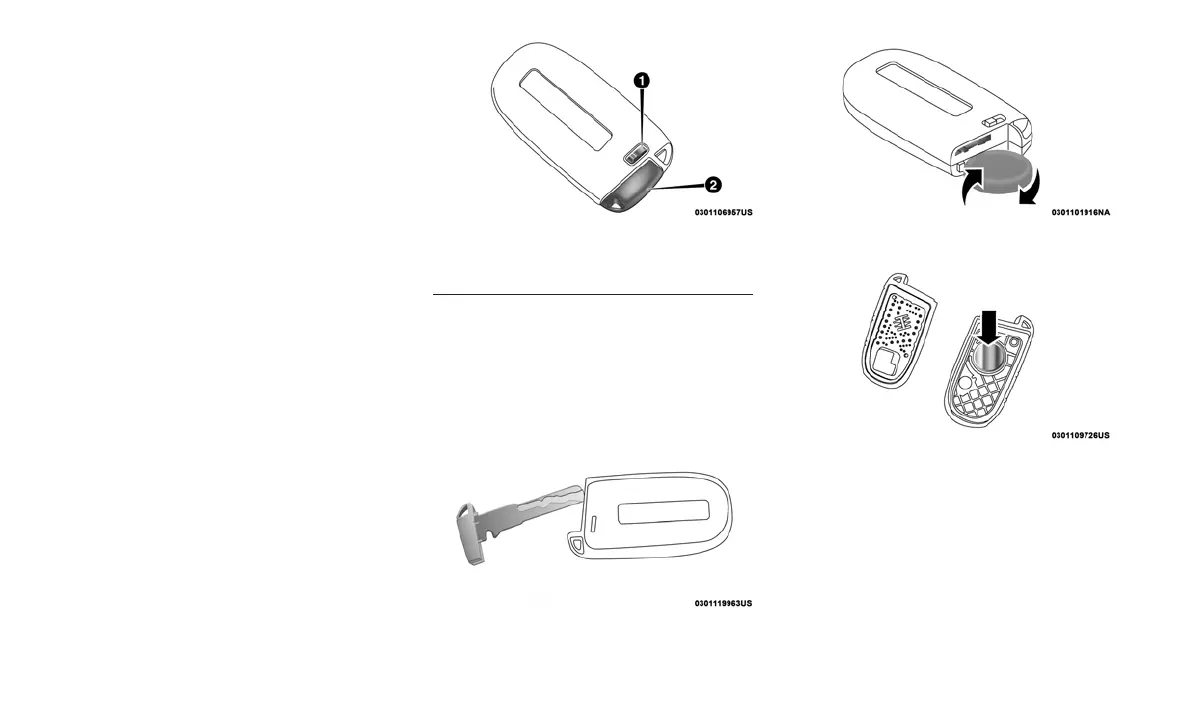
1. Remove the emergency key by sliding the
mechanical latch on the back of the key fob
sideways with your thumb and pull the emer-
gency key out with your other hand.
2. Separate the key fob halves using the tip of
the emergency key, a #2 flat blade screw-
driver, or a coin and gently pry the two halves
of the key fob apart. Make sure not to dam-
age the seal during removal.
3. Remove the battery by turning the back
cover over (battery facing downward) and
tapping it lightly on a solid surface such as a
table or similar and replace the battery. When
replacing the battery, match the + sign on the
battery to the + sign on the inside of the
battery clip, located on the back cover. Avoid
touching the new battery with your fingers.
Emergency Key Removal
1 — Emergency Key Release Button
2 — Emergency Key
Emergency Key Removal
Separating Case With A Coin
Key Fob Battery Replacement
18












 To Next Page