UCONNECT RADIOS
For detailed information about your Uconnect
radio or pairing a phone to your Uconnect radio,
refer to your Uconnect Owner’s Manual Supple-
ment.
NOTE:
Uconnect screen images are for illustration pur-
poses only and may not reflect exact software
for your vehicle.
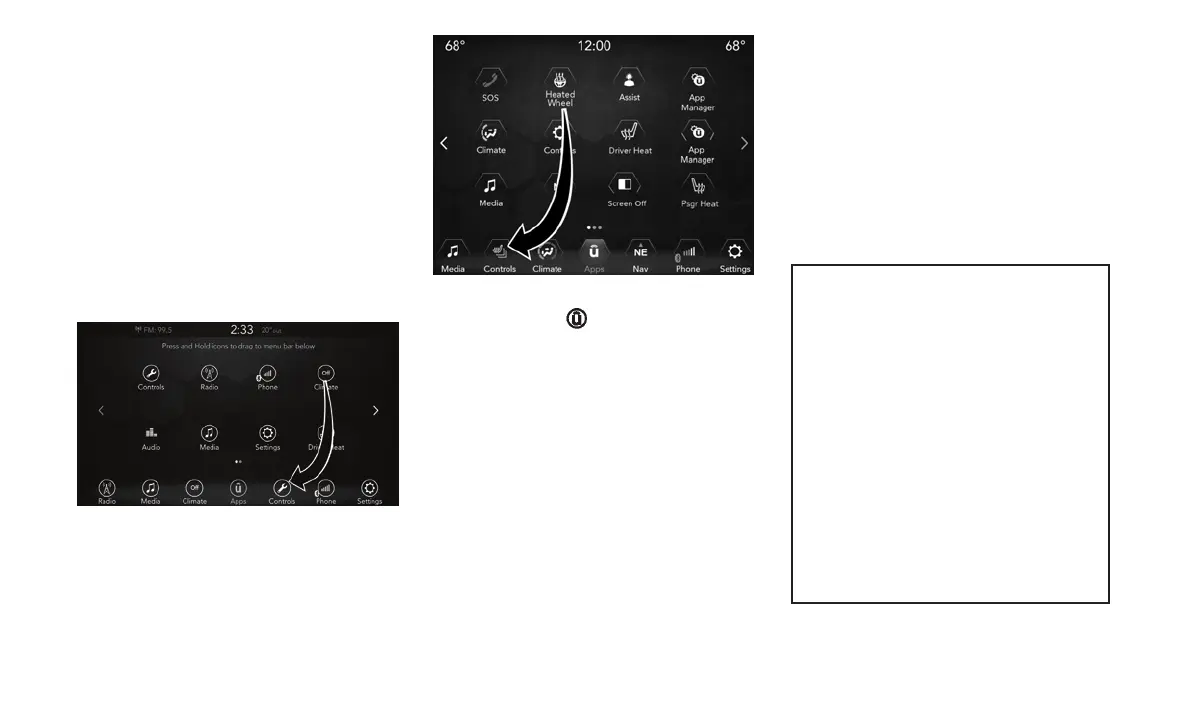
PERSONALIZED MENU BAR
The Uconnect features and services in the main
menu bar are easily changed for your conve-
nience. Simply follow these steps:
1. Press the “Apps
” button to open the App
screen.
2. Press and hold, then drag the selected App
to replace an existing shortcut in the main
menu bar.
The new shortcut will now be an active App/
shortcut on the main menu bar.
CYBERSECURITY
Your vehicle may be a connected vehicle and
may be equipped with both wired and wireless
networks. These networks allow your vehicle to
send and receive information. This information
allows systems and features in your vehicle to
function properly.
The risk of unauthorized and unlawful access to
your vehicle systems may still exist, even if the
most recent version of vehicle software (such as
Uconnect software) is installed.
WARNING!
• It is not possible to know or to predict all of
the possible outcomes if your vehicle’s
systems are breached. It may be possible
that vehicle systems, including safety re-
lated systems, could be impaired or a loss
of vehicle control could occur that may
result in an accident involving serious in-
jury or death.
• ONLY insert media (e.g., USB, SD card, or
CD) into your vehicle if it came from a
trusted source. Media of unknown origin
could possibly contain malicious software,
and if installed in your vehicle, it may
increase the possibility for vehicle systems
to be breached.
(Continued)
Uconnect 4 Apps Menu
Uconnect 4/4C NAV Apps Menu
282















 To Next Page