Safety/Driving Assistance — If Equipped
After pressing the “Safety/Driving Assistance”
button on the touchscreen, the following settings
will be available:
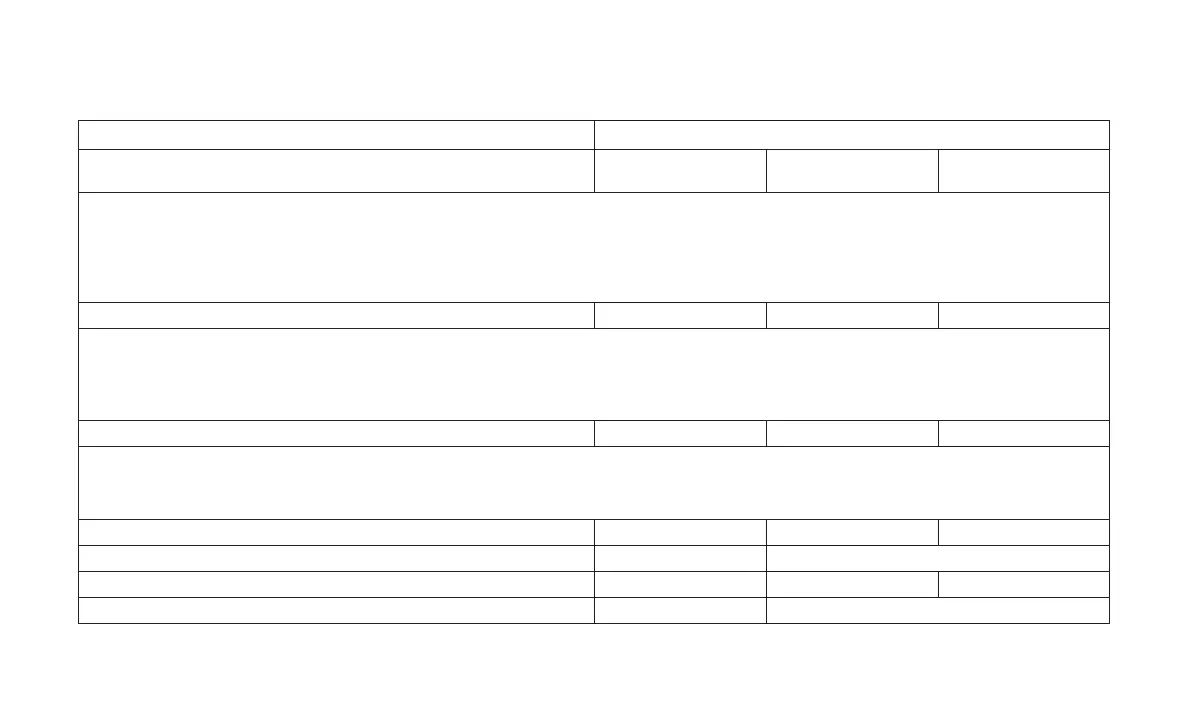
Setting Name Selectable Options
Forward Collision Warning Off Warning Only
Warning + Active
Brake
NOTE:
The “Forward Collision Warning Plus (FCW+)” setting includes Advanced Brake Assist (ABA). The ABA applies additional brake pressure when the
driver requests insufficient brake pressure to avoid a potential frontal collision. When the “Sound Only” option is selected a chime will sound alerting
you of a possible collision with the vehicle in front of you and more brake pressure is needed. When the “Sound and Brake” option is selected, it will
apply the brakes to slow your vehicle in case of potential forward collision and sound an audible chime to alert you.
Forward Collision Warning Sensitivity — If Equipped Near Medium Far
NOTE:
The “Forward Collision Warning Plus (FCW+) Sensitivity” setting determines at what relative distance the vehicle directly in front of you needs to be
at, before the system will warn you of a possible collision with the vehicle directly in front of you, based on the option is selected. “Far” will give you
the most amount of reaction time, whereas “Near” will give you the least amount of reaction time, based on the distance between the two vehicles.
LaneSense Warning — If Equipped Early Medium Late
NOTE:
The “LaneSense Warning” setting determines at what distance the LaneSense system will warn you, through steering wheel feedback, of a possible
lane departure.
LaneSense Strength Low Med High
ParkSense — If Equipped Sound Sound and Display
Rear ParkSense Volume Low Medium High
Rain Sensing Auto Wipers On Off
298














 To Next Page