NOTE:
A good calibration requires a level surface
and an environment free from large metallic
objects such as buildings, bridges, under-
ground cables, railroad tracks, etc.
Manual Compass Calibration
If the compass appears erratic and the “CAL”
indicator does not appear in the instrument
cluster display, you must put the compass into
the Calibration Mode manually as follows:
1. Start the engine. Leave the gear selector in
PARK in order to enter the instrument cluster
display Programming Menus.
2. Push and release the MENU button until the
Personal Settings (Customer-Programmable
Features) menu displays in the instrument
cluster display.
3. Push and release the down arrow button
until “Calibrate Compass” displays in the
instrument cluster display.
4. Push and release the right arrow button to
start the calibration. The “CAL” indicator will
display in the instrument cluster display.
5. Complete one or more 360 – degree turns (in
an area free from large metal or metallic
objects) until the “CAL” indicator turns off.
The compass will now function normally.
Compass Variance
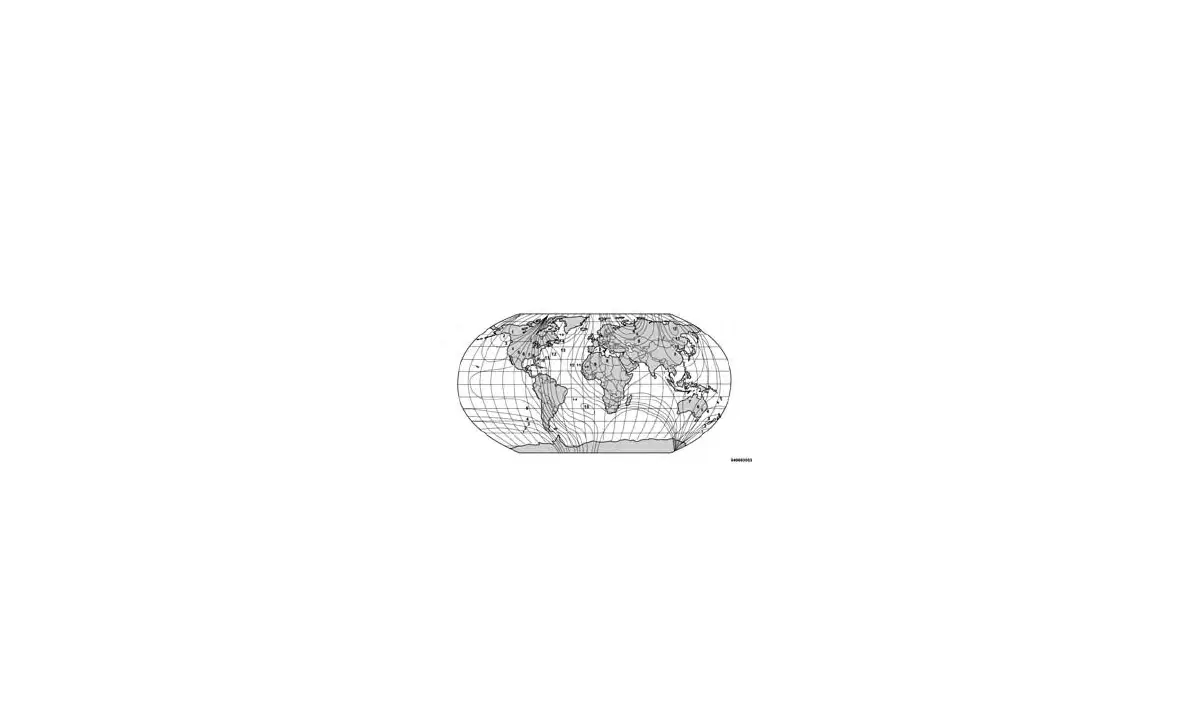
Compass Variance is the difference between
Magnetic North and Geographic North. To com-
pensate for the differences, the variance should
be set for the zone where the vehicle is driven,
per the zone map. Once properly set, the com-
pass will automatically compensate for the dif-
ferences and provide the most accurate com-
pass heading.
NOTE:
Magnetic materials should be kept away from
the top of the right rear quarter window. This is
where the compass sensor is located.
1. Turn the ignition switch ON.
2. Push and hold the compass button for ap-
proximately two seconds.
3. Push and release the down arrow button
until “Compass Variance” message and the
last variance zone number displays in the
instrument cluster display.
4. Push and release the right arrow button until
the proper variance zone is selected accord-
ing to the map.
5. Push and release the compass button to
exit.
MINI-TRIP COMPUTER — IF
EQUIPPED
The Mini-Trip Computer is located in the instru-
ment cluster and features a driver-interactive
trip information and temperature display.
NOTE:
The system will display the last known out-
side temperature when starting the vehicle
and may need to be driven several minutes
before the updated temperature is displayed.
Engine temperature can also affect the dis-
played temperature; therefore, temperature
readings are not updated when the vehicle is
not moving.
Compass Variance Map
67



















 To Next Page