EasyManua.ls Logo

Jetter JC-340 - Page 16

Jetter JC-340
Print Icon
To Next Page IconTo Next Page
To Previous Page IconTo Previous Page
Loading...
Setting the IP address
Step
Action
5
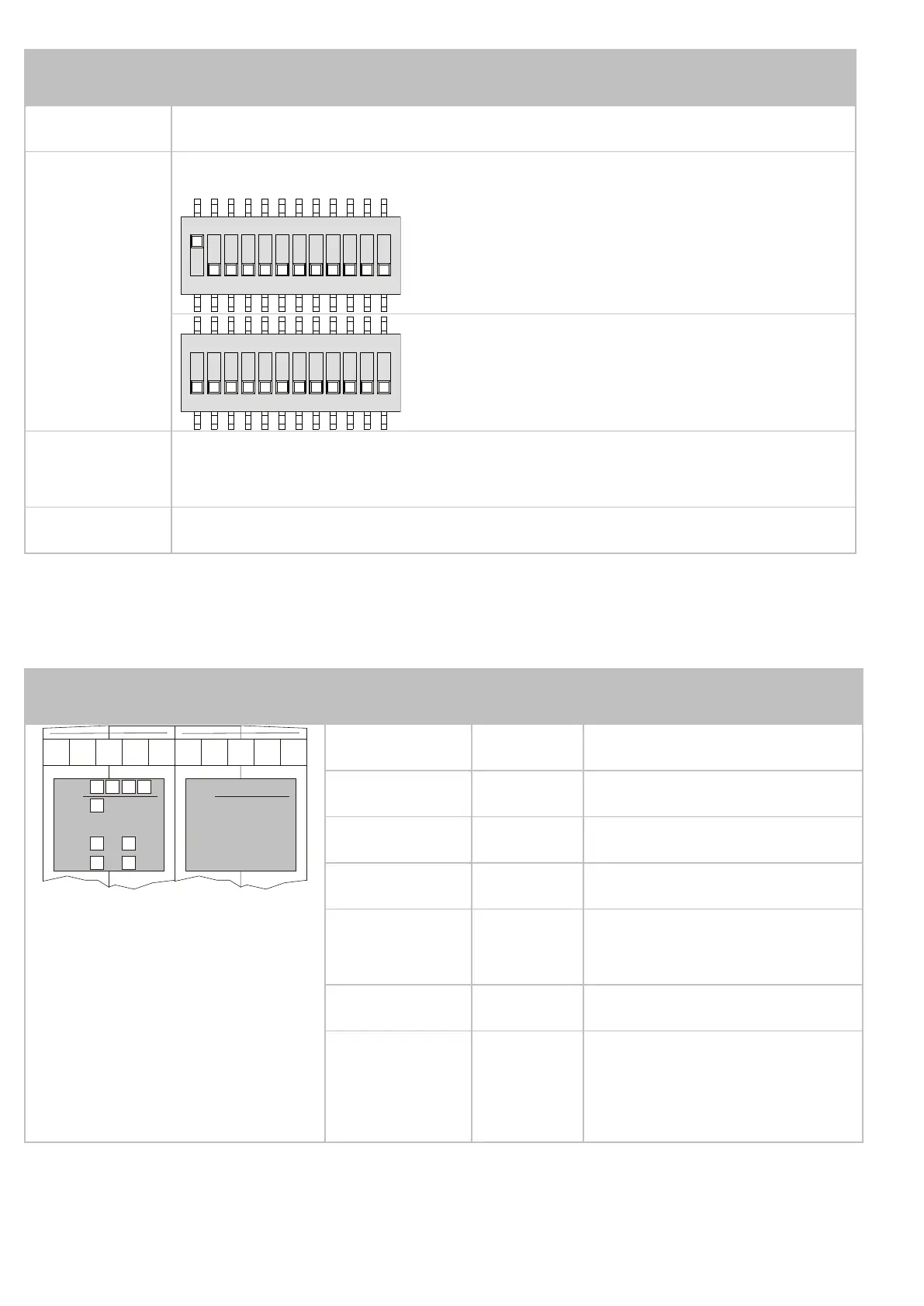
Set the IP address using the DIP switches (1).
ON
1 2 3 4 5 6 7 8 9 10 11 12
IP address: 192.168.1.1
Factory settings
ON
1 2 3 4 5 6 7 8 9 10 11 12
IP address: 192.168.10.15
Default IP address
6
Reattach the JX3 enclosure to the
JX3 backplane module.
7
Restore the power supply of the JX3 station.
For further information on setting the IP address, please refer
to the user manual of the device.
LEDs
R
SD
U1
U3 U4
U2
E D1 D2
JC-3xx
Jetter
LED
Color
Description
R Green
OS is running
E Red
Generic error
D1 Red
Special conditions
D2 Red
Boot loader is
running
SD Amber
Access to SD card
U1 ... U4 Amber
Programmable
depending on the
application

Related product manuals