EasyManua.ls Logo

Jinghao JH-W5 - User Manual

Default Icon
18 pages
Print Icon
To Next Page IconTo Next Page
Loading...
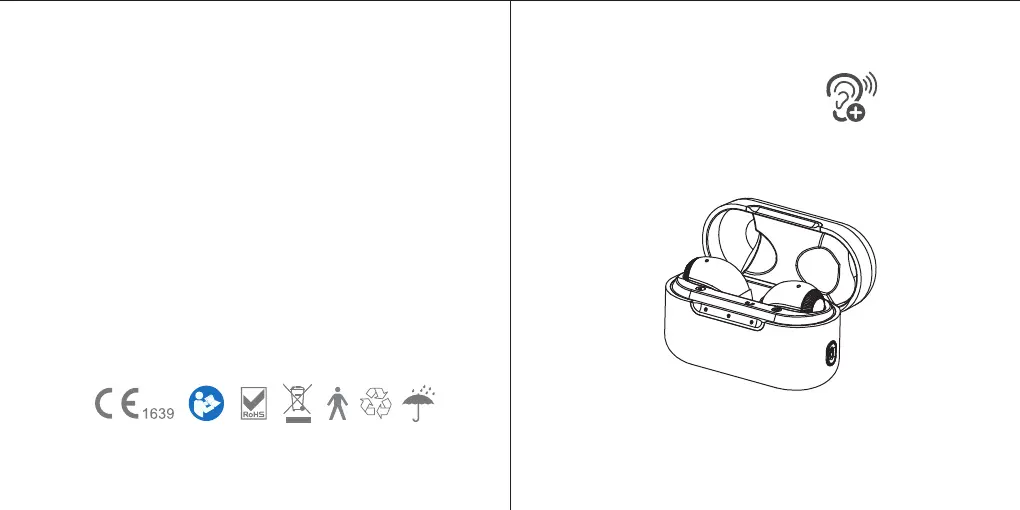
Instruction Manual Model: JH-W5
Please read this user manual thoroughly and
completely before using the product.
HEARING AID
VER: W5(A620)-20211213-V01
Life cycle of product is three years

Questions and Answers

  • M
    Melissa WoodAug 9, 2025
    Why are the Jinghao Hearing Aid indicator lights dim?
    • R
      rclarkAug 9, 2025
      If the indicator lights on your Jinghao Hearing Aid are dark or dim, it could be due to a low battery. Try connecting the USB cable to charge it. Also, the charging contacts might be dirty, so clean both the hearing aid and the charger contacts.
  • B
    Benjamin JacksonAug 14, 2025
    What to do if my Jinghao Hearing Aid plays a notification sound?
    • S
      Stephanie AdamsAug 14, 2025
      If your Jinghao Hearing Aid is playing a notification sound, it likely indicates a low battery. Charge the hearing aid.
  • D
    derekwigginsAug 25, 2025
    Why are my Jinghao Hearing Aids whistling in the charger?
    • R
      Ryan FernandezAug 25, 2025
      If your Jinghao Hearing Aids are whistling in the charger, it could be due to: * A depleted charger battery. Ensure the USB cable is connected to the charging case and plugged into power. The case power status lights will show a solid orange to indicate charging. * Incorrect orientation. Reposition your hearing aids in their slots, ensuring the contact points are touching the charge points in the case.
  • H
    Hunter LeAug 29, 2025
    What to do if Jinghao JH-W5 Hearing Aid has distorted sound?
    • J
      Justin BowenAug 29, 2025
      To address inconsistent performance or distorted sound with your Jinghao Hearing Aids, place the aids in the charger until charging begins, then remove them. This will power cycle your hearing aids.
  • P
    Paul CrawfordSep 10, 2025
    What to do if the indicator light of my Jinghao Hearing Aid does not light up when placed in charging inserts?
    • J
      joanna10Sep 12, 2025
      If the indicator light of your Jinghao Hearing Aid doesn't light up when placed in the charging inserts, it could be due to: * Poor contact between the hearing aid and the charging case. Try reinserting the hearing aid. * The hearing aid being reversed. Check its orientation. * Incorrect insertion into the charger. Ensure correct placement. * The charger not being connected to a power source. Connect it to an external power supply. * A fully discharged battery. Wait three hours after placing the hearing aid in the charger, regardless of the LED behavior.
  • R
    Rebecca BurtonNov 3, 2025
    Why is there no sound coming from my Jinghao JH-W5 Hearing Aid?
    • M
      Michael MorrisonNov 3, 2025
      If your Jinghao Hearing Aid isn't producing any sound, there could be several reasons: * The device may not be charged, so place it in the charger until the indicator lights up green. * The volume might be too low; increase it if a volume control is available. * The microphones could be clogged; clean any debris from the mic holes. * Ear domes or speaker tips might be blocked; clean them with a cleaning brush. * The battery may be fully discharged; connect the hearing aid to the charging case. * The battery could be low; place the aids into the charging case for at least 1.5 hours. * The ear domes may be too loose, or the hearing aid might not be correctly inserted; ensure correct placement. * The in-ear detection sensor may have failed, or the device might be worn incorre...

Summary

I. IMPORTANT SAFETY INSTRUCTIONS

1. Contraindications

Conditions preventing device use, such as ear discharge or age.

2. Warnings

Keep away from children, avoid damage from drops, liquids, heat, and magnets.

3. Notice

Avoid high volume and prolonged use; consult doctor for discomfort.

II. DO NOT USE IF ANY OF THE FOLLOWING APPLY TO YOU

Specific Contraindications

Lists specific ear conditions, recent hearing loss, infections, allergies, or unsuitable symptoms.

III. MATTERS NEEDING ATTENTION, WARNINGS AND TIPS

1. Liquid Immersion and Drying

Do not immerse in liquid; dry ear canal after washing before use.

2. Storage Conditions

Store in a desiccant case, protected from light, heat, and humidity.

3. Cleaning Ear Domes and Surfaces

Keep surfaces clean and earwax from ear domes removed daily.

4. Applicable Objects

Suitable for air-conducting hearing loss of 30-50dB.

5. Regular Charging

Charge regularly to avoid battery damage; recommended interval is ≤28 days.

IV. HOW TO USE YOUR DEVICE

1. How to Apply Domes

Steps for choosing and securely mounting ear domes to the hearing aid.

2. Left & Right Hearing Aid Markings

Identifies left and right hearing aids via 'L' or 'R' markings.

3. Wearing and Removing the Hearing Aid

Instructions for wearing and removing the hearing aid, noting auto-on/standby.

4. Turn On;Turn Off

Procedures for powering the hearing aid on and off, including automatic functions.

5. Volume Adjustment

How to increase or decrease the volume using the control.

6. HEARING AID CHARGING

7. HOW TO USE THE CHARGING CASE

Charging Case Indicators and Operation

Explains indicator lights, auto-off, and button functions for the charging case.

V. MAINTENANCE AND CLEANING

1. Daily Maintenance

Routine cleaning of devices with a soft cloth or tissue.

2. Care and Maintenance

Storing away from children/pets, avoiding heat, humidity, and sharp objects.

3. Cleaning Ear Tips and Tool

How to clean ear tips and the cleaning tool.

VI. HEARING AIDS CARE

Hearing Aid Care

Avoid extreme temperatures, moisture, foreign substances; use cleaning brush/cloth.

Charging Case Care

Keep charger clean, ports clear, lid closed, and store in a dry location.

Battery Life and Service

Charge nightly for battery life; contact professionals for repairs, do not self-repair.

VII. TROUBLESHOOTING GUIDE

No Sound Issues

Solutions for no sound, including wearing, volume, charging, and clogged components.

Low;Weak;Unclear Voice Issues

Solutions for low volume, loose domes, or earwax buildup.

Indicator Light and Charging Issues

Diagnosing problems with indicator lights and charging not starting.

VIII. TIPS FOR BETTER COMMUNICATION

For You

Tips for the user to improve communication, like moving closer and minimizing distractions.

For Your Family and Friends

Requests for family/friends to help improve communication for the user.

IX. TECHNICAL SPECIFICATION

Hearing Aid Specifications

Technical details like OSPL90, Gain, Frequency Range, and Working Current.

Charging Case Specifications

Technical details for the charging case, including input/output voltage and current.

X. ACCESSORIES LIST

Included Accessories

Lists items included in the package, such as hearing aids, domes, and cables.

Optional Accessories

Lists items available for separate purchase, like adapters.

XI. NORMALIZED SYMBOLS

Standard Symbols Explained

Explains symbols like CE, WEEE, SN, and warning icons.

Test Conditions and Certifications

Details on IP53 rating, test conditions for dust and water resistance.

XII. MAINTENANCE, STORAGE, AND DISPOSAL

Maintenance and Repair Policy

Instructions on authorized maintenance, repair, and warranty implications.

Storage Guidelines

Recommendations for storing devices to prevent damage from temperature, humidity, or shock.

Disposal Instructions

Guidance on disposing of the device according to WEEE directive.

XIII. WARRANTY

Limited Warranty Coverage

Details on the one-year warranty for material and workmanship defects.

Exclusions and Claims

What is not covered by warranty (damage, unauthorized service) and claim submission.

Jinghao JH-W5 Specifications

General IconGeneral
BrandJinghao
ModelJH-W5
CategoryHearing Aid
LanguageEnglish

Related product manuals