VOICE PROMPTS
“HELLO” = Power is ON.
“READY TO PAIR” = JLab Play headphones are ready to connect to your Bluetooth device.
“YOU’RE CONNECTED” = JLab Play headphones are connected to your Bluetooth device and ready for use.
“GOODBYE” = Power turning OFF.
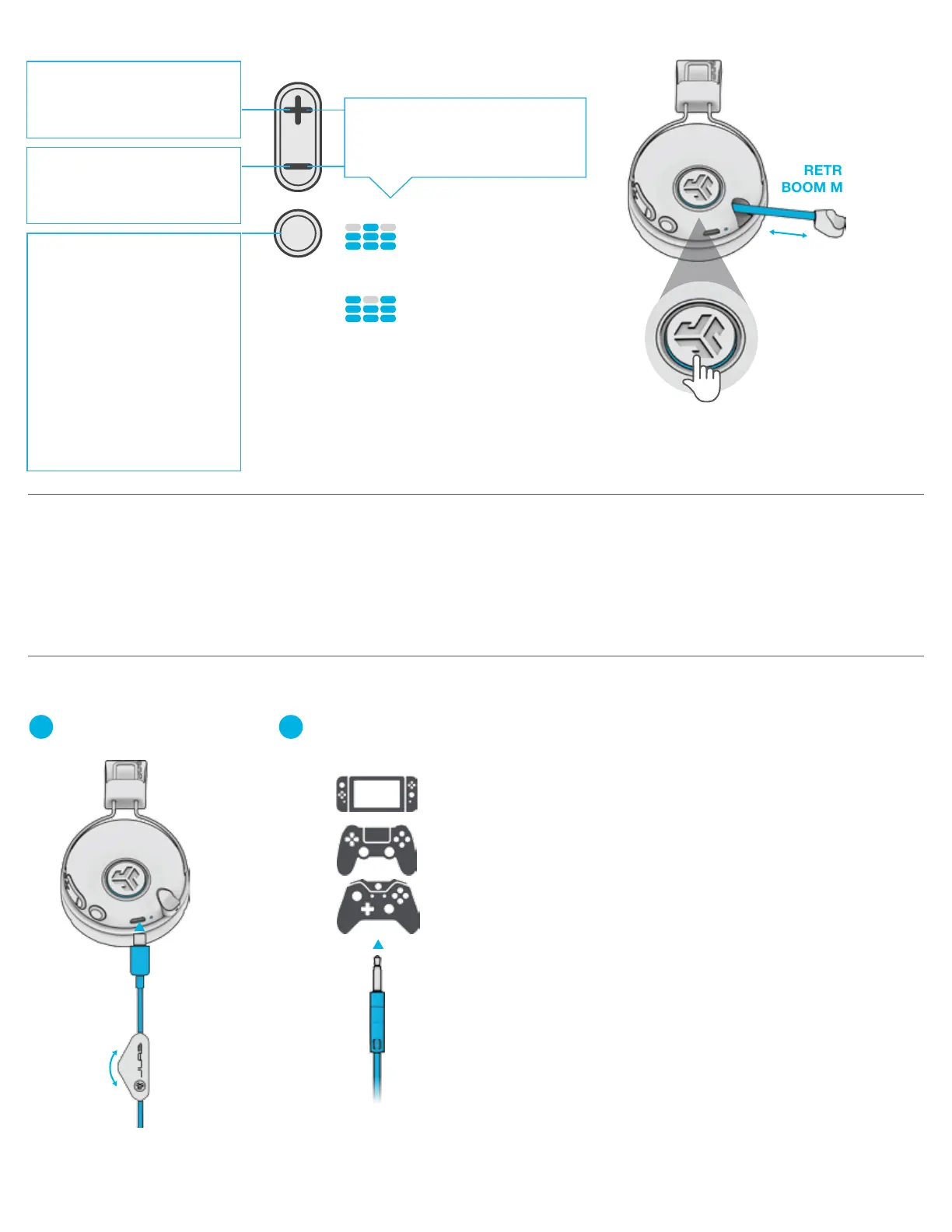
Plug in the Micro USB into
the Micro USB input.
1
Plug in the AUX input
your controller or device.
2
CONSOLE
+
MOBILE GAMING
HEADPHONE
VOLUME WHEEL
(Adjust your console/
device volume accordingly)
NOTES:
• When using the AUX INPUT, the microphone and game
volume will also be determined by your console settings.
Adjust accordingly.
• The boom microphone and mute function works in both
Bluetooth and AUX INPUT modes.
• The button functions on the headphone ear cup will only
work in Bluetooth mode.
BUTTON FUNCTIONS
POWER ON / OFF:
Press & hold 2+ seconds.
PLAY / PAUSE / ANSWER /
HANG UP CALLS: Press once.
REJECT INCOMING CALL:
Press & hold 1 second.
ACTIVATE SIRI (iOS) OR
“OK GOOGLE” (ANDROID):
Press twice.
BLUETOOTH PAIRING:
See Bluetooth Pairing.
VOLUME UP: Press once.
TRACK FORWARD:
Press & hold 2+ seconds.
VOLUME DOWN: Press once.
TRACK BACKWARD:
Press & hold 2+ seconds.
GAMING
(One Beep)
Increased mid-high frequency response
for clear vocals and spacial awareness
MUSIC
(Two Beeps)
Amplified vocals and bass
for enhanced music listening
SWITCH GAMING / MUSIC EQ:
Press and hold 1+ second both
buttons simultaneously
MICROPHONE ON:
Press OUT (blue ring)
MICROPHONE
OFF (MUTE):
Press IN (no blue ring)
RETRACTABLE
BOOM MICROPHONE


 To Next Page