Shop products | Product alerts | Burn-in your headphones
JLab Audio + Burn-in Tool
IN USE
• The Talk PRO works with almost any recording software installed on macOS, Windows, or Linux.
Review in your software’s setting and adjust accordingly.
• No additional drivers/software are needed for the Talk PRO. Simply plug in and setup in device settings.
• Talk PRO will not work through a power bank/battery pack. It will only work with USB-A input with an operating system.
JLABAUDIO.COM
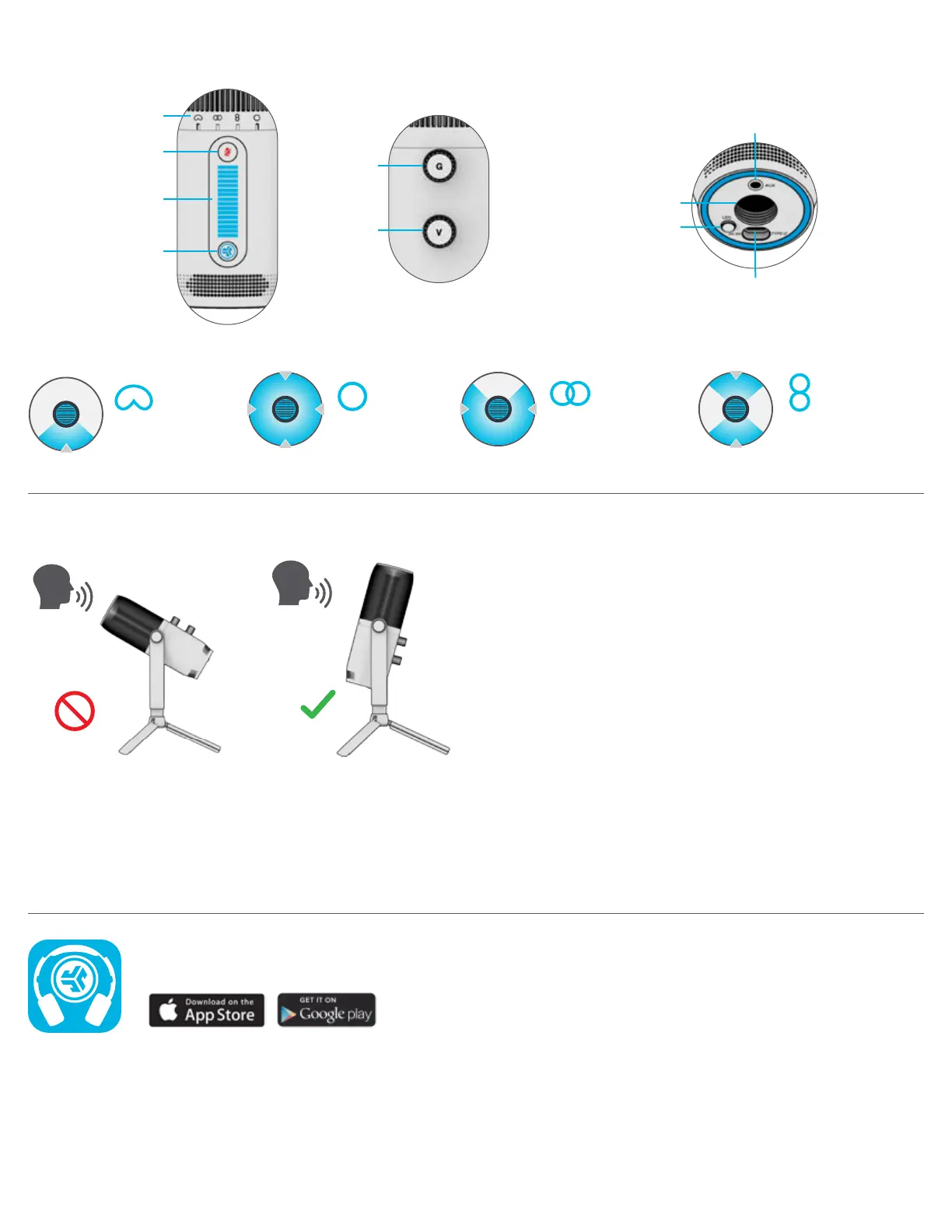
CONTROLS
CARDIOID
Record front
OMNI
Record all
surroundings
STEREO
Record left &
right channel
BIDIRECTIONAL
Record front &
back channel
RECORDING
SETTING
BACK BOTTOM
FRONT
MUTE ON / OFF
VOLUME / GAIN
INTERFACE
TOGGLE
RECORDING
GAIN
CONTROL
VOLUME
CONTROL
3.5MM AUX
OUTPUT
USB-C INPUT
5/8”
MOUNT
LED
CONTROL
Correct
position
Incorrect
position


 To Previous Page