ATTENTION
Risque de dommages matériels:
Ne mettez pas l’appareil sous tension avant d’avoir
vérifié toutes les connexions du câblage. Le câblage
inadéquat de cette borne peut causer un court-
circuit sur l’alimentation électrique de 24 V c. Un
court-circuit peut causer le déclenchement du
disjoncteur ou le grillage d’un fusible. Si vous utilisez
un transformateur avec un fusible intégré, vous
pourriez devoir remplacer le transformateur.
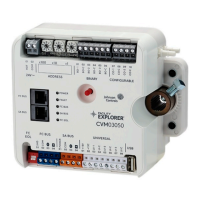
To wire the CVM03050 controller, complete the following
steps:
1. Terminate wiring according to the appropriate figure
in Termination diagrams.
2. Wire network sensors and other devices to the SA
Bus.
3. Ensure that the CVM03050 is assigned a device
address. Set the device address using the rotary
switches at the top of the controller. See Setting the
device address.
4. Connect the CVM controller to 24 VAC, Class 2 power.
Note: If you are using the CVM03050 controller with
the Wireless Field Bus System, refer to the WNC1800/
FX-ZFR182x Pro Series Wireless Field Bus System Bulletin
(LIT-12012378) or the FX-ZFR Series Wireless Field Bus
System Bulletin (LIT-12011660).
Terminal wiring guidelines, functions,
ratings, and requirements
This section provides further guidelines on input and
output wiring, maximum cable length versus load current,
and SA Bus and supply power wiring.
Input and Output wiring guidelines
Table 5 provides information and guidelines about the
functions, ratings, and requirements for the controller
input and output terminals, and Table 5 also references
guidelines for determining proper wire sizes and cable
lengths.
In addition to the wiring guidelines in Table 5, observe the
following guidelines when wiring CVM inputs and outputs:
• Run all low-voltage wiring and cables separate from
high-voltage wiring.
• All input and output cables, regardless of wire size or
number of wires, must consist of twisted, insulated, and
stranded copper wires.
• Shielded cable is not required for input or output cables
but is recommended for input and output cables that
are exposed to high electromagnetic or radio frequency
noise.
• Cable runs of less than 30 m (100 ft) often do not
require an offset in the input/output software setup.
• Cable runs over 30 m (100 ft) often require an offset in
the input/output software setup.
I/O terminal blocks, ratings and requirements
Table 5: I/O terminal blocks, functions, ratings, requirements, and cables
Terminal Block label Terminal labels Function, ratings, and requirements
To determine wire size and
maximum cable length
+15 V
15 VDC Power Source for active (3-wire) input
devices connected to the Universal UI-n terminals.
Provides 35 mA total current.
Same as (Universal) UI-n.
Note: Use 3-wire cable for
devices that source power
from the +15 V terminal.
Analog Input - Voltage Mode (0–10 VDC)
10 VDC maximum input voltage
Internal 75k ohm Pulldown
See Guideline A in Table 6.
Analog Input - Resistive Mode (0–600k ohm)
Internal 12 V, 15k ohm pull up
Qualified Sensors: 0–2k potentiometer
RTD (1k Nickel [Johnson Controls sensor]
1k Platinum, and A99B Silicon Temperature Sensor)
Negative Temperature Coefficient (NTC) Sensor
10K Type L (10K Johnson Controls Type II is
equivalent to Type L) or 2.252K Type II
See Guideline A in Table 6.UI-n
Binary Input - Dry Contact Maintained Mode
1 second minimum pulse width
Internal 12 V, 15k ohm pull up
See Guideline A in Table 6.
UNIVERSAL
(Inputs)
UI-C
Universal Input Common for all Universal IN
terminals
Note: All Universal UI-C terminals are
isolated from all other commons.
Same as (Universal) UI-n.
F4-CV Series VAV Terminal Equipment Controllers Installation Guide 7



 To Next Page
 Loading...