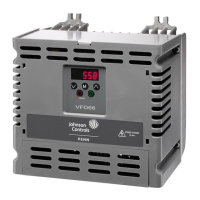
YORK, A Johnson Controls Company
The motor data on the ratings plate may differ from the defaults in the AYK550. The
drive provides more precise control and better thermal protection if you enter the
rating plate data.
1. Gather the following from the motor ratings plate:
•Voltage
• Nominal motor current
• Nominal frequency
• Nominal speed
• Nominal power
2. Edit parameters 9905…9909 to the correct values.
• Assistant Control Panel: The Start-up Assistant walks you through this data entry
(see page 22).
• Basic Control Panel: Refer to "Parameters Mode" on page 24, for parameter
editing instructions.
8
2,8 Selecting the appropriate macro should be part of the original system design,
since the control wiring installed depends on the macro used.
1. Review the macro descriptions in "Application Macros" on page 30. Use the macro
that best fits system needs.
2. Edit parameter 9902 to select the appropriate macro. Use either of the following:
• Use the Start-up Assistant, which displays the macro selection immediately after
motor parameter setup.
• Refer to "Parameters Mode" on page 21, for parameter editing instructions.
#(=/*
The system can benefit from one or more of the AYK550 special features, and/or fine
tuning.
1. Review the parameter descriptions in "Parameter Descriptions" starting on page 48.
Enable options and fine tune parameter values as appropriate for the system.
2. Edit parameters as appropriate.
)&*&>*
The AYK550 can detect a wide variety of potential system problems. For example,
initial system operation may generate faults or alarms that indicate set-up problems.
1. Faults and alarms are reported on the control panel with a number. Note the number
reported.
2. Review the description provided for the reported fault/alarm:



 To Next Page
 Loading...