14
Appliance parts
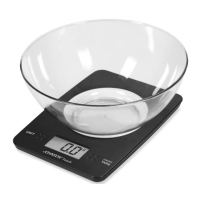
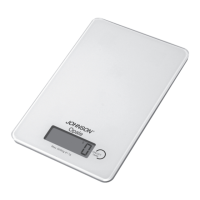
A Weighing surface
B. Appliance body
C. Display
D. ON (switching on, switching off key,
tare function).
E. Batteries compartment
F. Batteries compartment cover
G. Removable bowl
Starting the appliance
Remove the cover F of the battery com-
partment E.
Insert the 2 batteries (AAA) making sure
to follow the correct polarities,
Close the cover of the batteries com-
partment
E with the cover F.
Using the scales function
Place the appliance on a flat and stable
surface.
Press de “ON” (D) key to turn on the scales.
For some seconds appears “88888” and
then “0 g”. Now place the items to weigh
(max. 3 kg) on the weighing surface A.
The weight in grams appears on the di-
splay.
Remove the items that are weighted
and turn off the scales pressing the key
ON (D).
Tare
To obtain the net weight when using a
bowl (G), first activate the scale function
and place the empty bowl on weighing
surface A
Press the ON key.
88888 appears briefly on the display and
then zero.
Place the item to weight in the bowl, its
net weight will appear on the display.
If you want to place other ingredients in
the bowl, and know the relative weight,
press the ON key to reset before each
addition.
Warning
also with the tare function the scale will
weigh the additional items until the maxi-
mum total of 3 kg.
Indications on the display
EEEE = overload, the weight exceeds the
maximum capacity.
Battery symbol = the battery needs to be
replaced (located in compartment E on the
back of the appliance).
Warning
don’t clear the used batteries into the
environment, but the batteries will be put
into a separate container on the refuse
collection .
Cleaning
Clean the appliance body B with a soft
moist cloth; do not use detergents or
abrasives.
Do not immerse the appliance in water or
other liquids. Do not put the appliance in
a dishwasher.
Do not use metal scouring pads or abra-
sive detergents to clean the appliance as
they could damage it.
Safety requirements
This device is only for domestic use and
must be used only for the function was
expressly designed: the weigh food.
Weigh is not valid for the commerce
Manuale Luna.indd 14 04/04/19 16:48


 To Next Page
 Loading...