EasyManua.ls Logo

Jolly logic AltimeterOne - User Manual

Jolly logic AltimeterOne
8 pages
Print Icon
To Next Page IconTo Next Page
Loading...
Contents copyright Jolly Logic, LLC.
No reproduction without written permission.
For consumer safety, environmental regulations compliance,
and more information please visit www.jollylogic.com.
Email us at support@jollylogic.com.
How to Use the
ALTIMETERONE
jolly logic

Other manuals for Jolly logic AltimeterOne

Question and Answer IconNeed help?

Do you have a question about the Jolly logic AltimeterOne and is the answer not in the manual?

Jolly logic AltimeterOne Specifications

General IconGeneral
BrandJolly logic
ModelAltimeterOne
CategoryMeasuring Instruments
LanguageEnglish

Summary

Getting Acquainted with Your Altimeter

Display Functionality

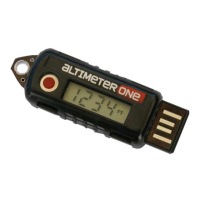
Shows up to four digits. Altitudes above 9,999 feet use a decimal point.

Push Button Operation

Quick press for ON/OFF. Long press to reset to "0" for the next flight.

How to Operate the Altimeter

Turning the Altimeter On

Press the button once to turn on and display the last measured altitude.

Turning the Altimeter Off

Press button once to turn off. Auto-off after 60 mins of inactivity.

Understanding Altitude Readings

Displays altitudes over 9,999 feet using a decimal point in thousands of feet.

Installation Tips for Optimal Performance

Recharging the Battery

Recharging Procedure

Insert into USB port; back glows red (charging) or green (100% complete).
Technical Overview of Altimeter One

Related product manuals