8
Product Summary
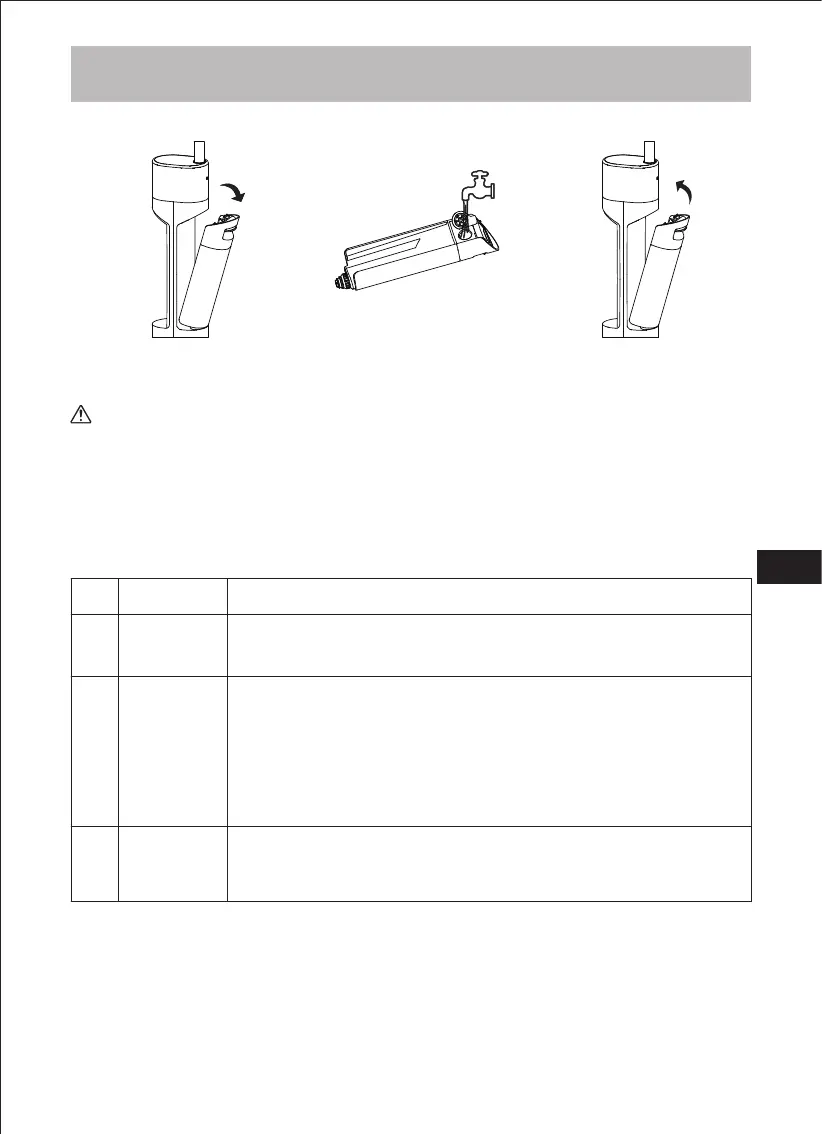
b) Filling the clean water tank
Open the silicone stopper
and fill with water
When the machine is turned on it automatically defaults to wet mopping mode. Default
Wet Mopping Mode on start-up; press the Mode button to cycle between Wet Mopping
Mode, Suction Mode.
After the product is fully charged, press the power button to turn it
on. Press this button again to turn off the machine.
▶ Standardmäßig Nasswischmodus beim Start; drücken Sie die
Modus-Taste, um in den Saugmodus zu wechseln. Drücken Sie die Default Wet Mopping Mode on start-up; press the Mode button to ▶
switch to Suction Mode, press the Mode button again to switch to
Turbo Mode. Cycle through them in sequence;
Wet mopping mode: the water pump discharges water to moisten ▶
the roller brush, enabling the floor to be wet mopped.
▶ Vacuum mode: The pump does not produce water, so you can
mop the floor dry, or suck up residual water on the floor.
Short press the voice switch button to switch the voice switch
function; the default voice broadcast function is turned on when
Booting, and tap the voice switch to turn off the voice function;
Remove the clean
water tank
Refit the clean water tank
on the machine body
B. Starting work
If you need to add floor cleaning solution, please use the product's special or designated
cleaning solution. Do not add other types of solution, so as to avoid damaging the product
or the floor.
Tips
EN


 To Next Page