Secure the seat in place
by switching to the lock
position. Only for use while
automatic swing mechanism
is deactivated.
Lock Switch
Protect and store
remote control in
convenient pocket
located under seat.
Remote
Storage
Operating Instructions
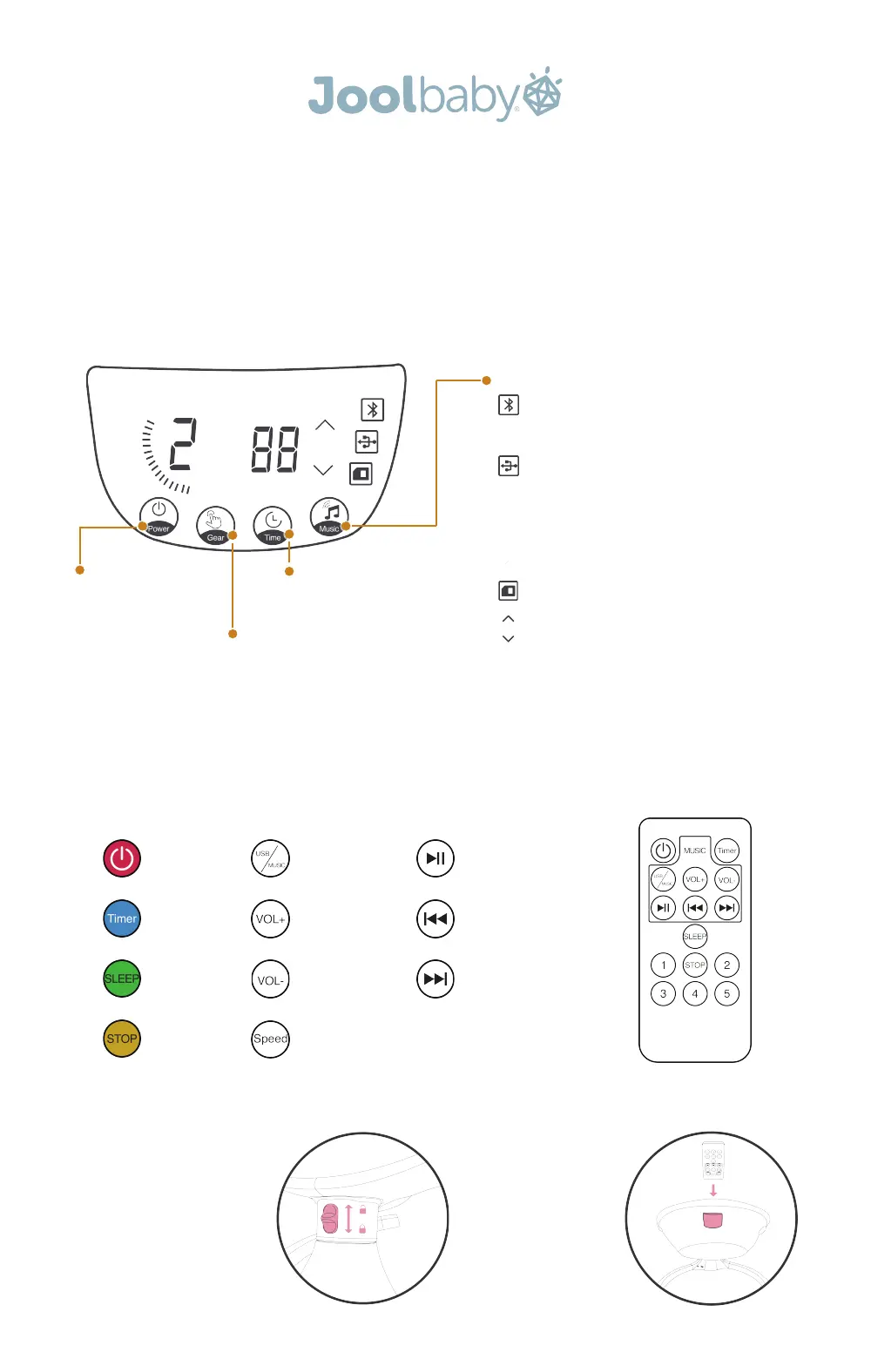
Control Panel
Remote Panel
Power
Press to power on. Press
again to power off.
Gear
Press to increase speed up to
5 levels of motion
Time
Set the Nova to turn off after 8,
15, or 30 minutes.
Music
Bluetooth: After switching the Nova on, select “Jool
Nova” on your Bluetooth enabled device and the
Nova will announce that you're connected.
USB: The USB port is located behind the main
console. Connect a flash drive or MP3 player to the
port and select between preset and USB options by
pressing the Music button.
To enable bluetooth playback while in USB or preset
mode, simply press play on your bluetooth device.
Preset: The Nova includes ten preset soft lullabies.
Volume: When music playback is enabled, volume
buttons appear above the Music button.
Power
Timer
Sleep Mode
Stop
Preset/USB
Volume Up
Volume Down
5 Speed Modes
Play/Pause
Previous Song
Next Song



 To Previous Page
 Loading...