To charge, connect the wall charger to the Magic Power’s
DC port. When charging, the charge symbol () will appear
on the display and the charge percentage will slowly rise. The
battery takes about two hours to reach full charge from 1%. The
Magic Power can also be charged via a Micro USB cable. This
charging method can take several hours, however.
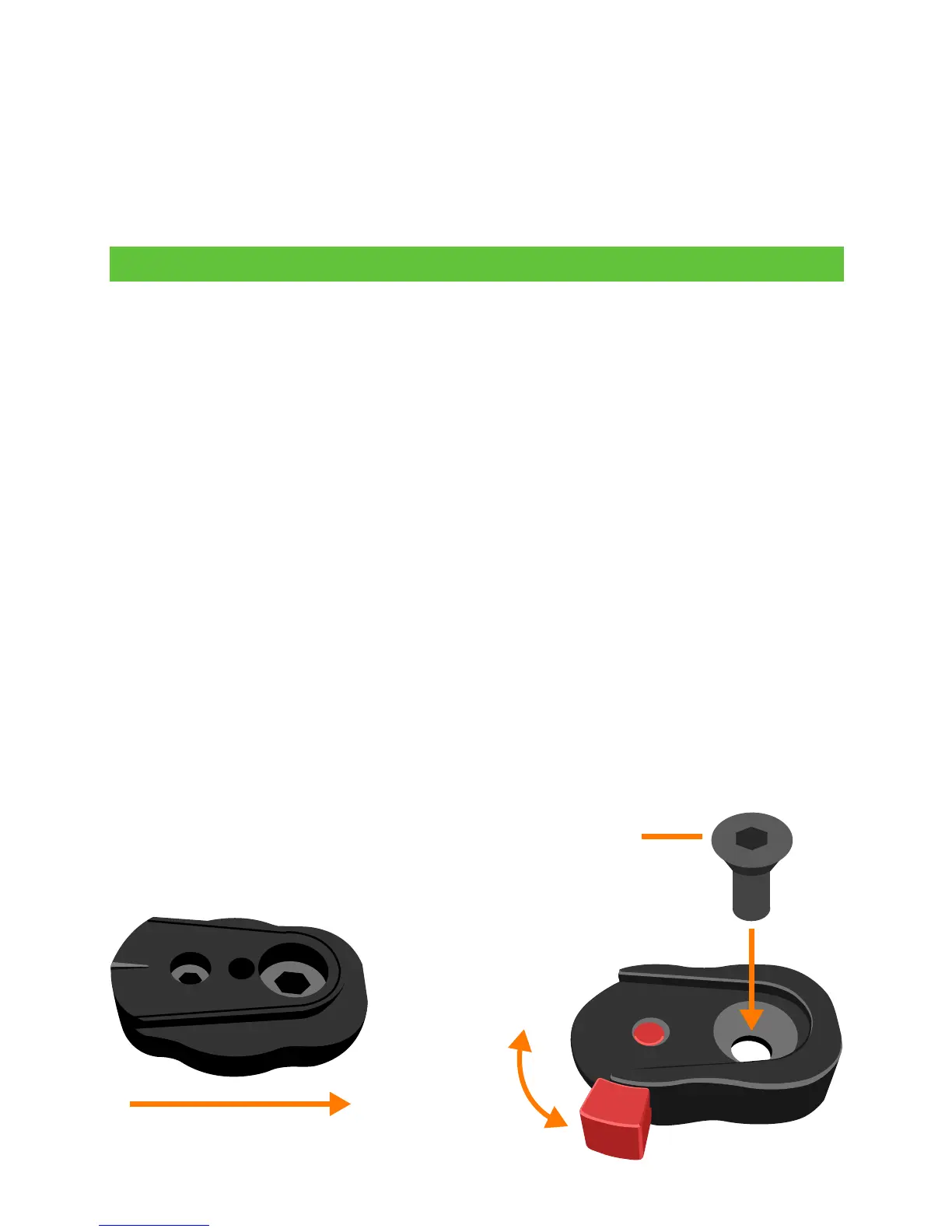
The included quick release mount can be attached to the
camera or any accessory with a standard 1/4-20 insert, present
on virtually all camera cages and most other camera mounting
accessories. For frequent relocation of the Magic Power, we
recommend the use of an adjustable camera clamp, which
can be easily attached to rail rods, tripods, monopods, etc.
To attach the Magic Power to the quick release mount, simply
slide the Magic Power’s quick release plate, located on the
back of the battery, onto the quick release mount and secure
it by locking the red tab in the upward position. To release, slide
the red tab downward.
Setup
Slide downward into mount
Lock
Unlock
Fasten to camera,
cage or other accessory
Thanks for purchasing a Juicebox! To ensure best results, please
read the following instructions before use.
We’d love to hear from you! Send us your feedback or support
questions to support@juicebox.direct. Also, please take the time
to review us online. Thank you for your support!



 To Next Page
 Loading...