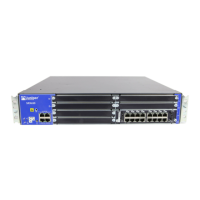
The 8-Port Gigabit Ethernet small form-factor pluggable XPIM (SFP XPIM) has the following key features:
•
8 triple-speed (10/100/1000 Mbps) Ethernet ports, single-high card
•
PoE not supported
•
PCI-Express interface for control and management
•
I2C interface for module monitor and identification
•
Maximum module power of 40 W without PoE
•
JTAG support for boundary scan test
CAUTION: If you face a problem running a Juniper Networks device that uses a
third-party optic or cable, the Juniper Networks Technical Assistance Center (JTAC)
can help you diagnose the source of the problem. Your JTAC engineer might recommend
that you check the third-party optic or cable and potentially replace it with an equivalent
Juniper Networks optic or cable that is qualified for the device.
8-Port Gigabit Ethernet SFP XPIM Components
The 8-Port Gigabit Ethernet small form-factor pluggable Gigabit-Backplane Physical Interface Module
(SFP XPIM) contains the components listed in Table 37 on page 64.
Table 37: 8-Port Gigabit Ethernet SFP XPIM Components
DescriptionLocationComponent
Use the ONLINE/OFFLINE button to gracefully
shut down the XPIM. Press and hold the button for
4 to 5 seconds, and then release. The XPIM
gracefully shuts down and turns off the power
supply units (PSUs).
To power up the XPIM (if the Services and Routing
Engine [SRE] is off), press and hold the
ONLINE/OFFLINE button for 4 to 5 seconds.
Right side of the XPIMONLINE/OFFLINE button
Use the captive screws to hold the XPIM in place.One on each side of the
XPIM
Two captive screws
64


 To Next Page
 Loading...