EN69
A M
001 002 003
005
004
EXIT INDEX
006
P
L
A
Y
/
P
C
O
F
F
C
A
M
E
R
A
5
S
D
S
C
D
S
C
P
L
A
Y
Superimposing A Title/Frame
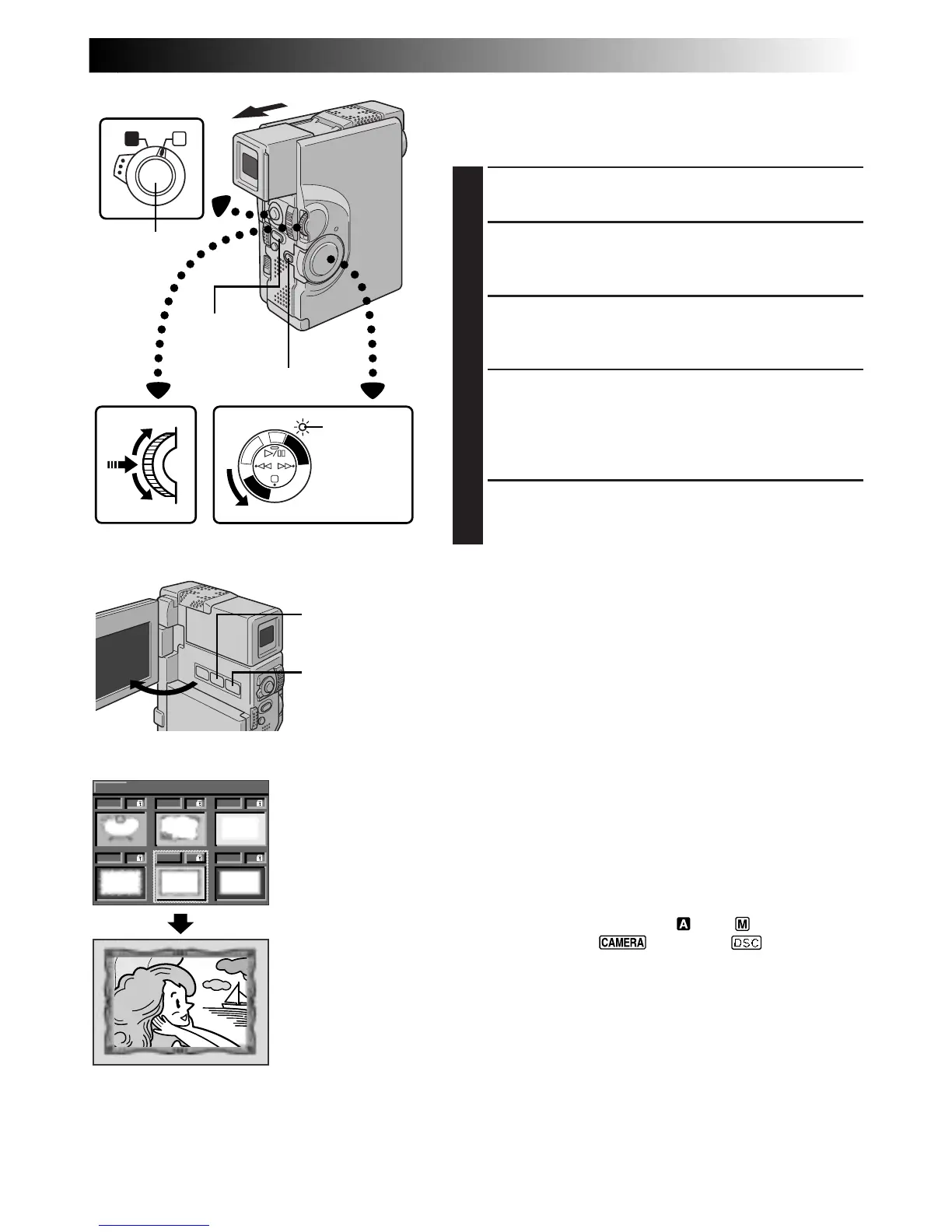
A title/frame can be superimposed over the playback
picture (image).
1
START PLAYBACK
Play back a tape or images in a MultiMediaCard.
2
SUPERIMPOSE TITLE/FRAME
Press TITLE (/Frame). A title/frame is superimposed
over the playback picture (image).
3
ACCESS TITLE/FRAME INDEX SCREEN
Press MULTI SCREEN. The Title/Frame Index Screen
appears.
4
SELECT DESIRED TITLE/FRAME
Rotate MENU/SET to move the green frame to the
desired title/frame and press it. The selected title/
frame is superimposed over the playback picture
(image).
5
MAKE TITLE/FRAME DISAPPEAR
Press TITLE (/Frame). The selected title/frame
disappears.
NOTES:
●
A title/frame created on a PC can be transferred to a
MultiMediaCard using the provided software.
Transferred titles/frames are displayed from title/frame
index number 013, and they can be used together with
the titles/frames in the camcorder’s memory. For details
on creating/transferring titles/frames, refer to the software
instructions.
●
If Snapshot recording/playback is performed with a title/
frame, the images will be recorded/played back in the
FULL mode regardless of the selected Snapshot mode.
●
Depending on the images you record or play back, the
title/frame outline may become grainy or vague.
●
During title/frame display, it is not possible to change the
Snapshot mode.
To Record An Image With A Title/Frame . . .
You can also record an image with a title/frame by
performing the following procedure.
1. Set the Operation Switch to “ ” or “ ”. Then, set the
Power Switch to “ ”, “5S” or “ ” while
pressing down the Lock Button.
2. Press TITLE (/Frame) to superimpose a title/frame on an
image.
3. Press MULTI SCREEN to display the Title/Frame Index
Screen.
4. Rotate MENU/SET to move the green frame to the
desired title/frame and press it. The selected title/frame
is superimposed over the image.
5. Press START/STOP or PHOTO (SNAPSHOT) to start
recording. The image is recorded with the selected title/
frame.
6. Press TITLE (/Frame) to make the title/frame disappear.
Display
Power Switch
Title/Frame Index
Screen
MENU/SET Dial
MULTI SCREEN
Button
START/STOP
Button
Operation Switch
PHOTO
(SNAPSHOT)
Button
Lock Button
Power lamp
TITLE (/Frame)
Button
NOTE:
During recording, it is not possible to change
the title/frame, as the Title/Frame Index Screen
does not appear if MULTI SCREEN is pressed.



 To Next Page