17
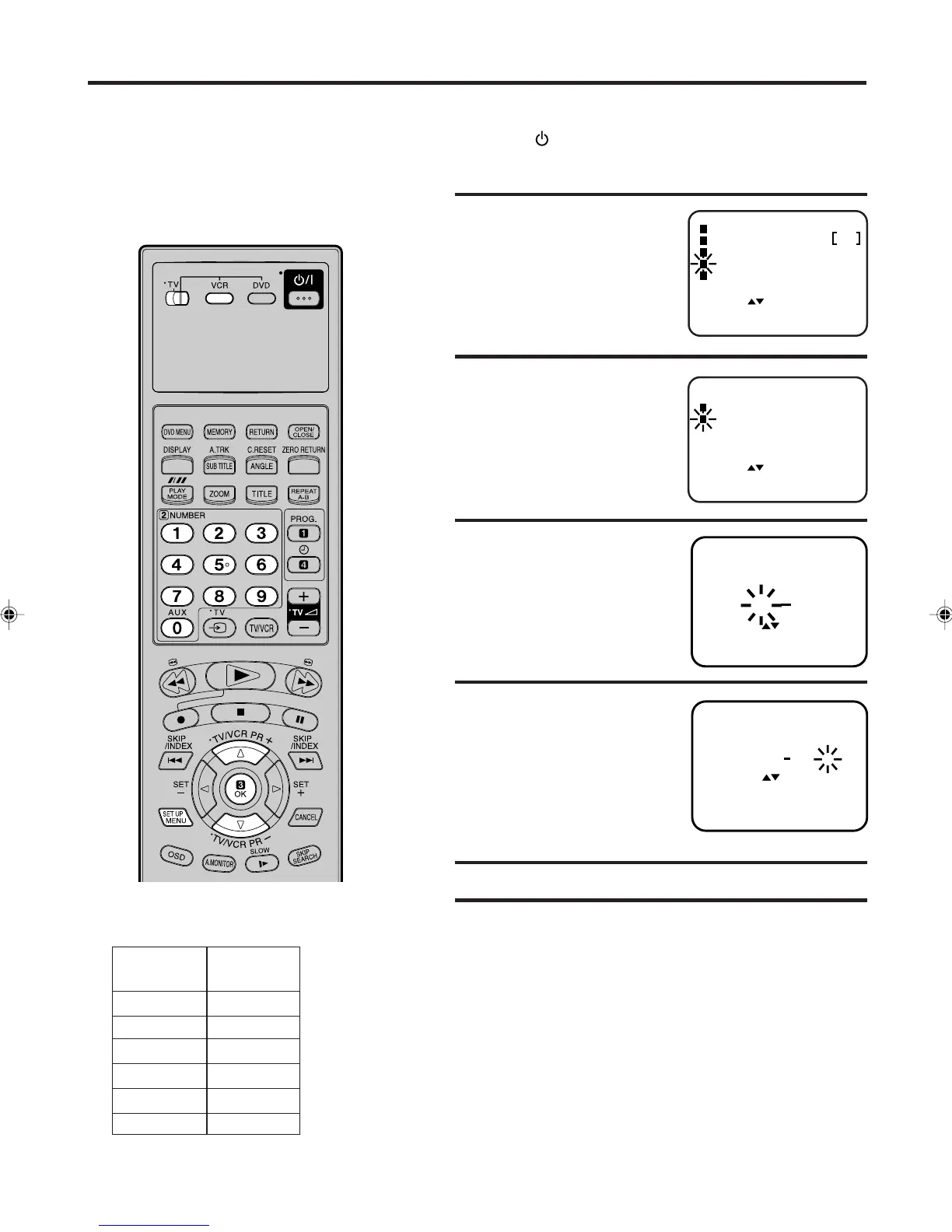
• Turn on the TV, and select the VCR channel on TV.
• Press the button to turn on the VCR.
Preparation
1
The TV stations must be stored according
to the tuning guide given on page 13,
otherwise the VIDEO Plus+ feature will not
work. If for any reason you did not select
channels BBC1, BBC2, ITV, CH4, CH5 and
Satellite in channel positions 1 through to 6
respectively, you must set each VIDEO Plus+
channel number (GUIDE CH) manually.
2
Press ▲ or ▼ to select
the
GUIDE CH SET.
Then press OK.
3
Enter "SAT" with ▲ or ▼ or
number keys.
Then press OK.
SET : / 0-9
GUIDE CH SET
GUIDE
6
VCR
CH CH
8
OK
EXIT
: OK
: MENU
SET : / 0-9
GUIDE CH SET
GUIDE
6
VCR
CH CH
6
CLEAR
OK
: CANCEL
: OK
EXIT : MENU
For other Codes, repeat steps 3 and 4.
5
6
Press SET UP MENU repeatedly until the TV picture
appears.
Enter "6" with
▲ or ▼ or
number keys.
Then press OK.
4
If you have connected
your satellite using the
scart socket, you must
select "AV" for the VCR
CH number.
TV
STATION
BBC1
BBC2
ITV
CH4
CH5
Satellite
1
2
3
4
5
6
GUIDE CH
GUIDE CHANNEL TABLE
Example: Satellite channel has been incorrectly stored on
channel 8 of your VCR.
Press SET UP MENU.
Press
▲ or ▼ to select
the CHANNEL SETUP.
Then press OK.
Setting the VIDEO Plus
+
®
Channel Number (Guide CH)
SELECT :
CHANNEL SETUP
ENTER
EXIT
: OK
: MENU
VCR SETUP
AUTO REPEAT OFF
SYSTEM SETUP
TIMER REC SET
SELECT :
CH TUNING
ENTER
EXIT
: OK
: MENU
GUIDE CH SET
CHANNEL SETUP
2A77501B E(12-17) 5/30/02, 9:21 PM17



 To Next Page
 Loading...








