Filename [XVS44U_08DVD.fm]
Masterpage:Left+
66
EN
Page 66 25 August 2003 11:01 am
OPERATIONS ON DVD DECK (cont.)
JPEG Playback
You can search and play back desired groups and files using the
JPEG control display.
NOTES:
●
PLAY
(
4
),
STOP
(
8
),
PAUSE
(
9
),
SKIP
(
2
) and
SKIP
(
6
)
buttons function the same as with Audio CD discs, however,
REW
(
3
) and
FF
(
5
) buttons do not function for JPEG
playback.
●
Resume playback, Program playback or Random playback also
does not function for JPEG playback.
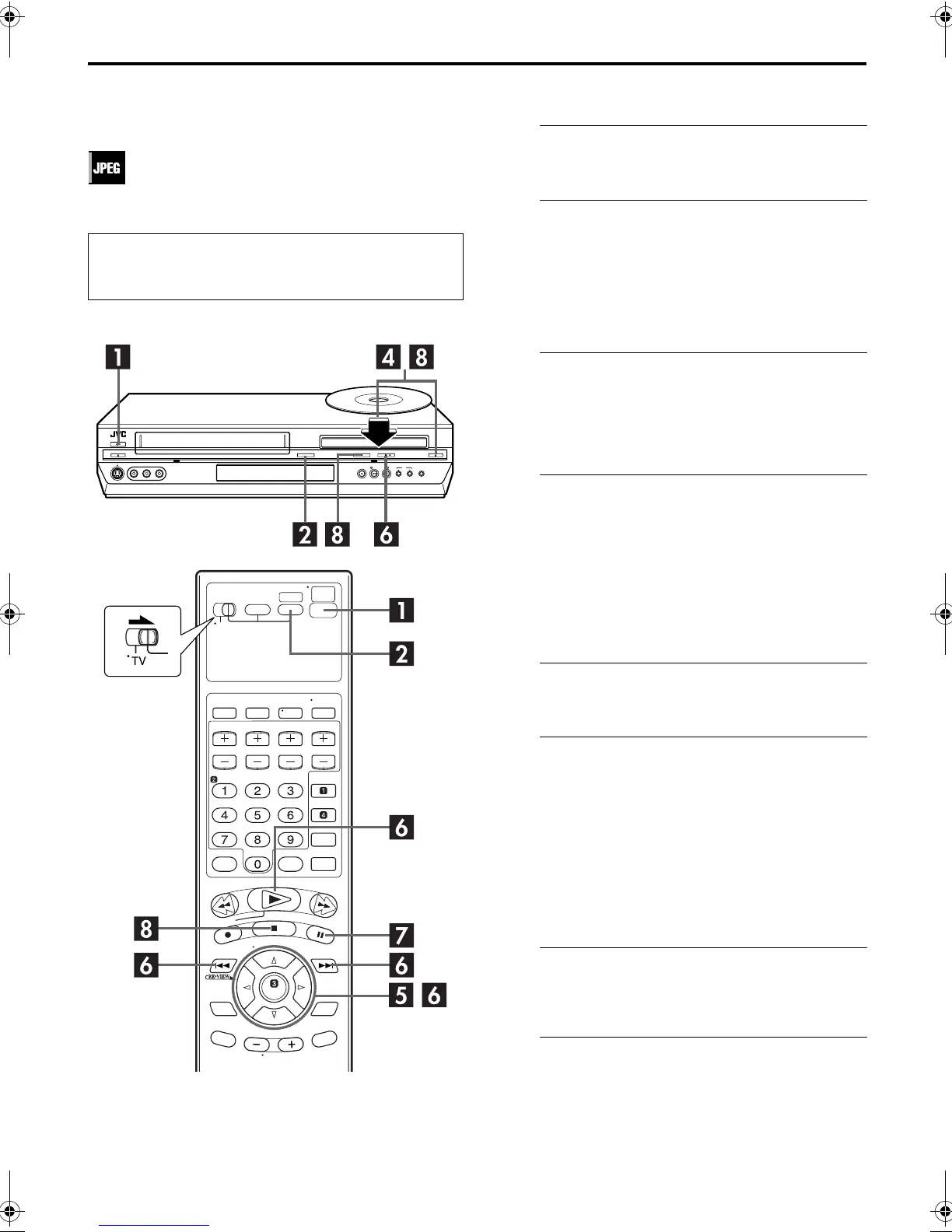
Using the JPEG control display
A
Turn on the unit.
Press
POWER
(
1
).
B
Select the DVD deck.
On the unit
Press
VCR/DVD
repeatedly so that the DVD indicator
lights up.
On the Remote
Press
DVD
so that the DVD indicator lights up.
C
Select the mode.
Be sure to set “MP3&WMA/JPEG” to “JPEG” before
loading a disc. (
墌
pg. 81)
●
You cannot access the DVD Set Up screen and “
X
” appears
on the TV screen if a disc is already placed.
D
Load the disc.
A
Press
OPEN/CLOSE
(
x
) on the DVD deck to open the
disc tray.
B
Place the JPEG disc in the disc tray.
●
For details, refer to “Placing a Disc” (
墌
pg. 9).
C
Press
OPEN/CLOSE
(
x
) on the DVD deck to close the
disc tray.
●
The JPEG control display appears on the TV screen when a
JPEG disc is loaded. (
墌
pg. 65)
E
Select the group.
Press
we
to select the desired group.
F
Start playback.
Press
rt
to select the desired file, then press
OK
or
PLAY
(
4
).
●
You can skip a file across a group. Press
SKIP
(
6
) to skip to
the first file of the next group when the last file of the current
group is selected.
The slide-show playback starts from the selected file.
●
After selecting a file, press
PLAY
(
4
) to starts slide-show
playback from the selected file, or press
OK
to show the
selected file.
G
Pause playback.
Press
PAUSE
(
9
).
●
To resume normal playback, press
PLAY
(
4
).
H
Stop playback.
Press
STOP
(
8
). Press
OPEN/CLOSE
(
x
) on the DVD
deck to open the disc tray, then remove the disc.
●
Turn on the TV and select the VCR channel (or AV
mode).
●
Slide the
TV/VCR/DVD
switch to the right.
XVS44U_01.book Page 66 Monday, August 25, 2003 11:08 AM



 To Next Page
 Loading...








