5
English |
Basics
Continued on the next page...
Basics
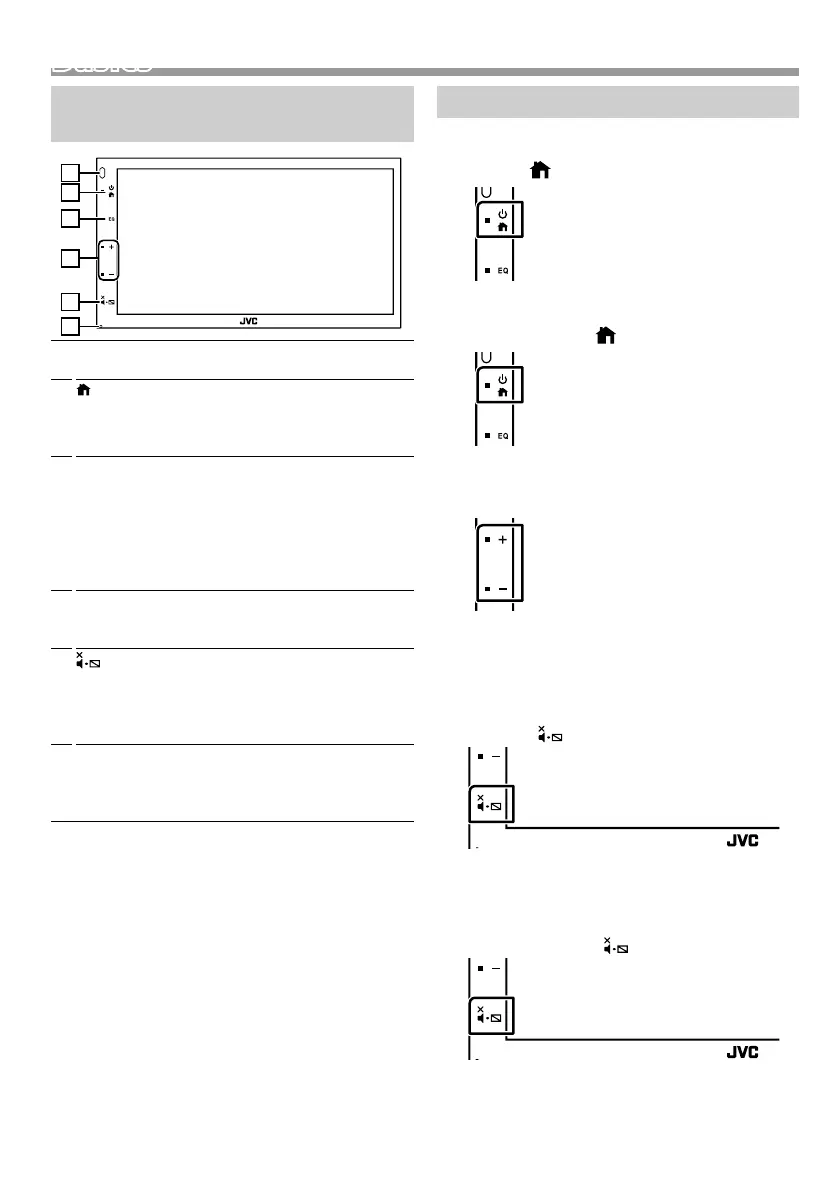
Functions of the Buttons on the Front
Panel
1
2
3
4
5
6
1
Remote Sensor
• Receives the remote control signal.
2
(HOME)
• Displays the HOME screen. (P.6)
• Pressing for 1 second turns the power off.
• When the power off, turns the power on.
3
EQ
• Displays the Equalizer screen.* (P.18)
* During video file playback, you can set only the
preset equalizer curve.
* The Equalizer screen is not displayed during
picture file playback or on the list screen or
SETUP screen etc,
4
+ , – (Volume)
• Adjusts volume. The volume will go up until 20
when you keep pressing [ + ].
5
(MUTE, Display off)
• Mutes/restores the sound.
• Pressing for 1 second turns the screen off.
When the screen is off, touch the display to turn
on the screen.
6
Reset
• If the unit or the connected unit fails to operate
properly, the unit returns to factory settings when
this button is pressed.
Common operations
Ñ Turning on the power
1 Press the < > button.
Ñ Turning off the power
1 Press and hold the < > button.
Ñ Adjusting the volume
1 Press the <+> or <–> button.
✎ NOTE
• The volume will go up until 20 when you keep
pressing [ + ].
Ñ Mutes the sound
1 Press the < > button.
To restore the sound, touch the button again, or
adjust the volume.
Ñ Turn off the screen
1 Press and hold the < > button.
To turn on the screen, touch the display.
!B5A-3197-00_KWM.indb 5 2019/06/11 16:42



 To Next Page
 Loading...








