6
Basics
Continued on the next page...
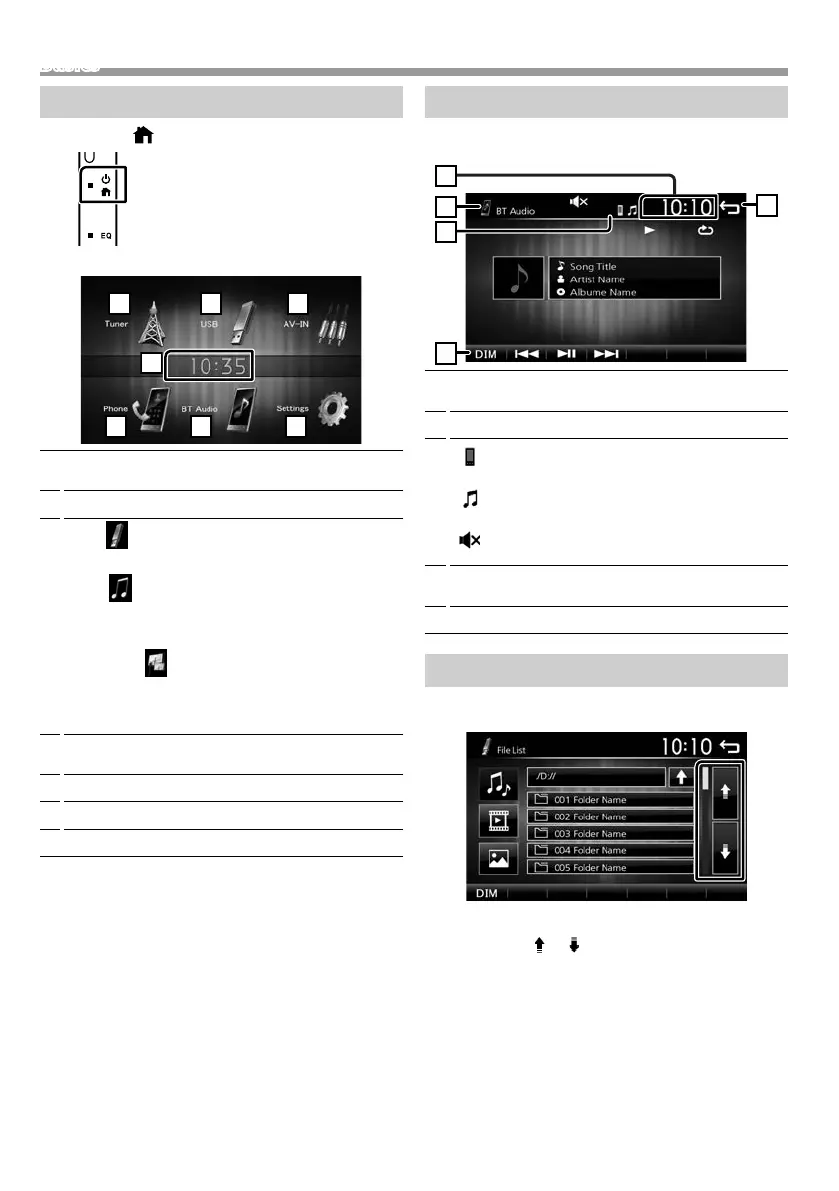
HOME screen descriptions
1 Press the < > button.
HOME screen appears.
1
Clock display
Touch to displays the Clock screen.
2
Switches to the radio broadcast. (P.12)
3
[USB]
Plays files on a USB device. (P.7)
[iPod]
Plays an iPod/iPhone. (P.9)
• When iPod/iPhone is connected.
[Mirroring]
Displays the Mirroring screen.(P.11)
• When android device with “Mirroring OA for JVC”
application installed is connected.
4
Switches to an external component connected to
the AV-IN input terminal. (P.14)
5
Displays the Hands Free screen. (P.16)
6
Plays a Bluetooth audio player. (P.17)
7
Displays the SETUP screen. (P.3)
Source control screen descriptions
You can perform source playback operations on the
source control screen.
1
Clock display
Touch to displays the Clock screen.
2
Source name
3
•
appears when the Bluetooth smartphone is
connected. *
•
appears when the Bluetooth audio player is
connected. *
•
appears when the mute function is active.
(P.5)
4
[DIM]
Select dimmer mode. Dim 1, Dim 2, Not dim
5
Returns to previous screen.
List screen
There are some common function keys in the list
screens of most sources.
1 You can change the page to display more items
by pressing [ ]/ [ ].
!B5A-3197-00_KWM.indb 6 2019/06/11 16:42



 To Next Page
 Loading...








