PK-EM1
3D SYNCHRO EMITTER
INSTRUCTIONS
PK-EM1
3D シンクロエミッター
LCT2662-001B
取扱説明書
© 2011 Victor Company of Japan, Limited
ÉMETTEUR DE SYNCHRO 3D
INSTRUCTIONS
PK-EM1
EMISOR SINCRO 3D
INSTRUCCIONES
PK-EM1
English Français Español
Name of Parts
Loosen
Fasten
3D SYNCHRO EMITTER
3D SYNCHRO EMITTER cable (3 m)
Connect it to the [3D Synchro] terminal of the
projector.
Stand (supplied)
Use this when there is a need to adjust the angle
for transmitting signals from the 3D SYNCHRO
EMITTER to the 3D GLASSES.
Platform
Fixing screw hole for stand (x 4)
Fixing screw for sync emitter unit
Installation
Install this product in the direction in which the 3D
GLASSES are to be used so that infrared signals
can reach the glasses directly.
Install this product at a location where there are
no obstructing objects in between it and the 3D
GLASSES.
By inclining the platform at an angle when
installing this product on the stand, you can
identify the bottom screws of the 3D SYNCHRO
EMITTER easily, thus helping you to install the
emitter more smoothly. In addition, you can also
insert your fingers easily, making it easier to turn
the set screws.
Caution:
When installing this product to a wall or ceiling,
make use of screws that suit the material and
strength of the wall or ceiling. Otherwise, it may
cause damage to the material of the wall or ceiling.
When using a screw, open a hole in the sponge at
the bottom of the stand in advance.
Request the authorized dealer or installation
service provider to install this product securely with
safety taken into thorough consideration.
JVC will not be liable for any accident or damage
due to causes such as improper installation,
insufficient mounting strength, misuse, or natural
disasters.
Connection
Turn off the power of the projector
Connect the 3D SYNCHRO EMITTER cable to
the [3D Synchro] terminal of the projector
Note:
For details on how to view 3D images, refer to the
“Instruction Manual” of the projector.
Caution:
Do not connect any device to this product other
than a JVC 3D projector.
Main Specifications
Power supply DC 12 V, 50 mA
Operating
temperature
range
5
f
to 35
f
Operating
humidity range
20 % to 80 %
(no condensation)
Infrared coverage
Coverage
distance
Within 10 m
Output
angle
(Vertical) approx.
20°
(Horizontal)
approx. 30°
External
dimensions
(W x H x D)
80 mm x 25 mm x 90 mm
(Main body)
80 mm x 49.5 mm x 90 mm
(Including stand)
Mass 160
g
(Including 3D SYNCHRO
EMITTER cable and stand)
Accessories
Stand
1.
A
2.
A
B
C
●
●
●
●
●
●
●
1.
2.
●
●
●
Safety Precautions
Make sure that the bolts and screws are securely
fastened. Otherwise, the unit may fall off, resulting
in injuries or accidents.
Do not drop or dismantle/modify the product. Doing
so may result in damage or malfunction.
Make sure that you put on the 3D GLASSES
when viewing 3D images. Do not view 3D images
with naked eyes. Otherwise, you may experience
discomfort.
For those who have a pre-existing photosensitivity
disorder or heart disease, or are feeling unwell, do
not use the 3D GLASSES.
When viewing 3D images, you may sometimes
experience discomfort, such as eye fatigue or
nausea. If you sense any change in your physical
condition, stop viewing immediately and consult a
doctor if necessary.
A guardian must be present when children
(particularly those below six years old) are using
the 3D GLASSES. Children may fall sick suddenly
as they may have difficulty detecting any fatigue
or discomfort. Pay attention to any change in the
physical condition of the children when using the
3D GLASSES.
Precautions During Use
Place of storage and use
When using the 3D GLASSES under a fluorescent
light in a room, the light of the room may appear to
flicker. In this case, darken the fluorescent light or
turn it off.
Others
Use this product with JVC’s 3D projectors or 3D
GLASSES (PK-AG1).
Please visit the JVC home page for information
on the 3D compatible devices.
3D images may appear different across individuals.
When viewing 3D images, it is recommended that
you take breaks at regular intervals.
The 3D GLASSES operates using infrared signals
received from the 3D SYNCHRO EMITTER. It may
not function properly in the following cases.
When it is used near devices such as an
infrared communication or lighting equipment.
When the 3D GLASSES are not facing the 3D
SYNCHRO EMITTER.
Do not install the 3D SYNCHRO EMITTER with it
facing the projector directly. Doing so may prevent
the remote control of the projector from functioning
properly.
This product may affect other infrared
communication equipments.
●
●
●
●
●
●
■
●
■
●
T
●
●
●
●
●
●
●
Thank you for purchasing this product.
Please read through the “INSTRUCTIONS” carefully in advance to ensure that it is used correctly. After
reading, keep this manual in a place that can be easily retrieved whenever necessary.
各部のなまえ
3D シンクロエミッター
3D シンクロエミッターケーブル(3 m)
プロジェクターの [3D Synchro] 端子に接続
します。
2, スタンド(付属)
3D シンクロエミッターの信号を3D メガネに送
る角度を調整する必要がある場合に使います。
雲台
スタンド固定用ねじ孔(4か所)
本体固定用ねじ
1,
A
A
B
C
設置について
本機は、赤外線が直接3D メガネに届くように3D
メガネを使用する方向に向けて設置してください。
本機
は、
本機
と 3D メガネの間に、障害物がない
場所に設置してください。
本機をスタンドに取り付ける際は、雲台を傾けてか
らセットすると、3D シンクロエミッターの底ねじ
がはっきり分かるので、装着がスムーズにできます。
また、指も入れやすくなるので止めねじが回しやす
くなります。
ご注意:
壁や天井へ取り付ける際は、壁や天井
の材質や強度に合ったねじをお使いく
ださい。壁や天井の材質によっては破
損する恐れがあります。
●
ねじを使用する際は、あらかじめスタ
ンド底部のスポンジに孔を空けてくだ
さい。
●
販売店や工事店に依頼して、安全性に充
分考慮して確実に取り付けてください。
●
取り付けの不備、取り付け強度不足、誤
使用、天災などによる事故、損傷につき
ましては、当社は責任を負いません。
●
●
●
●
安全上のご注意
絵表示について
この「取扱説明書」には、いろいろな絵表示が記載されています。これらは、製品を安全に正しくお使いいただき、
人への危害や財産への損害を未然に防止するための表示です。絵表示の意味をよく理解してから本文をお読みください。
この表示の注意文を無視して、誤った取り扱いを
すると「死亡または重傷を負う可能性が想定され
る」内容を示しています。
●
この表示の注意文を無視して、誤った取り扱いを
すると「傷害を負ったり物的損害が想定される」
内容を示しています。
●
ボルトやねじは確実に取り付けてください。落下してけがや事故の原因となります。
●
落としたり、分解・改造をしないでください。破損や故障の原因となります。
●
3D映像の視聴は必ず3Dメガネを装着してください。また、裸眼で3D映像を視聴しないで
ください。体調不良の原因となることがあります。
●
光過敏の既住症のある方や心臓に疾患のある方、体調不良の方は3Dメガネを使用しないでく
ださい。
●
3D映像を視聴中、目の疲労や気分が悪くなるなどの不快な症状がでることがあります。体調
に変化を感じたときは、すぐに視聴を中止し、必要に応じて医師に相談してください。
●
お子様(特に6歳未満の子)が3Dメガネを使用する場合は、必ず保護者が同伴してください。
お子様は、疲労や不快感などに対する反応がわかりにくいため、急に体調が悪くなることがあ
ります。お子様に体調の変化がないか、ご注意ください。
●
使用上のご注意
保管および使用場所について
蛍光灯をご使用の部屋で視聴すると、部屋全体の明かりがちらついて見えることがあります。このような場
合は、蛍光灯を暗くしたり、消したりして視聴してください。
その他
本機は、当社製 3D 対応プロジェクターおよび当社製 3D メガネ(PK-AG1)との組み合わせでご使用に
なれます。
3D 対応機器については、当社ホームページをご覧ください。
3D映像の見え方には個人差があります。
3D映像を視聴中は、定期的に休憩をとることをおすすめします。
3D メガネは、3D シンクロエミッターからの赤外線を受光して動作します。以下の場合、正しく動作しな
いことがあります。
赤外線通信機器や照明器具などが近くにある場合。
3D メガネが、3D シンクロエミッターの方向を向いていない場合。
3D シンクロエミッターを直接プロジェクターに向けて設置しないでください。プロジェクターのリモコン
が正しく動作しないことがあります。
他の赤外線通信機器に影響をおよぼす場合があります。
■
●
■
●
T
●
●
●
●
●
●
●
接続について
プロジェクターの電源を切る
3D シンクロエミッターケーブルをプロジェク
ターの [3D Synchro] 端子に接続する
メモ:
3D 映像を視聴する方法については、プロジェク
ターの「取扱説明書」をご覧ください。
ご注意:
本機は、3D 映像に対応した当社製プロジェクター
以外に接続しないでください。
主な仕様
電源 DC 12 V、50 mA
使用温度範囲 5
f
~ 35
f
使用湿度範囲 20 % ~ 80 %(結露なきこと)
赤外線到達範囲
到達距離 10 m 以内
出射角度 上下 約 20°
左右 約 30°
外形寸法
(幅x高さx奥行)
80 mm x 25 mm x 90 mm
(本体のみ)
80 mm x 49.5 mm x 90 mm
(スタンド含む)
質量 160
g
(3D シンクロエミッターケーブル、
スタンド含む)
付属品
スタンド
1,
2,
●
●
●
お買い上げありがとうございます。
ご使用の前にこの「取扱説明書」よくお読みのうえ、正しくお使いください。お読みになったあとは、いつ
でも見られる所に大切に保管してください。
絵表示の説明
注意(警告)を
うながす記号
●
行為を禁止する記号
●
Nom des pièces
Desserrer
Serrer
ÉMETTEUR DE SYNCHRO 3D
Câble de l’ÉMETTEUR DE
SYNCHRO 3D (3 m)
Branchez-le au terminal [3D Synchro] du
projecteur.
Pied (fourni)
Utilisez-le pour ajuster l’angle de transmission de
signaux depuis l’ÉMETTEUR DE SYNCHRO 3D
vers les LUNETTES 3D.
Plateforme
Orifice des vis de fixation pour le pied (x 4)
Vis de fixation pour l’émetteur de synchronisation
Installation
Installez ce produit de sorte à ce qu’il se trouve
en face de l’emplacement où les LUNETTES 3D
seront utilisées, afin que les signaux infrarouges
puissent atteindre les lunettes directement.
Choisissez soigneusement l’emplacement d’installation
de ce produit, de sorte à ce qu’il n’y ait pas d’objets
gênant entre le produit et les LUNETTES 3D.
Lorsque vous installez le produit sur le pied, en
inclinant légèrement la plateforme, vous pourrez
identifier plus facilement les vis du fond de
l’ÉMETTEUR DE SYNCHRO 3D; il vous sera ainsi
plus facile d’installer l’émetteur. De plus, cette
position vous permettra d’insérer vos doigts plus
facilement pour serrer les vis.
Mise en garde :
Lorsque vous installez ce produit contre un
mur ou au plafond, utilisez des vis adaptées au
matériau et à la résistance du mur ou du plafond.
Autrement, vous pourriez endommager le matériau
du mur ou du plafond.
Si vous utilisez une vis, percez un orifice dans le
tampon sous le pied à l’avance.
Demandez au revendeur autorisé ou au fournisseur
du service d’installation d’installer ce produit, dans
le plus grand respect des normes de sécurité.
JVC décline toute responsabilité en cas d’accident
ou de dommage dû à des causes telles qu’une
installation inadaptée, une force de montage
insuffisante, une mauvaise utilisation du produit ou
des désastres naturels.
Connexion
Éteignez le projecteur
Branchez le câble de l’ÉMETTEUR DE SYNCHRO
3D au terminal [3D Synchro] du projecteur
Remarque :
Pour obtenir de plus amples informations sur le
visionnage d’images en 3D, reportez-vous au
“Mode d’emploi” du projecteur.
Mise en garde :
Seul un projecteur 3D JVC doit être connecté à ce
produit.
Spécifications principales
Alimentation
électrique
CC 12 V, 50 mA
Gamme de
températures de
fonctionnement
5
f
à 35
f
Gamme
d’humidité de
fonctionnement
20 % à 80 % (sans condensation)
Couverture
infrarouge
Distance de
couverture
Dans les 10 m
Angle
d’émission
(Vertical) environ 20°
(Horizontal) environ
30°
Dimensions
externes
(L x H x P)
80 mm x 25 mm x 90 mm
(Corps principal)
80 mm x 49,5 mm x 90 mm
(Avec le pied)
Poids 160
g
(Avec le câble et le pied de
l’ÉMETTEUR DE SYNCHRO 3D)
Accessoires
Pied
1.
A
2.
A
B
C
●
●
●
●
●
●
●
1.
2.
●
●
●
Précautions de sécurité
Assurez-vous que les boulons et les vis sont
bien serrés. Autrement, l’unité pourrait tomber et
provoquer des blessures ou des accidents.
Ne pas laisser tomber ou démonter/modifier le
produit. Cela pourrait créer un dommage ou un
dysfonctionnement.
Assurez-vous de mettre les LUNETTES 3D pour
visionner des images en 3D. Ne regardez pas des
images en 3D sans les lunettes. Vous pourriez
ressentir une gène.
Les personnes atteintes de photosensibilité ou
d’une maladie cardiaque, ou les personnes ne
se sentant pas bien, ne doivent pas utiliser les
LUNETTES 3D.
Lorsque vous visionnez des images en 3D, il est
possible que vous ressentiez une certaine gène,
comme une fatigue des yeux ou des nausées. Si
vous ressentez un changement de votre condition
physique, arrêtez immédiatement de visionner les
images et consultez un médecin, si nécessaire.
Les enfants (en particulier lorsqu’ils ont moins de
six ans) doivent être surveillés lorsqu’ils utilisent
les LUNETTES 3D. Les enfants peuvent tomber
malades soudainement, puisqu’il leur est parfois
difficile de détecter la fatigue ou la gène. Faites
bien attention à tout changement de la condition
physique des enfants lorsqu’ils utilisent des
LUNETTES 3D.
Précautions pendant l’utilisation
Stockage et utilisation
Lorsque les LUNETTES 3D sont utilisées sous une
lampe fluorescente dans une pièce, l’utilisateur
peut avoir l’impression que la lampe de la pièce
clignote. Dans ce cas, baissez l’intensité de la
lampe fluorescente ou éteignez-la.
Autres
Utiliser ce produit avec les projecteurs 3D JVC ou
des LUNETTES 3D (PK-AG1).
Rendez-vous sur la page d’accueil JVC pour
obtenir de plus amples informations sur les
dispositifs 3D compatibles.
Les images en 3D peuvent sembler différentes
selon les individus.
Lorsque vous visionnez des images en 3D, il est
recommandé de faire des pauses régulièrement.
Les LUNETTES 3D fonctionnent grâce aux
signaux infrarouges envoyés par l’ÉMETTEUR
DE SYNCHRO 3D. Il est possible qu’elles ne
fonctionnent pas correctement dans les cas
suivants :
Lorsqu’elles sont utilisées à proximité
de dispositifs comme un équipement de
communication ou d’éclairage infrarouge.
Lorsque les LUNETTES 3D ne sont pas en
face de l’ÉMETTEUR DE SYNCHRO 3D.
Ne pas installer l’ÉMETTEUR DE SYNCHRO
3D directement en face du projecteur. Cela
pourrait entraver le bon fonctionnement de la
télécommande du projecteur.
Ce produit peut altérer le fonctionnement d’autres
équipements de communication à infrarouge.
●
●
●
●
●
●
■
●
■
●
T
●
●
●
●
●
●
●
Merci d’avoir acheté ce produit.
Lisez attentivement toutes les INSTRUCTIONS préalablement, afin d’être sûr d’utiliser le produit correctement. Après
avoir lu ce manuel, conservez-le dans un endroit où vous le retrouverez facilement pour vous y reportez si nécessaire.
Nombre de las piezas
Aflojar
Apretar
EMISOR SINCRO 3D
Cable del EMISOR SINCRO 3D (3 m)
Conéctelo al terminal [3D Synchro] del
proyector.
Soporte (facilitado)
Úselo cuando sea necesario ajustar el ángulo
para transmitir las señales del EMISOR SINCRO
3D a las GAFAS 3D.
Plataforma
Orificios de los tornillos de fijación del soporte (x 4)
Tornillos de fijación del emisor sincrónico
Instalación
Instale este producto en la dirección en que vayan
a usarse las GAFAS 3D para que las señales
infrarrojas puedan llegar directamente a las gafas.
Instale este producto en un lugar en que no
existan obstáculos entre dicho producto y las
GAFAS 3D.
Al inclinar la plataforma en ángulo al instalar
este producto sobre el soporte, podrá localizar
fácilmente los tornillos inferiores del EMISOR
SINCRO 3D, lo que le permitirá instalar el emisor
sin problemas. Además, también podrá introducir
los dedos fácilmente, lo que le facilitará el
atornillado.
Precaución:
Al instalar este producto en una pared o en el
techo, utilice tornillos adecuados para el material y
firmeza de la pared o techo. De otro modo, podría
dañar el material de la pared o del techo.
Al utilizar un tornillo, practique antes un orificio en
la esponja de la parte inferior del soporte.
Solicite a su distribuidor autorizado o proveedor
de servicios de instalación que instale este
producto teniendo en cuenta todas las medidas de
seguridad pertinentes.
JVC no se hará responsable de ningún accidente o
daño debido a causas como instalación incorrecta,
resistencia insuficiente del montaje, uso incorrecto
o desastres naturales.
Conexión
Apague el proyector
Conecte el cable del EMISOR SINCRO 3D al
terminal [3D Synchro] del proyector
Nota:
Para más información sobre el visionado
de imágenes en 3D, consulte el “Manual de
Instrucciones” del proyector.
Precaución:
No conecte a este producto ningún dispositivo
distinto del proyector 3D de JVC.
Especificaciones importantes
Fuente de
alimentación
DC 12 V, 50 mA
Temperatura de
funcionamiento
5
f
a 35
f
Humedad
permitida
20 % al 80 %
(sin condensación)
Cobertura de
infrarrojos
Distancia
de
cobertura
En un radio de
10 m
Ángulo de
salida
(Vertical) aprox.
20°
(Horizontal) aprox.
30°
Medidas externas
(An x Al x F)
80 mm x 25 mm x 90 mm
(Cuerpo principal)
80 mm x 49,5 mm x 90 mm
(soporte incluido)
Peso 160
g
(incluidos cable y soporte del
EMISOR SINCRO 3D)
Accesorios
Soporte
1.
A
2.
A
B
C
●
●
●
●
●
●
●
1.
2.
●
●
●
Precauciones de seguridad
Asegúrese de que los pernos y tornillos están bien
apretados. De no ser así, la unidad podría caerse,
provocando lesiones o accidentes.
No deje caer ni desmonte/modifique el producto.
Si lo hace, pueden producirse daños o un
funcionamiento incorrecto.
Recuerde ponerse las GAFAS 3D al ver imágenes
en 3D. No mire imágenes en 3D sin gafas. Al
hacerlo así, podría sentirse incómodo.
Aquellas personas con trastornos previos de
fotosensibilidad o cardiopatías, o que simplemente
no se encuentran bien, no deben utilizar las
GAFAS 3D.
En ocasiones, al ver imágenes en 3D puede
experimentarse cierta incomodidad, como
fatiga visual o náuseas. Si nota algún cambio
en su estado físico, deje de ver estas imágenes
inmediatamente y acuda a su médico si es
necesario.
Cuando los usuarios de las GAFAS 3D sean
niños (especialmente si son menores de seis
años) deben estar acompañados por una persona
responsable en todo momento. Los niños podrían
enfermar de repente, ya que suelen tardar más
ser conscientes de sus síntomas de fatiga o
incomodidad. Preste atención a cualquier cambio
del estado físico de los niños que estén usando
GAFAS 3D.
Precauciones durante el uso
Lugar de almacenamiento y uso
Al usar GAFAS 3D en una sala con iluminación
fluorescente, puede parecer que la luz parpadea.
En ese caso, oscurezca la iluminación fluorescente
o apáguela.
Varios
Utilice este producto con proyectores 3D o GAFAS
3D de JVC (PK-AG1).
No dude en visitar la página web de JVC para
más información sobre dispositivos compatibles
con tecnología 3D.
Las imágenes en 3D pueden ser percibidas de
forma diferente según las personas.
Al ver imágenes en 3D, se recomienda hacer
descansos a intervalos regulares.
Las GAFAS 3D utilizan señales infrarrojas
recibidas desde el EMISOR SINCRO 3D. Este
sistema podría no funcionar adecuadamente en
los siguientes casos:
Cuando se usa cerca de dispositivos como
equipos de comunicación o iluminación por
infrarrojos.
Cuando las GAFAS 3D no están dirigidas
hacia el EMISOR SINCRO 3D.
No instale el EMISOR SINCRO 3D mirando
directamente al proyector. Si lo hace así, podría
impedir que el mando a distancia del proyector
funcione adecuadamente.
Este producto podría afectar a otros equipos de
comunicación por infrarrojos.
●
●
●
●
●
●
■
●
■
●
T
●
●
●
●
●
●
●
Le agradecemos la compra de este producto.
Por favor, lea atentamente las “INSTRUCCIONES” antes de utilizarlo para asegurarse de que lo hace correctamente.
Una vez leído, guarde este manual en un lugar fácilmente accesible para poder consultarlo en caso necesario.

 Need help?
 General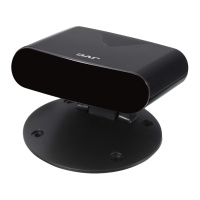

 To Next Page