VS-DT2000
1-14
Fig.4
Fig.5
Fig.6
Claw e
Traverse mechanism
assembly
Section f
C
DD
Shaft
Pickup unit
Pickup unit
Traverse mechanism assembly
Rack plate
P.S. spring
G
F
E
E
CD servo board
bracket
Shaft
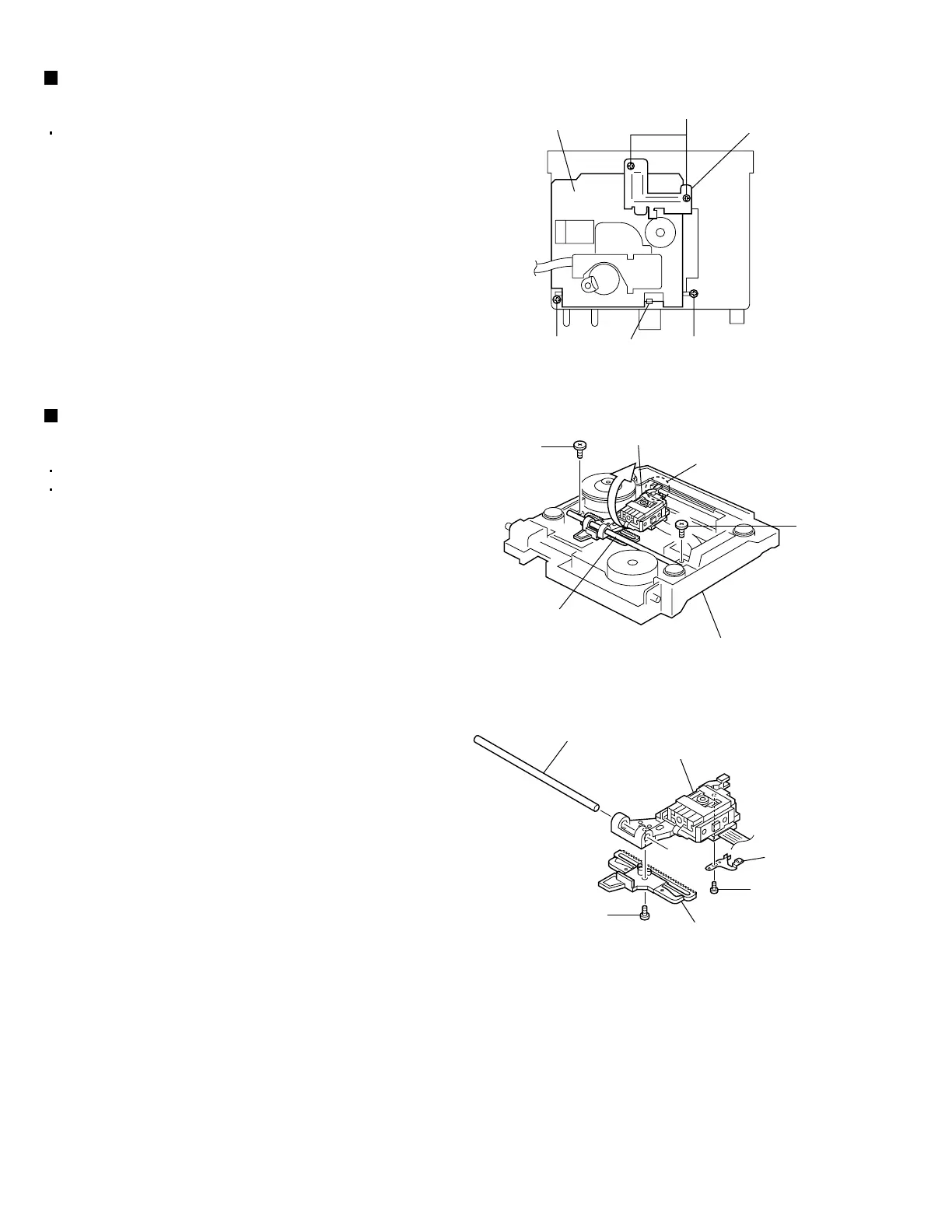
Removing the traverse mechanism
assembly (See Fig. 4.)
1.
2.
3.
Remove the CD servo board.
Remove the two screws C attaching the CD servo
board bracket.
Remove the two screws D attaching the traverse
mechanism assembly.
Disengage the claw e attaching the traverse
mechanism assembly and then take out the
traverse mechanism assembly.
Removing the pickup unit
(See Figs. 5 and 6.)
1.
2.
3.
4.
5.
Remove the CD servo board.
Remove the traverse mechanism assembly.
From the top side of the traverse mechanism
assembly, remove the two screws E attaching the
shaft.
From the traverse mechanism assembly, disengage
the section f of the pickup unit and then remove the
pickup unit with the shaft.
Pull the shaft out of the pickup unit.
Remove the screw F attaching the rack plate from
the pickup unit.
Remove the screw G attaching the P.S. spring from
the pickup unit.


 To Next Page
 Loading...