REMOTE CONTROL BATTERY REPLACEMENT
REMOTE CONTROL
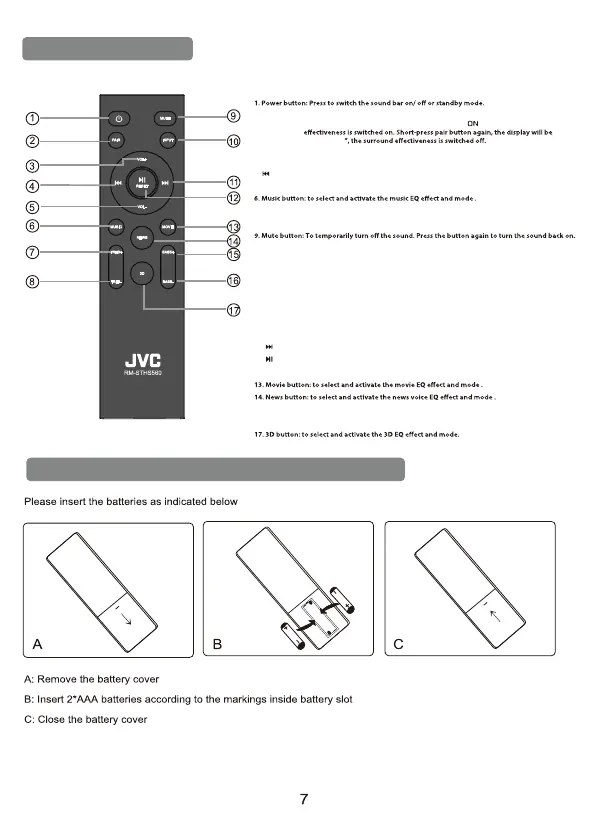
2. Pair button: long-press pair button more than 2 seconds to conect and disconect last device.
short-press pair button, the display will be shown “
Surround eectiveness will only work when the signal source is from a Dolby Atmos device
”, it is indicated that the surround
shown “OFF
3. VOL+: to increase the volume.
4. Previous button: Skip to the previous track in USB & BT mode.
5. VOL-: to decrease the volume.
7. Treble-up button: to increase the treble volume.
8. Treble-down button: to decrease the treble volume.
10. Source input button: to select an input source for playback:
ARC: sound from connected HDMI ARC device
Hd 1: sound from connected HDMI 1 port
Hd 2: sound from connected HDMI 2 port
bLUE: sound from connected Bluetooth drive.
AUX: sound from connected Auxiliary Line-in
USb: sound from connected USB driver
OPTI: Sound from connected Digital Optical device.
11. Next button: Skip to the next track in USB & BT mode.
12. Play/Pause button: Start, pause or resume play in USB & BT mode.
Reset button: Press and hold the button more than 2 seconds to restore factory default settings.
15. Bass+ button: To increase the bass.
16. Bass- button: To decrease the bass.


 To Next Page