To Next PageTo Next Page
 Need help?
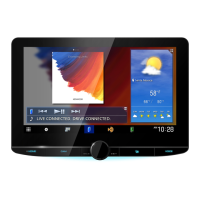
Do you have a question about the JVCKENWOOD Kenwood DDX7016BT and is the answer not in the manual?
 General
| Resolution | 800 x 480 pixels |
|---|---|
| Touchscreen | Yes |
| Bluetooth | Yes |
| USB Port | Yes |
| Navigation | No |
| DVD Player | Yes |
| Apple CarPlay | No |
| Android Auto | No |
| Rear View Camera Input | Yes |
| AUX Input | Yes |
| AM/FM Tuner | Yes |
| CD Playback | Yes |
| Steering Wheel Control Compatible | Yes |
| Power Output | 50W x 4 |
| Audio Formats Supported | MP3, WMA, AAC, WAV |
| Video Formats Supported | MPEG-1, MPEG-2, MPEG-4, WMV |
Covers warnings, important notes, and driving precautions to ensure safe operation.
Procedure for resetting the unit if it fails to operate properly.
Guides through the first-time setup process for the unit.
Procedure to register a security code for theft protection.
Guides on how to choose different audio/video sources.
Guides on connecting iPod/iPhone devices for music and video.
Configuring the unit to work with specific iPod/iPhone connection types.
Basic instructions for tuning into radio stations.
Steps for pairing and registering Bluetooth devices.
Details on making calls, adjusting volume, and managing calls.
Configuring Bluetooth settings like auto-pairing and auto-response.
Guides for setting up and connecting smartphone applications.
Procedure for updating the unit's system software.
Critical warnings and precautions before installing the unit.
Step-by-step guide for installing the unit in the vehicle.
Detailed wiring instructions for specific models.
Detailed wiring instructions for specific models.
Guide to connecting USB storage devices.
Lists common error messages and their remedies.
Guides for diagnosing and resolving issues with unit functions.
Guides for diagnosing and resolving issues with media and connectivity.
Steps to connect and use the Spotify application.