Online operation with firmware option Subterminal
k4evo707en-2012-07 57
6.4.4 Connection and configuration
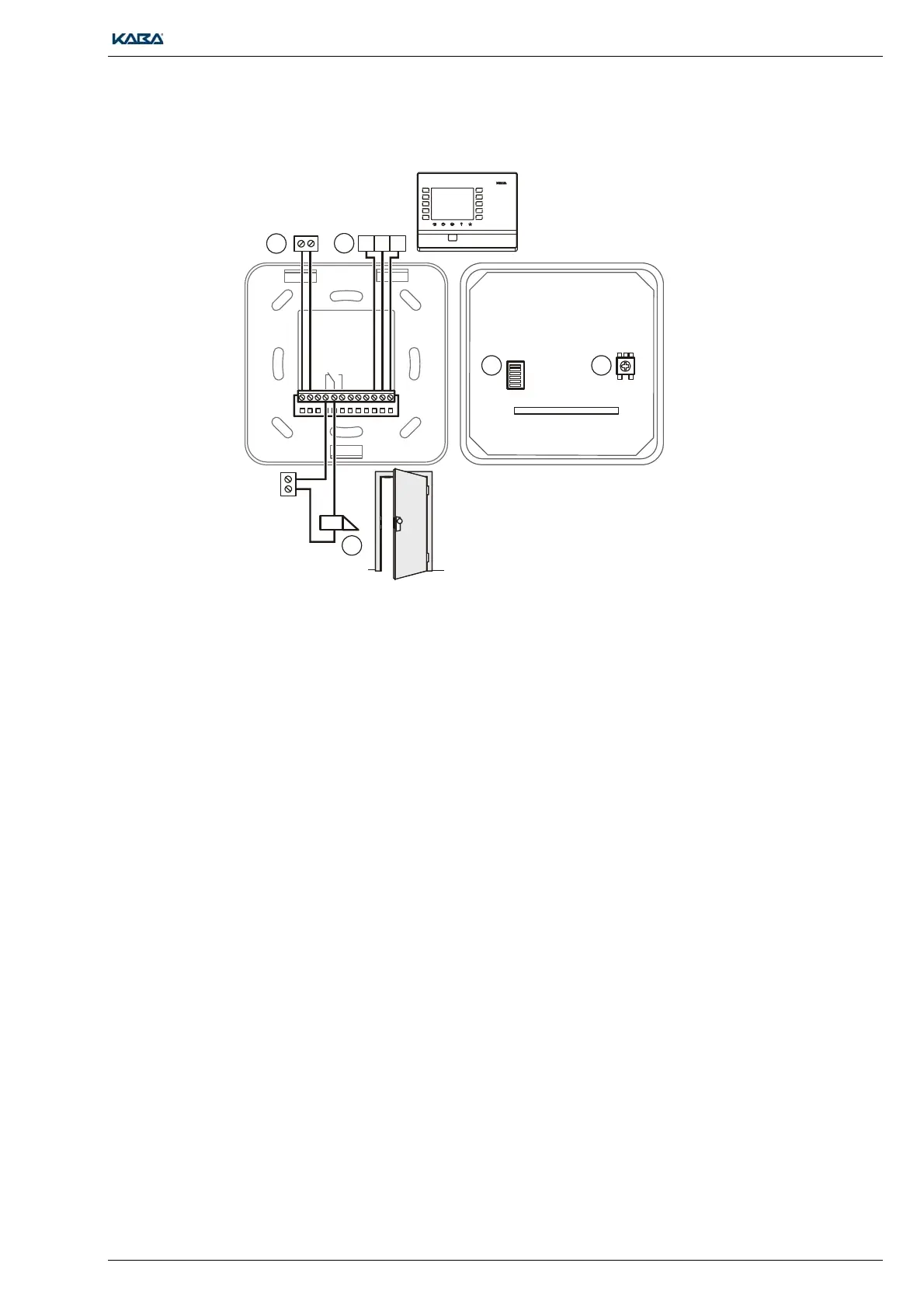
4. Set the DIP switch (1) as follows:
1=OFF, 2=ON, 3=OFF, 4=OFF, 5=OFF, 6=OFF
5. Set the required DID peripheral address on the rotary switch (2).
6. Connect the RS-485 sub-party line (4) to the B-web terminal
7. If required, connect the door opener via the relay output (5)
8. Connect the power supply (3) for the Compact Reader
6.5 Putting into operation
1. Establish the power supply for the remote reader.
2. Configure and register remote reader via B-COMM Java on parent time registration terminal.
3. Run functional test.
12
3
45
6
78
9
C0 E
24 V
12 V
1
4
5
3
2
ABC
112


 To Next Page